How to add alternative redirects for mobile links?
You can add alternative redirects for Android, iOS, Windows Mobile, and fallback redirects for other mobile devices.
Cuttly also supports mobile deep links and app store redirects, allowing you to send users directly into your app or to the app store when the app is not installed.
Android deferred deep linking (optional)
When Google Play Redirect is enabled, Cuttly can pass an Install Referrer value to your app after installation.
This allows your app to determine where the user should be redirected on first launch.
To add alternative short link redirects for mobile devices, follow the steps below:
1. Log in to your Cuttly account.
2. Go to the list of short links in your dashboard.
3. Click the button to open Mobile alternative linking for the selected short link.
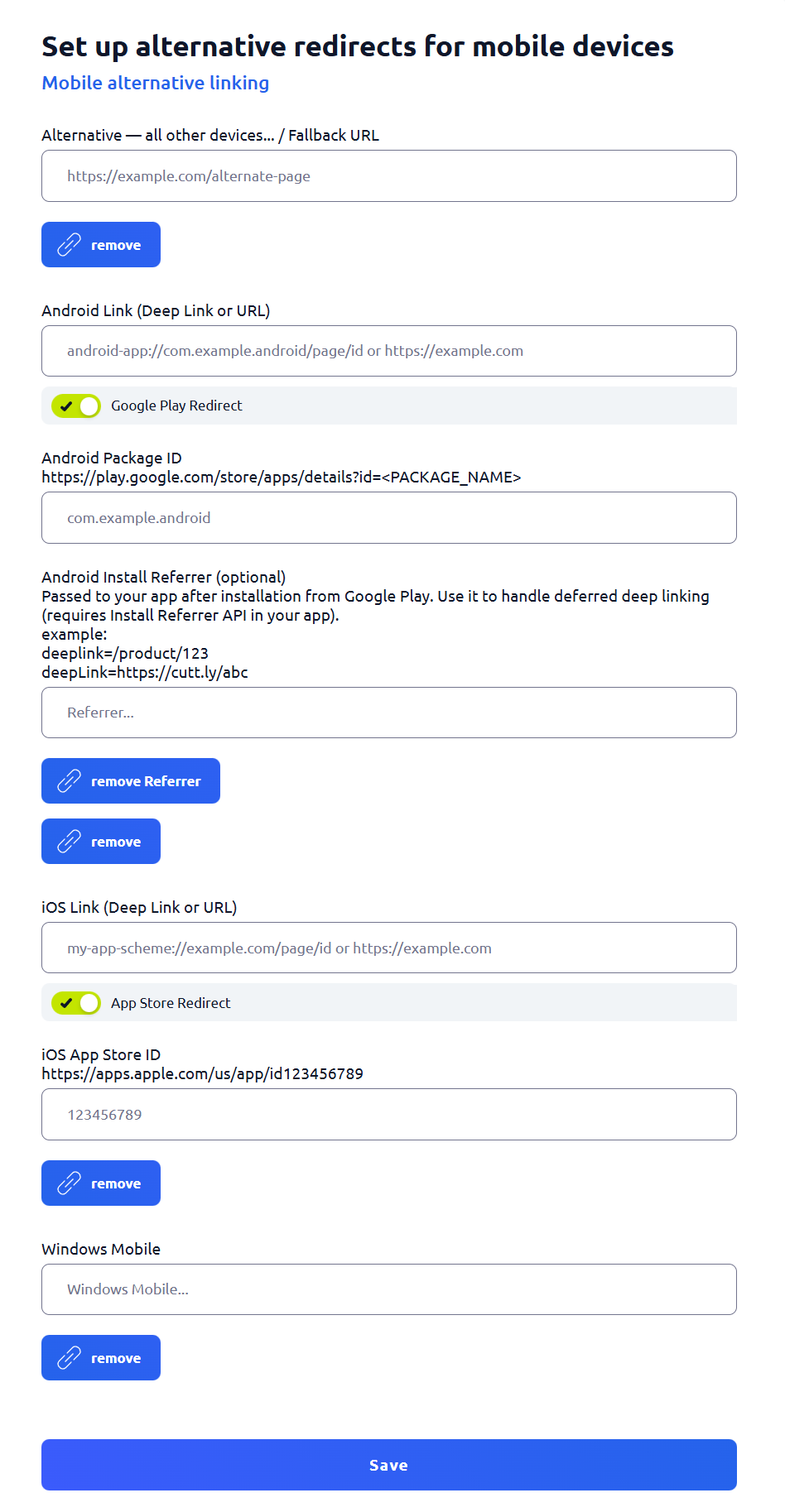
4. The mobile settings screen will open. Here you can configure alternative redirects for mobile devices:
Alternative – all other devices / Fallback URL
This URL will be used for devices that are not matched by Android, iOS, or Windows Mobile settings.
Android Link (Deep Link or URL)
You can enter a regular URL or a mobile deep link, for example:
- myapp://product/123
- youtube://watch?v=...
- Android intent format: intent://...
Google Play Redirect (optional)
Enable this option to redirect users to Google Play when the Android app is not installed.
After enabling it, additional options will appear:
- Android Package ID
Example: com.google.android.youtube
You can copy it from the Google Play URL:
https://play.google.com/store/apps/details?id=<PACKAGE_NAME>
- Android Install Referrer (optional)
Passed to your app after installation from Google Play.
Use it to handle deferred deep linking (requires Install Referrer API in your app).
Examples:
- deeplink=/product/123
- deepLink=https://cutt.ly/abc
- cutt_clck=/test
iOS Link (Deep Link or URL)
You can enter a regular URL, a deep link, or a universal link.
App Store Redirect (optional)
Enable this option to redirect users to the App Store when the app is not installed.
After enabling it, an additional field will appear:
- iOS App Store ID
You can copy it from the App Store URL:
https://apps.apple.com/us/app/id123456789
You can paste 123456789 or id123456789.
Windows Mobile
Optional alternative URL for Windows Mobile devices.
5. Use the remove buttons to delete individual redirects.
To remove only the Android Install Referrer, use remove Referrer.
6. Click Save to apply your changes.
7. Now, when someone opens your short link on a mobile device:
- Android users will be redirected to the Android destination or Google Play (if enabled).
- iOS users will be redirected to the iOS destination or the App Store (if enabled).
- other devices can use the fallback URL.
Find out more about the options available in your subscription plan here:
Cuttly pricing and features
-
How to create short link with Cuttly?
How to copy short link with Cuttly?
How to change short link alias (name) with Cuttly?
How to set UTM parameters with Cuttly?
How to set a password to open short link with Cuttly?
How to add alternative redirects for mobile links with Cuttly?
How to change the source URL in a short link?
How to set up link analytics counting by unique clicks?
How to change the link title displayed in the dashboard?
How to set link redirect expiration?
How to set a pixel for a short link?
Link rotation - how to set A/B/C test for a short link?
How to generate the QR code for short link?
How to remove short link?
How to share a short link on social media?