Is Cuttly Free? URL Shortener Plans and Pricing The Complete Guide
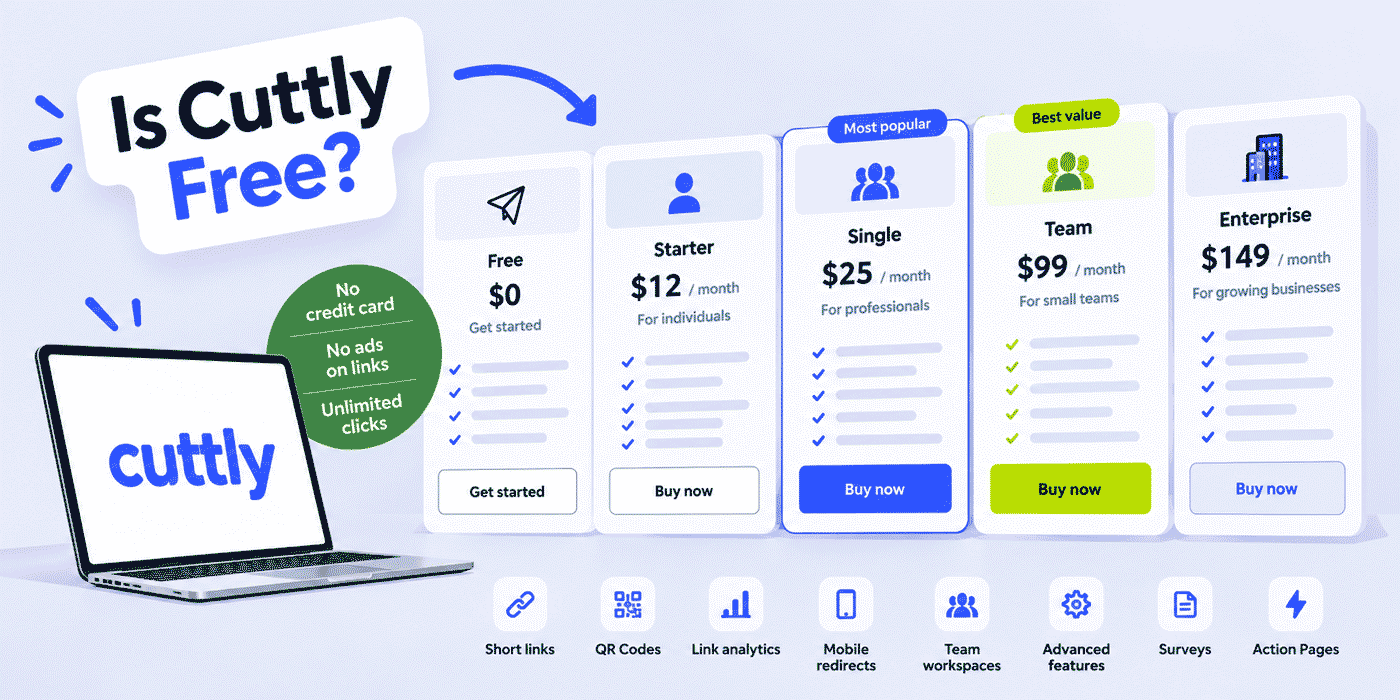
Yes. Cuttly has a real free plan: $0, no credit card at signup, no ads injected into your links, and unlimited clicks on every link you create. It is a standing plan rather than a trial, so it does not expire into a payment screen after two weeks. What it does have is limits, and this guide lays out every one of them, next to everything each paid tier changes, so you can see exactly where your usage lands before you commit to anything.
Pricing pages compress; guides can afford to be complete. This article is the uncompressed version of how the Cuttly URL Shortener is priced: the full contents of the Free plan, the honest meaning of each limit, plan-by-plan breakdowns of Starter, Single, Team and Team Enterprise, the volume tables, what is identical on every tier, and the usage signals that tell you which plan actually fits. Prices reflect the state at publication; the pricing page is always the live source.
What This Guide Covers
- The short answer: what "free" means at Cuttly, and what it does not mean
- Everything the Free plan includes, feature by feature
- Where Free stops: the features that begin on paid tiers
- The full pricing table, monthly and annual, with the one-month-free math
- Plan-by-plan deep dives: Starter, Single, Team, Team Enterprise
- The volume tables: links, aliases, domains, API, bulk import and analytics history
- What is identical on every plan, including unlimited clicks and no ads
- TRAI SMS compliance limits as a worked example of how tiers scale
- Choosing by scenario: creator, small business, professional, team, agency
- The upgrade signals: how to know Free has stopped fitting
- Common misconceptions about free URL shortener plans
The Short Answer, With Its Fine Print Read Aloud
"Free plan" is a phrase that has earned suspicion, because across software it can mean five different things: a trial with a countdown, a crippled demo, an ad-supported tier where you are the product, a card-on-file arrangement that converts quietly, or an actual plan. Cuttly's Free is the last kind, and the specifics are worth stating as plainly as a specification, because each one answers a real worry:
- $0, indefinitely. Free is a standing plan. Monthly allowances reset on the first of each month and the account keeps working without a payment step.
- No credit card at signup. Registration requires an account, not a payment method. There is nothing on file to charge.
- No ads on your links. Cuttly does not insert interstitial pages or advertising between a click and your destination, on any plan. A free link behaves exactly like a paid one for the person clicking it.
- Unlimited clicks. The 30-links-per-month allowance limits how many links you create, never how many times they are clicked. A free link that goes viral keeps redirecting.
- Registration required. The one requirement worth naming: Cuttly links are created from an account, not anonymously. That is also what makes your dashboard, analytics and link management possible.
If your question was only "can I shorten links without paying," the answer is yes and you can stop reading here; the walkthrough in how to shorten a URL for free covers the mechanics. The rest of this guide is for the question behind the question: what exactly do I get, where are the walls, and what does each next tier buy.
Why a Real Free Tier Exists at All
Transparency about pricing should include transparency about motive, so here it is. A link management platform earns trust slowly: you are routing your audience's clicks through someone's infrastructure, and no pricing page can prove reliability the way months of your own links working can. The Free plan is how that proof gets made. You run real links, watch real analytics, scan your own QR codes, and form a judgment on evidence rather than claims. Some share of Free users eventually hits a volume or feature wall and upgrades; the rest keep using Free, and their links keep working, because a free user whose links never fail is also the platform's reputation walking around in public.
That motive explains the plan's shape. Everything that defines what Cuttly is (clean redirects, no ads, encrypted survey answers, hardened login, EU-based infrastructure with aggregated and anonymized analytics) stays identical on Free, because degrading any of it would sabotage the very trust the tier exists to build. What scales with payment is capacity: how many links, how many names, how long the history, how many hands in the account. Capacity costs money to serve; the product's character does not change with the invoice.
A Checklist for Judging Any "Free" Short Link Plan
Whether you are evaluating Cuttly or anything else, the same six questions separate a real free tier from a decorated trap. We answer them for our own plan in brackets, and you should demand answers from any service you consider:
- Does it expire? A countdown makes it a trial, not a plan. [No: allowances reset monthly, indefinitely.]
- Is a card required? A card on file means the real question is when, not whether, you will be charged. [No card at signup.]
- Who monetizes the click? If the free tier shows ads between the click and the destination, your audience is paying the bill with their attention. [No ads on links, on any plan.]
- Are clicks metered? A link that stops redirecting after a traffic threshold fails at the worst possible moment, when something you shared is finally working. [Clicks are unlimited on every plan.]
- What happens to your data at the walls? A plan that holds analytics or exports hostage behind an upgrade turns your own history into leverage. [Free includes 30-day analytics; survey responses export to PDF, XLS and CSV even on Free.]
- Is security tiered? Login protection sold as a premium feature prices your account's safety. [Two-step verification and 2FA are on every plan.]
The questions matter more than our answers, because they travel. Any shortener that answers all six cleanly is dealing in good faith, whoever runs it.
What the Free Plan Includes
The Free plan is more complete than the price suggests, and listing its actual contents is the fastest way to show it. On $0 you get:
Links and Link Management
- 30 short links per month, on the cutt.ly domain or your own branded domain, with the allowance resetting on the first of each month.
- Unlimited clicks on every link.
- 3 custom aliases per month, so your most important links can read as words rather than random strings:
cutt.ly/autumn-offerinstead ofcutt.ly/aBcDeF. - Tags and comments on every link, with search by tag and a dedicated tag list, so even a free inventory stays organized.
- The UTM builder, for adding campaign parameters to short links without hand-writing query strings.
- Hide and favourite lists: links can be hidden from the main dashboard or pinned to a favourites page.
- Bulk short links: up to 10 links combined into one bulk cutt.ly link, with its own list page and its own QR code.
- Link removal whenever you want it.
Analytics
- Click analytics covering the last 30 days, aggregated and anonymized, as all Cuttly analytics are.
- A dashboard showing 10 links per page, which is a pagination detail worth knowing only because it quietly doubles as a hint about the plan's intended scale.
QR Codes
- A QR code for every short link, in PNG, JPG and WEBP formats. Scans route through the same link, so the same analytics apply.
Branded Domain
- 1 branded domain, meaning links on your own domain rather than cutt.ly. The domain connects through DNS A and TXT records; on Free (and Starter) the SSL certificate is configured on your side, for example through your CDN or proxy provider, where Single and above include Let's Encrypt SSL as part of the setup.
Link in Bio
- 1 Link in Bio page with up to 5 URLs, on the cutt.ly domain, so a creator's social profiles have a working hub at $0.
Surveys
- 1 survey with up to 5 questions, 3 options per multiple choice question, 10 responses and a 7-day active window.
- Every structural survey feature is included rather than gated: steps or one-page layout, a custom link back-half, custom start and finish pages, transition effects, interface buttons in 16 languages, customizable backgrounds, templates and fonts, your own privacy policy link, password protection, a QR code for the survey, response export to PDF, XLS and CSV, and 256-bit encryption of open answers before they are saved.
Security and API
- Two-step verification (email OTP) and two-factor authentication with any authenticator app, on every plan including Free. Account security is not a paid feature.
- API access at 3 calls per 60 seconds, with up to 30 links per month created through the API on the cutt.ly domain. Small, but real: a hobby script or a low-volume automation runs on $0.
Read as a whole, Free is a complete small-scale account rather than a demo: organized links, real analytics, a QR code on everything, a bio page, a working survey with encryption, and hardened login. The limits are about volume, not about which parts of the product you may touch.
A Month on the Free Plan: A Worked Example
Numbers become real when they meet a calendar, so here is an illustrative month for a one-person pottery studio running entirely on Free. The owner creates 22 links across the month: weekly social posts pointing at new pieces (8 links), the month's two market appearances announced by email (2), a links refresh of the bio page's 5 slots (5), a QR code printed on the stall's price card pointing at the online shop (1), and assorted one-off shares (6). The three custom aliases go where names matter most: cutt.ly/winter-markets on the printed card, cutt.ly/studio-shop in the email footer, and cutt.ly/workshop-signup for the month's class.
The single survey slot runs the class feedback form after the workshop: four questions, steps layout, password-free, closed after its 7-day window with responses exported to XLS. The 30-day analytics window answers the questions a business this size actually asks: did the market announcement get opened, which social post drove shop visits this week, does anyone scan the stall's code. Total spent: $0, with 8 links of headroom left in the allowance.
The example also shows the plan's edges in daily terms. The owner cannot rename the fourth important link this month (alias budget), cannot check whether December beat last December (30-day window), and prints a standard black QR rather than a branded one (customization starts on Single). None of those edges blocks the business; each one is a defined moment where a tier upgrade would buy a specific, visible thing. That is what a well-shaped free plan looks like from inside: working, with labeled doors.
Worth adding what the second and third month look like, because a free tier's quality shows in repetition, not novelty. The allowance resets on the first; last month's links keep working and keep counting clicks without touching the new month's 30; the tag list built in month one makes month three's dashboard faster to navigate, not slower. Nothing accumulates against you. The only thing that accumulates is your own history, up to the 30-day analytics horizon, and the habit of reaching for a short link where a long one used to go.
Budgeting 30 Links Without Feeling the Ceiling
Two habits stretch the allowance further than expected. First, links are reusable: a link to your shop, bio page or booking form is created once and shared forever, so the monthly spend goes on new destinations, not repeated shares. Second, the bulk short links feature combines up to 10 links into one bulk cutt.ly link with its own QR code, which suits recurring bundles like a newsletter's link set. Users who treat the 30 as "30 new destinations this month" rather than "30 shares" often discover their real monthly need is in the teens.
Where Free Stops
Equally worth stating plainly is what begins on paid tiers, because knowing the walls in advance beats discovering them mid-campaign:
- Editing a link's destination starts on Starter (limited to URLs on the same domain; Team tiers allow any URL). On Free, a created link keeps its destination.
- Link titles in the dashboard start on Starter.
- Password-protected links, link rotation (A/B testing), search by short or long URL, social posting and CSV export of the dashboard start on Single.
- QR customization (colors, dot styles, logo, quality settings, SVG export) starts on Single; Free and Starter produce standard codes in raster formats.
- The CSV Link Importer for bulk creation starts on Single (100 links per month there).
- Action Pages, the standalone call-to-action pages under the /c/ path, start on Single.
- Analytics history beyond 30 days starts on Single (1 year) and extends on Team tiers (2 years).
- Teams, with shared dashboards, roles and the Team API, start on the Team plan.
- TRAI SMS tracking headers for India start on Single.
Reading that list, notice what is absent from it: nothing in the core act of shortening, sharing and measuring a link sits behind a paywall. The gated items are operator tools (bulk operations, rotation, long history), production tools (SVG, customization) and organizational tools (teams, roles). That is the line between Free and paid in one sentence: Free covers using links; paid covers running links as an operation.
The Pricing Table
| Plan | Monthly | Annual | Annual saving |
|---|---|---|---|
| Free | $0 | $0 | n/a |
| Starter | $12/month | $132/year | one month free |
| Single | $25/month | $275/year | one month free |
| Team | $99/month | $1,089/year | one month free |
| Team Enterprise | $149/month | $1,639/year | one month free |
The annual arithmetic is uniform across tiers: pay for eleven months, use twelve. Whether that trade suits you depends less on the discount than on confidence in the tier; the usage signals later in this guide are the better basis for that confidence than any percentage. Current prices live on the pricing page.
Plan by Plan: What Each Tier Actually Changes
Starter ($12/month): The Branding Tier
Starter's job is identity and headroom. Volume rises from 30 to 300 links per month and from 3 to 30 custom aliases, which moves you from "a few careful links" to "every link named properly." Link titles make the dashboard readable. Destination editing appears (within the same domain). And the branded domain, available since Free, becomes central in daily use at this scale: at 300 links per month you are distributing enough addresses that whose name they carry starts to matter. API volume rises in step, to 6 calls per 60 seconds and 300 links per month, including up to 30 per month on branded domains.
Who fits: a creator or small business that shares links weekly rather than occasionally, wants its own domain on them, and does not yet need bulk tooling or long analytics history.
Single ($25/month): The Professional Tier
Single is where the product's full width opens for one person. The volume jump is large: 5,000 links per month, unlimited custom aliases, up to 5 branded domains with Let's Encrypt SSL included. Analytics history extends from 30 days to a full year, which changes what the numbers are for: trends across quarters rather than snapshots. The operational toolkit arrives in one tier: the CSV Link Importer (100 links per month), CSV export, search by short or long URL, password-protected links, link rotation with a 50/50 A/B split, social posting, and destination editing within the same domain.
Two whole features start here as well. QR codes become customizable, with colors, dot styles, logo and SVG export for print production. Action Pages open, with an inventory of 3 standalone call-to-action pages. Surveys scale to 5 surveys, 20 questions, 100 responses and 30-day windows. The API moves to 60 calls per 60 seconds, 5,000 links per month on cutt.ly and 1,000 on branded domains. TRAI tracking headers begin: 1 per custom domain, and 2s.ms volume up to 5.
Who fits: a freelancer, marketer or small business running real campaigns, printing QR codes, or managing an inventory measured in hundreds. Most solo professional use lands here.
Team ($99/month): The Organization Tier
Team's defining change is structural, not just volumetric. Up to 3 teams with up to 5 members each, dedicated team dashboards, roles from Owner through Admin, Moderator and User to Viewer, a team communicator (up to 25 messages, with the oldest overwritten past the limit), and the detail that matters for budgeting: only the team owner needs the subscription. Members join without their own plans.
Volume scales to 20,000 links per month, up to 10 branded domains, a 2,000-per-month CSV importer, 2 years of analytics history, and an API at 180 calls per 60 seconds with 20,000 links per month, matched by a separate Team API with its own key and up to 20,000 links per team per month, including link editing, tagging and analytics through the API. Destination editing frees up to any URL. Link rotation gains percentage control over the A/B split. Action Pages grow to 10, with CTA destinations editable to any URL. Surveys scale to 20 surveys with 2,000 responses each. TRAI headers rise to 5 per custom domain and 2s.ms volume to 10. Link in Bio pages lose Cuttly branding.
Who fits: marketing teams, agencies managing client inventories, and any organization where more than one person works the links and access needs roles rather than a shared password.
Team Enterprise ($149/month): The Scale Tier
Team Enterprise is the same machinery at the platform's highest standard limits: 50,000 links per month, up to 99 branded domains, a 5,000-per-month importer, up to 10 teams with up to 20 members each, a 360-calls-per-60-seconds API with 50,000 links per month and a 50,000-link Team API that adds the noTitle parameter for faster shortening, A/B/C rotation with percentage control, 20 Action Pages, 50 surveys with 5,000 responses each, and TRAI headers at 15 per custom domain with 2s.ms volume up to 99. Analytics history stays at 2 years.
Who fits: multi-brand companies, larger agencies and organizations whose monthly link volume, domain count or team structure outgrows Team's ceilings.
Reading the Gaps Between Tiers
The jumps between plans are not evenly sized, and the unevenness is informative. Starter to Single is the widest functional gap in the lineup: $13 more per month buys unlimited aliases, a 16x link volume increase, year-long analytics, the importer, rotation, password links, customizable QR, Action Pages and the first TRAI headers. That density is deliberate; Single is built to be the tier a serious individual user settles on, so it collects the professional toolkit in one place rather than drip-feeding it across three tiers. If you find yourself on Starter wanting any two of those features, the arithmetic almost always says to skip ahead rather than wait.
Single to Team is a different kind of jump: $74 more per month, and most of it buys structure rather than features. Roles, team dashboards, the Team API, member seats that need no subscriptions of their own. A solo user scaling volume alone can often stay on Single longer than they assume (5,000 links per month is a high ceiling for one person), while a two-person operation sharing one login is paying Team's price in risk already and just not seeing the invoice. The honest heuristic: count hands, not links, when deciding between these two.
Team to Team Enterprise is the simplest read: the same shape at higher ceilings, plus A/B/C rotation and the faster API with the noTitle parameter. You move when a specific ceiling (links, domains, teams, headers, importer volume) is in sight, and not before. Ceiling-driven upgrades are the easiest to time, because the dashboard shows you the approach.
The Volume Tables
For readers who want the numbers in one place rather than woven through prose:
| Volume | Free | Starter | Single | Team | Team Ent. |
|---|---|---|---|---|---|
| Short links / month | 30 | 300 | 5,000 | 20,000 | 50,000 |
| Link clicks | Unlimited | Unlimited | Unlimited | Unlimited | Unlimited |
| Custom aliases / month | 3 | 30 | Unlimited | Unlimited | Unlimited |
| Branded domains | 1 | 1 | up to 5 | up to 10 | up to 99 |
| Analytics history | 30 days | 30 days | 1 year | 2 years | 2 years |
| CSV importer / month | n/a | n/a | 100 | 2,000 | 5,000 |
| API rate / 60 s | 3 | 6 | 60 | 180 | 360 |
| API links / month (cutt.ly) | 30 | 300 | 5,000 | 20,000 | 50,000 |
| API links / month (branded) | n/a | 30 | 1,000 | 20,000 | 50,000 |
| Product areas | Free | Starter | Single | Team | Team Ent. |
|---|---|---|---|---|---|
| Link in Bio pages / URLs per page | 1 / 5 | 1 / 5 | 3 / 20 | 10 / 50 | 20 / 99 |
| Surveys / responses each | 1 / 10 | 3 / 30 | 5 / 100 | 20 / 2,000 | 50 / 5,000 |
| Action Pages | n/a | n/a | 3 | 10 | 20 |
| Teams / members per team | n/a | n/a | n/a | 3 / 5 | 10 / 20 |
| TRAI headers per custom domain | n/a | n/a | 1 | 5 | 15 |
What Is Identical on Every Plan
A pricing model says as much through what it refuses to tier as through what it scales. The list of constants at Cuttly is long enough to be a feature in itself:
- Unlimited clicks. No plan meters the traffic your links receive.
- No ads on links. On every tier, a click goes straight to the destination. The reasoning is covered in why Cuttly puts no ads on short links.
- Account security: two-step email verification and two-factor authentication with any authenticator app, from Free upward.
- The UTM builder, tags and QR codes for links, on every tier.
- Survey fundamentals: password protection, your own privacy policy link, export to PDF, XLS and CSV, 16 interface languages, and 256-bit encryption of open answers, available even on the single Free survey.
- The platform in 48 languages, with every feature available in each language version.
- The data posture: Cuttly is operated by a company with servers in the EU, and link analytics are aggregated and anonymized on every plan.
The pattern across the tiers is consistent: Cuttly scales volume, retention and team structure, and keeps the product's nature constant. A Free link is not a worse link. There are simply fewer of them per month.
Two Products Hiding Inside Every Plan
A fair cost comparison should count what the plans replace elsewhere. Every Cuttly tier, Free included, carries a working Link in Bio page and a survey tool that many businesses otherwise pay separate subscriptions for. On Free those are starter-sized (one page with 5 links, one survey with 10 responses), but from Single upward they are working tools at campaign scale: 3 bio pages with 20 links each on the cutt.bio domain, 5 surveys with 100 responses apiece, and on the Team tiers 10 to 20 pages, up to 50 surveys with thousands of responses, and bio pages with no Cuttly branding. Our surveys series documents the full feature depth; for pricing purposes the point is simpler. If your current stack bills a link tool, a bio page tool and a survey tool separately, the comparison column for any Cuttly tier should have all three on it.
A Worked Example of Tiering: TRAI SMS Compliance
One feature family shows the tiering philosophy concretely. Businesses sending SMS campaigns in India operate under TRAI regulations, and Cuttly supports compliant links through tracking headers in the format 2s.ms/HEADER/short-alias, on the public 2s.ms domain or on your own custom domains. The capability itself is documented in the TRAI compliance guide; what belongs in a pricing article is how it scales. Headers for custom domains begin on Single at 1 per domain, rise to 5 per domain on Team and 15 on Team Enterprise, while 2s.ms volume runs 5, 10 and up to 99 across the same tiers. A business running one brand's SMS program fits Single; a multi-brand sender or an agency serving Indian clients grows through Team into Team Enterprise with the header counts, not against them. That is the model in miniature: the regulated capability exists from the first paid tier that can use it, and the ceilings are what you buy more of.
Monthly or Annual: Deciding Without Regret
The annual discount is identical in structure on every tier (eleven months' price for twelve months' service), so the decision reduces to one question: how confident are you that this tier fits your next twelve months? The confident cases are clear. A business that has run two or three months on a tier, hit no ceilings and seen no signals of the next tier approaching can bank the free month safely. The uncertain cases are equally clear: a first month on a new tier, a business whose seasonality is untested, or a team mid-growth should stay monthly and pay the small premium for the option to move. The discount rewards stability; it should never be the reason you guess.
A useful middle path for upgraders: move up on monthly billing, run one full billing cycle against your real usage while watching the volume dashboard, then switch to annual once the fit is proven. The cost of that caution is a few dollars; the cost of an annual commitment to the wrong tier is eleven months of mismatch in either direction.
Budgeting the API Across Tiers
Developers read pricing differently, so the API numbers deserve their own frame. Two meters run independently: the rate limit (how fast you may call: 3, 6, 60, 180 and 360 calls per 60 seconds across the tiers) and the monthly volume (how many links the calls may create: matching the plan's link budget on cutt.ly, with separate branded-domain ceilings of 30 on Starter, 1,000 on Single and 20,000 or 50,000 on the Team tiers). Free's 3 calls per minute is deliberately hobby-sized: enough for a personal script, a learning project or an integration prototype. Single's 60 per minute carries real automations. The Team tiers add the separate Team API with its own key per team, which matters operationally because a client project's integration can be keyed, scoped and revoked independently. Integration patterns live in the developers guide; the budgeting rule of thumb is to size by monthly volume first and rate second, because volume is the wall automations actually hit.
What This Pricing Deliberately Does Not Do
Three absences in the model are choices, and naming them completes the picture. There is no per-click pricing anywhere: your costs do not rise because your content succeeded, which makes budgets predictable in exactly the situations where click-metered pricing becomes frightening. There are no per-seat charges inside Team plans: the owner's subscription covers members, so adding a colleague to a team dashboard is an access decision, not a procurement one. And there is no feature ransom at the walls: when you hit a limit, the work you have done (your links, your analytics within their window, your exports) remains yours and functional; the limit gates new volume, not past work. Models are easiest to trust when their failure modes are boring, and these three absences are what boring failure looks like: you hit a ceiling, you see the ceiling's name, you decide.
Choosing by Scenario
- A creator with a bio page and occasional links: Free, possibly for a long time. One Link in Bio page, a handful of monthly links with unlimited clicks, and QR codes cover the actual usage.
- A side project or local business posting weekly: Starter. The 300-link allowance and 30 aliases fit the rhythm, and the branded domain puts the business's name on every address it shares.
- A freelancer or marketer running campaigns: Single. Unlimited aliases, year-long analytics, the importer, rotation, password links, customizable QR for print and the first Action Pages are the campaign toolkit in one tier.
- A marketing team or agency: Team. Roles instead of shared logins, client inventories in separate team dashboards, 2 years of history, any-URL destination edits, and a Team API per client project.
- Multi-brand, multi-market, or high monthly volume: Team Enterprise, sized by whichever ceiling you hit first: links, domains, teams or headers.
Edge cases resolve by the dominant constraint. A high-volume solo user with no team picks Single and ignores Team until a second person exists. A tiny team with low volume still picks Team, because shared credentials are a risk no link count justifies. A business whose only special need is TRAI headers sizes by header count per domain: 1 on Single, 5 on Team, 15 on Team Enterprise. When two constraints point at different tiers, the structural one (people, domains, compliance) outranks the volumetric one, because volume ceilings bend with a month's patience and structural gaps do not.
The Upgrade Signals
Rather than guessing tiers in advance, watch for the specific moments when a limit starts costing you something real:
- You ration aliases. When you skip naming a link because only 3 custom aliases remain this month, branding has become a constraint: Starter's 30, or Single's unlimited, is the fix.
- The month ends before your links do. Hitting 30 links mid-month once is an anomaly; twice is a pattern that 300 resolves.
- You need last quarter's numbers. The 30-day analytics window is fine for checking a campaign, and useless for comparing seasons. The need for history is a Single signal.
- A spreadsheet of links is waiting. Manual creation past a few dozen links is the importer's job, which starts on Single.
- A second person needs access. The moment credentials get shared is the moment Team's roles are cheaper than the risk.
- Print is involved. A designer asking for an SVG of the QR code is asking for Single.
The inverse discipline also holds: if none of these moments has happened, Free is not a compromise, it is the correct plan. An honest pricing guide should say so. For a wider look at what a capable free tier can carry, see the free URL shortener guide.
Keeping This Guide Honest Over Time
Pricing articles age, and the responsible ones say how. The numbers in this guide reflect Cuttly's plans at publication in October 2026, drawn directly from the current plan specifications. Prices, allowances and feature placement can change, and when they do, the pricing page is updated first and this guide follows. If you are reading this far from its publication date and a number here disagrees with the pricing page, the pricing page wins, and we would rather say so in plain text than let an outdated paragraph oversell or undersell a plan. The dateModified field in this page's metadata tells you when it was last reviewed.
Common Misconceptions, Corrected
- "Free means a trial." No. Nothing expires; allowances reset monthly.
- "Free links carry ads." No, on any plan. The click goes to your destination.
- "Unlimited clicks must have an asterisk." The volume table's row reads "Unlimited" across all five columns, and it means the count of redirects served.
- "Branded domains are enterprise features." Every plan includes at least one; what scales is the count and whether SSL setup is included (Single and above) or configured on your side (Free, Starter).
- "The free tier is anonymous." No. Registration is required on every plan, which is also what makes a managed dashboard possible at all.
- "Surveys and Link in Bio are paid add-ons." Both exist on Free, at small but genuine scale: one page, one survey, with the survey's security features intact.
The Pricing on One Page
Compressed for the person skimming before a decision: Cuttly's Free plan is a standing $0 account with no card, no ads and unlimited clicks, sized at 30 links and 3 aliases per month with a 30-day analytics window, and it includes a working bio page, an encrypted survey, QR codes and 2FA. Paid tiers scale capacity, never character: Starter ($12) buys daily-use volume and link titles; Single ($25) buys the professional toolkit from unlimited aliases through the importer, customizable QR, Action Pages and year-long history; Team ($99) buys organizational structure where members ride the owner's subscription; Team Enterprise ($149) buys the highest ceilings. Annual billing takes one month off any tier and should follow proven fit, not precede it. The upgrade signals are concrete and visible from inside the product, so the cheapest correct strategy is also the simplest: start at zero, work normally, and pay only when a named limit starts costing you something you can point at.
Behind every tier sits the same platform: operated by a company with servers in the EU, analytics aggregated and anonymized, available in 48 languages with every feature present in each, and committed to links that carry no advertising between your audience and your content. Those are the parts no plan can buy more of, because every plan already has all of them.
Cuttly Plan Guide: The Summary
The Free plan ($0) provides a complete small-scale account: 30 links per month with unlimited clicks, 3 custom aliases, basic analytics over 30 days, QR codes, the UTM builder, tags, one branded domain (SSL on your side), one Link in Bio page, one encrypted survey, and 2FA. Registration is required; no credit card is needed.
The Starter plan ($12/month) adds volume and identity: 300 links, 30 aliases, link titles, destination editing within the same domain, and the scale at which the branded domain starts working daily.
The Single plan ($25/month) adds the professional toolkit: 5,000 links, unlimited aliases, up to 5 domains with Let's Encrypt SSL, 1-year analytics, the CSV importer, password links, rotation, search, customizable QR with SVG, Action Pages, expanded surveys and TRAI headers.
The Team plan ($99/month) suits organizations: teams with roles where only the owner pays, 20,000 links, 10 domains, 2-year history, any-URL editing, the Team API, and client-ready structure for agencies.
The Team Enterprise plan ($149/month) is for scale: 50,000 links, 99 domains, 10 teams, the fastest API and the highest ceilings across every feature family.
The practical way to choose is to start where the price is zero and let the upgrade signals arrive on their own schedule: create a free Cuttly account and put real links through it. Registration required; free plan available with no credit card needed.
Frequently Asked Questions
Is Cuttly really free?
Yes: $0, no credit card, no ads on links, unlimited clicks, and no expiry. The Free plan includes 30 links per month, 3 custom aliases, 30-day analytics, QR codes, the UTM builder, tags, one branded domain, one Link in Bio page and one survey. Registration is required.
What are the limits of the free plan?
The main ones: 30 links and 3 custom aliases per month (resetting on the first), analytics covering the last 30 days, SSL for the branded domain configured on your side, one bio page with 5 URLs, and one survey with 5 questions and 10 responses. Clicks are never limited.
Does Cuttly put ads on free links?
No, on no plan. There is no interstitial page and no advertising between the click and your destination. A free link behaves identically to a paid one for the person clicking it.
How much do the paid plans cost?
Starter $12, Single $25, Team $99 and Team Enterprise $149 per month, or annually $132, $275, $1,089 and $1,639, which works out to one month free on each tier. The pricing page carries the live numbers.
Which plan do I need for a branded domain?
Any plan: Free and Starter include 1 branded domain with SSL configured on your side, while Single (up to 5), Team (up to 10) and Team Enterprise (up to 99) include Let's Encrypt SSL in the setup.
Is the free plan a trial that expires?
No. Free is a standing plan. Monthly allowances reset on the first of each month and the account continues at those allowances indefinitely, with no payment step and nothing on file to charge.
When should I upgrade from Free?
When a limit starts costing you something real: rationing aliases, running out of monthly links, needing analytics older than 30 days, holding a spreadsheet the importer should handle, sharing credentials with a second person, or being asked for an SVG QR code for print. Each of those signals points at a specific tier, as described in this guide.
- PRICING
- URL Shortener →
- Link in Bio Builder →
- QR Code Generator →
- Related Guides
- Free URL Shortener Guide
- Shorten a URL for Free
- No Ads on Short Links
- Why Choose Cuttly
- How Cuttly Works
- Custom Domains for Short Links
- Our Pillar Guides
- Online Surveys
- Action Pages
- Bulk Link Migration
- Compliance
- TRAI SMS Compliance (India)
- Encyclopedia
- Branded Links
- Link in Bio
- Verticals Hub
- URL Shortener for Every Industry →
- Start Here
- Create Free Account
- Plans & Pricing
URL Shortener
Cuttly simplifies link management by offering a user-friendly URL shortener that includes branded short links. Boost your brand’s growth with short, memorable, and engaging links, while seamlessly managing and tracking your links using Cuttly's versatile platform. Generate branded short links, create customizable QR codes, build link-in-bio pages, and run interactive surveys—all in one place.
Cuttly More Than Just a URL Shortener
Cuttly is a comprehensive, ever-evolving platform for link shortening that combines innovation and user-friendliness to deliver a seamless experience in managing and shortening URLs.


