Bulk Link Migration to a URL Shortener The Complete Guide
A link migration is not a transfer. Nothing physically moves between providers; there is no export button on one side that becomes an import button on the other with everything intact. What actually happens is simpler and more demanding: you recreate the links that still matter, repoint the places that reference them, and retire the rest. Teams that understand this on day one run clean migrations in a week. Teams that expect teleportation discover the truth mid-move, with half an inventory in each system.
This guide is the full playbook for moving a link inventory to the Cuttly URL Shortener: the inventory and triage phase that decides what moves at all, the three intake routes and the volume math behind choosing one, the own-domain path that lets your existing short URLs survive the switch unchanged, and the cutover runbook that sequences it all. It is also plain about what does not transfer, because a migration planned on wishful thinking fails on schedule. It opens our migration series; the provider-specific guides that follow build on the phases defined here.
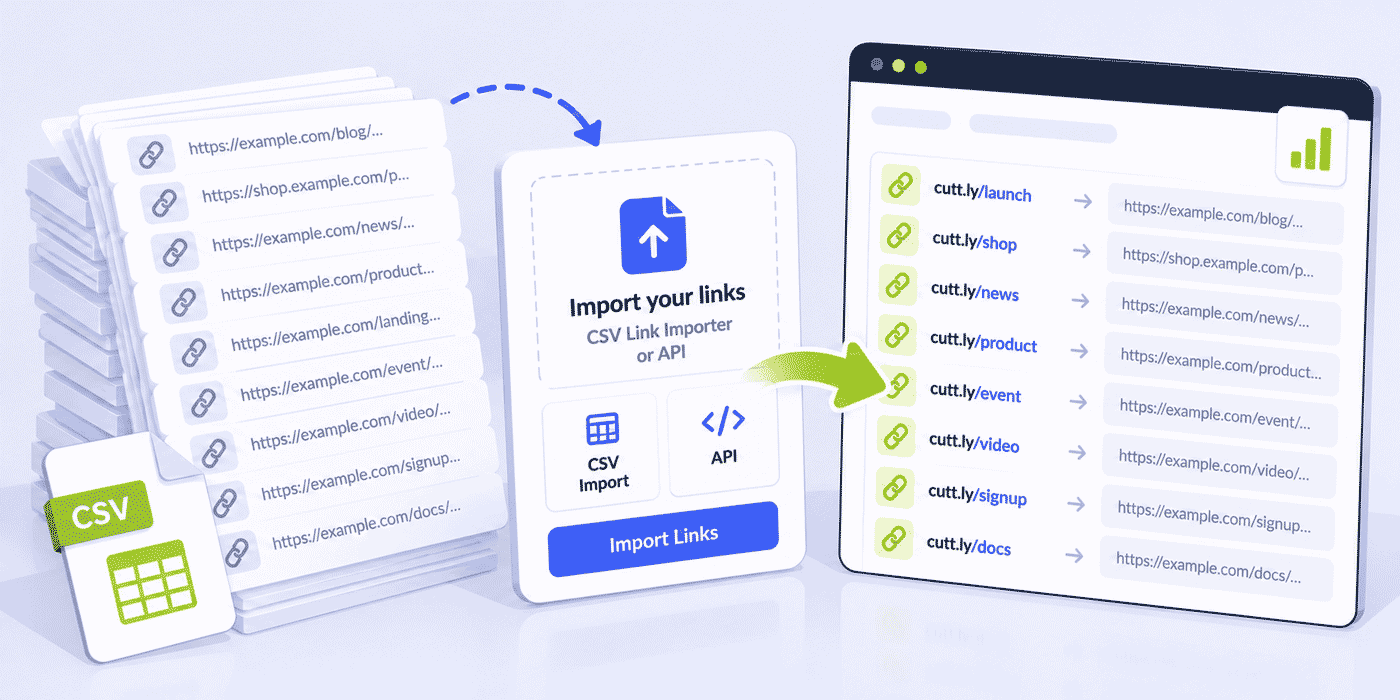
What This Guide Covers
- Why a migration is a recreate-and-repoint project, never a transfer
- The fork that decides everything: links on your own domain vs links on the provider's domain
- Phase one: exporting, inventorying and triaging the links you actually still need
- The three intake routes: CSV Link Importer, the Cuttly API, and manual recreation
- Volume math: import limits, API rate limits and monthly link budgets per plan
- The own-domain path in detail: DNS A and TXT records, verification, alias preservation
- The provider-domain path: prioritized recreation and updating every reference
- What does not transfer: click history, taken aliases, and domains on existing links
- Organizing the inventory on arrival: tags, titles, UTM and naming conventions
- Team-scale migrations: roles, the team dashboard and Team API volumes
- The cutover runbook, a worked example, and the plan-sizing guide
The Fork That Decides Everything
Before any export or spreadsheet, answer one question: whose domain do your existing short links live on? Every other decision in this guide descends from the answer, because the two cases have opposite properties.
Links on your own branded domain (go.yourbrand.com, or any domain you control) can survive the migration with their URLs unchanged. The domain is yours; the provider merely resolves it. Point the domain's DNS at Cuttly instead, verify it, recreate the links with the same aliases, and the exact addresses printed on your packaging and embedded in your old posts now resolve through Cuttly. This is the closest thing to a true transfer that exists in link management, and the section on the own-domain path walks it step by step.
Links on the provider's shared domain (their public short domain) cannot come with you. That domain belongs to them, and every link on it stops being yours the day you leave. These links get recreated at new addresses, on cutt.ly or on your own branded domain, and every live reference to the old address gets updated. The work is larger, which is precisely why the triage phase exists: most old inventories contain far fewer links worth recreating than their row count suggests.
Mixed inventories, which are common, simply run both tracks in parallel. And if the migration is also the moment you finally adopt a branded domain, so much the better: the branded domains guide makes the case, and this guide's own-domain sections cover the setup. A migration is the one moment when "we'll brand our links someday" costs nothing extra to become "now," because the references are being updated anyway.
Why Teams Migrate at All
Naming the motive sharpens the plan, because different motives weight the phases differently. The common ones, in the order we see them: consolidation, where links, QR codes, a Link in Bio page and surveys currently live across three subscriptions and the team wants one account and one dashboard; branding, where links still ride a generic shared domain and the business has decided its name belongs in its own addresses; cost, where the old provider's pricing outgrew the usage; governance, where an EU organization wants its link infrastructure on a platform operated by an EU company with EU servers and analytics that are aggregated and anonymized; and features, where something specific (per-domain TRAI headers for SMS in India, link rotation, Action Pages) pulled the decision.
The motive sets the migration's center of gravity. A branding migration spends its care on the domain path and alias choices. A consolidation migration spends it on the organizing pass, since the point is one legible system. A governance migration documents the sunset rigorously, because the compliance story is only complete when the old account is verifiably closed. Write the motive at the top of the migration sheet; every later judgment call gets easier with it in view.
When to Schedule the Move
Calendars matter twice here. The month boundary matters because every volume in this guide resets on the first: starting a wave-based migration late in a month wastes most of a cycle, while starting on the second gives the full allowance a clean runway. And the business calendar matters because the own-domain path includes a dark window and the provider-domain path includes weeks of reference churn; neither belongs in the middle of a launch, a peak season or a campaign that depends on the very links being moved. The quiet quarter is the migration's friend, and the one-line scheduling rule covers most cases: pick the business's slowest stretch, start just after the first of the month, and put the sunset's end date on the calendar the same day the project starts.
Phase One: Inventory and Triage
Export Everything, Twice
Start at the old provider: export the full link list in whatever format it offers, and separately export or save the analytics reports you care about. Do both before changing anything, and archive both files somewhere permanent. The analytics export matters more than it seems in the moment, because click history does not migrate anywhere, ever; the archived report is the only copy you will have of the old links' performance, and it is also the triage phase's raw material.
Triage by Life, Not by Count
A raw export overstates the real inventory badly. Years of accumulated links include one-off campaign links whose campaigns ended, test links, duplicates, and links to pages that no longer exist. Recreating all of it wastes import volume and clutters the new dashboard from day one. The triage pass sorts the export into three buckets:
- Alive and referenced. Links still printed, embedded, pinned or distributed somewhere you cannot easily edit: packaging, PDFs, old posts, email signatures, QR codes in the field. These migrate first and carefully.
- Alive and editable. Links in places you control and can update in minutes: your bio pages, your site, active email templates, documentation. These get recreated fresh, often with better aliases than they had.
- Dead. No clicks in recent history, campaign over, destination gone. These stay in the archive and never enter Cuttly at all.
The old provider's click data is the sorting tool: links with zero recent clicks are candidates for the dead bucket, and links with steady traffic from unknown referrers are exactly the "referenced somewhere immovable" cases that need the careful track. Expect the live inventory to be a fraction of the export. A thousand-row export routinely triages down to a few hundred links that matter, which changes the plan sizing, the intake route and the timeline all at once.
Build the Migration Sheet
The triage output becomes one working spreadsheet, and it is the project's backbone: one row per surviving link, with its old short URL, its destination URL, its desired alias at Cuttly, its target domain (cutt.ly or your branded domain), its bucket, and a column for where it is referenced. This sheet later becomes the CSV the Link Importer consumes, the checklist the reference-updating pass works through, and the record the project closes on. Teams that keep links in spreadsheets anyway will recognize the workflow from the Google Sheets guide.
The Three Intake Routes
Cuttly offers three ways to get links in, and the inventory's size picks between them.
The routes also mix well within one project, and large migrations usually do mix them: the importer carries the bulk of the inventory, the API handles a scripted long tail or a recurring pipeline that will outlive the migration, and the dashboard takes the dozen links that deserve individual attention, such as the flagship aliases whose settings warrant a human pass. The migration sheet's bucket column can simply gain a route column beside it, and each wave runs its own route against its own limits.
Route One: The CSV Link Importer
The Link Importer takes a .CSV file and creates short links in bulk. It is the natural route for most migrations, because the migration sheet already exists as a spreadsheet. Monthly import limits are plan-dependent: 100 links per month on Single, 2,000 on Team, 5,000 on Team Enterprise; the Free and Starter plans do not include the importer. The limits reset on the first of the month, so an inventory slightly above a plan's limit can also migrate in two monthly waves, with the alive-and-referenced bucket going first. The importer's mechanics and CSV preparation are covered in depth in the bulk URL shortening guide.
The CSV itself deserves ten careful minutes. Build it from the migration sheet, not from the raw export: destination URLs cleaned of the old provider's own tracking artifacts, aliases written exactly as they should appear, one row per surviving link and nothing else. Spreadsheet software loves to mangle URLs, so watch the two classic corruptions before saving: auto-formatting that turns plain addresses into hyperlink objects, and encoding changes that break characters in longer destination URLs. Save as plain .CSV, open it once in a text editor to see what the importer will actually receive, and run the pilot wave's twenty rows through before committing the full file.
Route Two: The API
For large inventories, scripted recreation through the Cuttly API runs the same job programmatically, including custom aliases. Two separate numbers govern it. The rate limit controls speed: 60 calls per 60 seconds on Single, 180 on Team, 360 on Team Enterprise, which translates to roughly 3,600 links per hour on Single and more than 10,000 per hour on the Team tiers, comfortably inside a weekend window for any realistic inventory. The volume limits control totals per month: API-created links on the cutt.ly domain follow the plan's overall link budget, while API links on branded domains have their own monthly ceilings of 30 on Starter, 1,000 on Single, 20,000 on Team and 50,000 on Team Enterprise. Developer-side patterns, including error handling around rate limits, live in the developers API guide; no-code teams can run the same loop through the tools in the Zapier and Make guide.
Route Three: By Hand
Below a few dozen links, the dashboard is the fastest route of all: no CSV formatting, no script, and each link gets a deliberate alias, title and tag as it is created. Small inventories should not be ashamed of this; a solo creator's twenty living links migrate in an afternoon, with better housekeeping than they ever had.
Choosing by the Numbers
| Surviving inventory | Recommended route | Plan floor |
|---|---|---|
| Up to ~50 links | Manual, in the dashboard | Any plan within its monthly link budget |
| 50 to 100 links | CSV Link Importer, one wave | Single ($25/month) |
| 100 to 2,000 links | CSV Link Importer | Team ($99/month), or Single across months |
| 2,000 to 5,000 links | CSV Link Importer or API | Team Enterprise, or Team across months |
| Beyond, or scripted pipelines | API | Team tiers, within API volumes |
One budget sits above all routes: the plan's overall monthly link volume of 30 on Free, 300 on Starter, 5,000 on Single, 20,000 on Team and 50,000 on Team Enterprise, covering every link created by any method. Migrations rarely hit it after honest triage, but the arithmetic belongs in the plan choice, not in a surprise mid-import.
The Own-Domain Path: URLs That Survive
When your links live on a domain you own, the migration can end with nothing visibly changing for anyone who holds an old URL. The sequence matters, so here it is in order.
1. Choose the Domain Deliberately
If the links already live on a dedicated short domain or subdomain, that is the domain you will move. If you are branding links for the first time during this migration, pick a dedicated domain or a subdomain of your main one, such as a short standalone domain or go.yourbrand.com. The rule comes straight from how DNS works here: the A record change makes the domain serve short links, and any website already running on that exact hostname becomes unavailable afterward. Cuttly's documentation says plainly that adding a domain which hosts a website or content is not recommended. A subdomain that hosts nothing is the clean answer, and any domain or subdomain you own or have rights to use qualifies.
2. Point DNS: A Record Plus TXT Record
Two records, both set at your domain provider: the DNS A record, which routes the domain's traffic to Cuttly so short links resolve, and the DNS TXT record, which verifies that you control the domain. After both are in place, the domain is verified and approved in your Cuttly account before links can use it. The click-by-click walkthrough, including provider-side screenshots and the SSL notes, is in the custom domain guide and the support article on adding a custom domain.
3. Recreate the Aliases Exactly
Here the own-domain path pays off. Each custom domain in Cuttly has its own alias namespace, separate from cutt.ly and from every other domain, so the back-halves your links used before are available to you and only you. Recreate each surviving link with its old alias and its old destination, via the importer or the API, and the old URLs come back to life: the address on last year's packaging resolves again, now through your Cuttly account, with analytics accruing from this moment on. Custom aliases are unlimited from the Single plan upward, so the recreation is constrained only by the intake route's volume, not by alias budgets.
4. Sequence the Dark Window
Between the DNS change and the recreation, old URLs on the domain resolve nowhere, so the window should be short and scheduled. Prepare the import file or script before touching DNS; make the DNS change at your traffic's quietest hour; verify the domain; run the import immediately; then spot-check a sample of recreated URLs from a phone on mobile data. For most inventories the whole window fits inside an evening, and the alive-and-referenced bucket goes first within it so the links that matter most are dark the shortest.
5. Expect Propagation, Not Instant Flip
DNS changes take effect across the internet gradually rather than at once, with timing that depends on your domain's previous record settings and resolvers along the way. Plan the window with that in mind: make the records change, let verification complete, and treat the spot-check as done only when recreated URLs resolve from a network other than your own, which is what the phone-on-mobile-data test exists for. Certificates depend on the plan: from Single upward, Let's Encrypt SSL is included and issued as part of the setup, with Let's Encrypt rate limits applying per the support documentation, so repeated add-and-remove cycles on the same domain are worth avoiding. On Free and Starter, the domain's SSL is configured on your side, for example through your CDN or proxy provider. Either way, set the domain up once, deliberately, per the walkthrough.
6. The Namespace Dividend
Once the domain lives at Cuttly, its private alias namespace keeps paying past the migration itself. New links on the domain never collide with other users' names, campaign aliases can follow clean conventions without checking availability, and the inventory's addresses read as one deliberate system. Teams migrating multiple brands take this one level up: with up to 5 branded domains on Single, 10 on Team and 99 on Team Enterprise, each brand's links live on each brand's domain, each with its own namespace, all in one account.
The Provider-Domain Path: Recreate and Repoint
Links on the old provider's shared domain follow a different logic, because the old URLs have a hard expiry: they live exactly as long as your old account does, and not a day longer. The work splits into recreation and reference-updating, and the second half is the real project.
Recreation runs through the same three routes, with one difference: the new addresses are new. This is the moment to choose aliases well, because every link is getting reprinted, re-pinned and re-pasted anyway; a migration is a free renaming amnesty. On the shared cutt.ly domain, aliases are first come, first served across all users, so some old names may be taken; your own branded domain, with its private namespace, sidesteps the problem entirely, which is one more argument for folding domain adoption into the migration.
Reference-updating works through the migration sheet's "referenced where" column, in priority order: the editable, high-traffic surfaces first (bio pages, site footers, active email templates, pinned posts), then documentation and older content, then the physical layer. Printed materials carrying old provider URLs get a decision per item: reprint with the new address, or let the material age out while the old account stays open as a bridge. QR codes deserve special attention in the audit, since a code is a link you cannot see at a glance; the QR best practices guide covers the reprint side.
The sunset window closes the path. Keep the old account alive, if the provider's terms allow it, for a defined bridge period while references update and traffic drains; watch the old links' click counts fall; and set a real end date, after which the account closes and the archived analytics export becomes the only record. An open-ended "we'll keep both for now" is how organizations end up paying two providers for years.
Recreating Behavior, Not Just Addresses
A short link is more than an alias and a destination; the old inventory likely carries settings, and the migration sheet should carry a column for them. The behaviors worth auditing per link, and their Cuttly equivalents: expiration, where a link stops redirecting on a date, is set per link via redirect expiration; password protection on a link is available from Single upward; split traffic maps to link rotation, with A/B at 50/50 on Single and percentage-controlled A/B and A/B/C on the Team tiers; mobile routing maps to alternative redirects for mobile links; and unique-click counting is a per-link analytics setting. Each exists in the dashboard and in the support documentation, and each is cheaper to configure during recreation than to retrofit across hundreds of links afterward.
One post-migration flexibility deserves advance notice, because it differs by plan: editing a link's destination later. On Starter and Single, a recreated link's source URL can be changed without limit, but only to a URL on the same domain as before; Team and Team Enterprise allow changing it to any URL. Inventories whose destinations churn across different domains, agency work above all, should weigh that rule in the plan choice alongside the volume math.
The Pilot Wave: Test With Twenty Before You Move a Thousand
Every route in this guide deserves a rehearsal at small scale before the real volume moves. Pick twenty links that span the inventory's variety: a few with custom aliases, one with each special behavior, a couple destined for each target domain. Run them through the chosen route end to end, including the verification spot-check and the organizing pass. The pilot surfaces the problems that are cheap at twenty and expensive at two thousand: a CSV column formatted wrong, an alias convention that collides, a behavior nobody knew the old links had, a domain that was not verified after all. It also produces the migration's true per-link effort number, which turns the remaining timeline from a guess into arithmetic. Half a day spent here is the best-leveraged half day in the project.
What Does Not Transfer, Stated Before It Hurts
- Click history. Analytics start fresh at Cuttly per link, from creation. The old numbers live only in your archived export. Going forward, history is retained for 30 days on Free and Starter, 1 year on Single, and 2 years on the Team tiers.
- The provider's domain. Covered above, but worth repeating as the single most common misunderstanding: links on their shared domain are theirs, full stop.
- Domains on already-created links. A Cuttly-side rule that shapes the import order: an existing link's custom domain cannot be swapped afterward, because each domain is a unique identifier tied to its analytics. Decide which domain each link belongs to before importing it, not after. Choosing wrong means recreating the link, so the migration sheet's domain column earns its place.
- Taken cutt.ly aliases. The shared domain's namespace is global; a branded domain's is yours alone.
- The old provider's features. Settings, integrations and tags from the old system do not map automatically. The organizing pass below rebuilds structure natively, which is usually an upgrade rather than a loss.
Arriving Well: Organize While You Import
A migration is the one chance to impose order on an inventory at zero marginal cost, because every link is passing through your hands anyway. Four Cuttly features do the organizing. Tags, available on every plan and searchable from a dedicated tag list, encode whatever taxonomy the old system lacked: by campaign, by channel, by owner. Tagging every migrated link with the migration wave itself (a simple migration-2026 tag) also gives you a permanent, filterable record of what came over. Link titles, editable from Starter upward, make the dashboard legible to humans. UTM parameters, built in on every plan, get rebuilt consistently instead of inheriting years of inconsistent tagging; the conventions are in the link analytics guide. And search by destination URL, from Single upward, is the post-migration safety net: when someone asks "did the pricing page link come over," the answer is one search away.
Team-Scale Migrations
When the inventory belongs to an organization rather than a person, the Team tiers add the structure the project needs. Teams get their own dedicated dashboards, so a migration can land links into the team that owns them rather than one shared pile: marketing's links into marketing's team, support's into support's. Roles (Owner, Admin, Moderator, User, Viewer) let the migration's operator work without handing out account-wide keys, and only the team owner needs the subscription, so contributors join without their own plans. The Team API carries up to 20,000 links per team per month on Team and 50,000 on Team Enterprise, with link editing, tagging and analytics available through it, which is enough headroom for an agency moving several clients' inventories in one season. Team dashboards also export to CSV, so the post-migration state can be snapshotted per team for the project's closing record.
Agency migrations add one closing discipline: per-client sunsets. Each client's old inventory drains at its own pace, so each gets its own bridge end date, its own archived analytics file, and its own closing note confirming the move is complete. The per-team CSV export makes the closing snapshot a two-minute task per client, and the folder of dated snapshots is the project's deliverable in the most literal sense: proof, per client, of what moved, when, and where it now lives.
The Cutover Runbook
- 1. Export everything at the old provider: links and analytics, archived permanently, before any other step.
- 2. Triage into alive-referenced, alive-editable and dead; build the migration sheet with destination, alias, domain and references per row.
- 3. Size the plan against the surviving count: importer limits, API volumes and the monthly link budget, per the table above.
- 4. Set up domains first. Branded domains added, DNS A and TXT set, verification complete, before a single link imports. The domain-on-existing-links rule makes this ordering mandatory, not stylistic.
- 5. Import in buckets: alive-and-referenced first, in one scheduled window for own-domain inventories; alive-and-editable second, with aliases improved where worth it.
- 6. Verify by sample: a spot-check of recreated URLs from a phone, plus a search-by-destination pass on the links the business cannot afford to miss.
- 7. Update references through the sheet's checklist, highest-traffic surfaces first; decide reprint-or-age-out per physical item.
- 8. Run the sunset: old account open for a defined bridge, old click counts watched down, end date kept, account closed, archive filed.
A Worked Example: An Agency Moves 1,200 Links
A marketing agency on behalf of itself and three retainer clients, migrating from a previous provider onto the Team plan. The export holds 3,400 rows across four accounts; triage against the old analytics kills test links, finished campaigns and dead destinations, leaving 1,150 that matter, of which about 300 are referenced on surfaces nobody can edit: client packaging, printed brochures, two years of posts.
Two of the four inventories already live on client-owned domains, so those run the own-domain path: DNS A and TXT repointed on a Sunday evening, domains verified, and the same-alias CSVs imported inside the hour, after which the printed materials simply keep working. The other two inventories lived on the old provider's shared domain; their links are recreated on freshly added branded domains with cleaned-up aliases, and the reference-updating pass runs for two weeks through the sheet, bios and templates first. Everything lands tagged by client and by wave, titled, and split across team dashboards per client, with each client's account manager holding a role in their own team only. Volume math: 1,150 links against Team's 2,000-per-month importer limit and 20,000-link budget, one wave, no waiting. The old accounts stay open for a sixty-day bridge; the analytics exports are filed per client; day sixty closes them on schedule.
Communicating the Migration
Most migrations need no announcement at all, and knowing which parts do saves both silence-where-it-hurts and noise-where-it-bores. The own-domain path is invisible by design: the URLs people hold keep working, so the audience has nothing to learn. The provider-domain path changes addresses, and three groups deserve a line each. Internal teams get the new naming convention and the date after which old links should not be pasted anywhere new, ideally in the same message that shares the migration sheet's reference checklist. Clients, in agency settings, get a short note that their links now run on their own branded domain, which is less an apology than a small piece of good news worth claiming. Partners and affiliates who embed your links in their content get the new addresses with a requested swap-by date tied to the sunset window, since their surfaces are the ones you cannot edit yourself.
Timing the notes follows the runbook: internal teams hear at step two, when the sheet exists and the convention is set; partners hear at step seven, with the new addresses in hand and the swap-by date attached; clients hear whenever their own domain's dark window is scheduled, since a planned hour of downtime announced in advance reads as competence and the same hour discovered by accident reads as an outage.
What never goes out: a public announcement that links are changing. Audiences do not track infrastructure, and the only public-facing duty is the quiet one of updating every surface you control before the old addresses go dark.
Reading the First Month
Post-migration monitoring has one clever trick in it. The recreated links start their analytics at zero, which means the first month's click counts are a live map of which references actually exist in the world: a link that was triaged as "referenced somewhere immovable" and now shows steady traffic has confirmed its bucket, while a supposedly living link that stays at zero for thirty days was mis-triaged and can be retired at the next housekeeping pass. On the own-domain path this reading is even sharper, because traffic arriving at recreated aliases is, by definition, coming from old references that survived the switch.
The month also establishes the inventory's new baseline: which links carry the business, which channels feed them, and what normal looks like, all in the same dashboard that will hold the next year (Single) or two (Team tiers) of history. Teams coming from providers with thin reporting often find this month quietly persuasive, and the reading habits are the standard ones from the link analytics guide. For the provider-domain path, the mirror reading runs on the old side: the sunset bridge's falling click counts on old links measure exactly how much reference-updating work remains, and a curve that flattens above zero names the references the audit missed.
A Smaller Example: The Solo Creator's Saturday
Not every migration is an agency project, so here is the other end of the scale. A creator with one audience and one old account exports the list, finds 140 rows, and triages them over coffee: 22 links still alive, of which 6 sit in old video descriptions and posts that will never be edited, and 16 live in the bio page and current templates. On the Starter plan, a branded domain goes up in the morning (DNS A and TXT at the registrar, SSL configured on the creator's side per Starter's setup, verification before lunch), and the 22 links are recreated by hand in the dashboard through the afternoon, titled and tagged as they land, well inside the month's 300-link budget and the 30-alias allowance. The bio page and templates get the new addresses the same day; the 6 immovable references keep working only if they were on the creator's own domain, and otherwise simply age out with the old content. Total elapsed time: one Saturday, and the inventory ends the day better organized than it ever was at the old provider.
Common Migration Mistakes
- Migrating the export instead of the inventory. Thousands of dead links recreated because nobody triaged. The sheet first, always.
- DNS after import. Links created on cutt.ly "for now," to be moved to the branded domain "later." There is no later: domains on existing links cannot be swapped. Domain first.
- Skipping the analytics export. The old numbers are unrecoverable the day the old account closes. Archive before anything.
- Pointing a live website's domain at Cuttly. The A record change takes the site down. Dedicated domain or empty subdomain, per the documentation.
- Ignoring the QR layer. Codes in the field are invisible old links. They belong in the referenced-where audit explicitly.
- The eternal bridge. Two providers paid indefinitely because the sunset had no end date. Set one in the runbook's step eight and keep it.
- Arriving disorganized. The inventory lands untagged and untitled, and the new dashboard inherits the old chaos. Organize in the same pass; it never gets cheaper.
The Migration on One Page
Compressed to its spine: name the motive, then answer the fork, because links on your own domain can keep their URLs and links on the provider's domain cannot. Export and archive both the links and the analytics before touching anything. Triage by life, not by count, into a migration sheet that carries destination, alias, target domain, behaviors and references per row. Size the plan to the surviving number against three budgets: the importer's monthly limit, the API's volumes and rate, and the plan's overall link budget. Domains go up and verify first, always, because a link's domain is permanent once created. Pilot with twenty, import by bucket with the referenced links first, verify by sample, organize in the same pass with tags and titles, then work the reference checklist from the highest-traffic surfaces down. Keep the sunset dated, watch the first month's clicks confirm the triage, and close the old account on schedule with the archive filed. None of it is difficult; all of it is sequencing, and the sequence is the product this guide ships.
Cuttly Plan Guide for Migrations
The Free plan ($0) fits the smallest moves: 30 links per month, created by hand, with tags and UTM from day one. A creator consolidating a handful of living links starts here, and the plan doubles as a sandbox for testing the own-domain path before committing a larger inventory. Registration is required; no credit card is needed.
The Starter plan ($12/month) adds the branded domain and 300 links per month, created manually or through the API within its volumes. Small inventories that fit a month's budget migrate here, by hand, onto their own domain.
The Single plan ($25/month) opens the CSV Link Importer at 100 links per month, CSV export of the dashboard, unlimited custom aliases, up to 5 branded domains, a 5,000-link monthly budget and a 60-calls-per-minute API. Solo professionals and small businesses run complete migrations here, in one wave or a few.
The Team plan ($99/month) is the migration workhorse: 2,000 importer links per month, 20,000-link budgets both overall and via API, up to 10 branded domains, 2 years of analytics retention, and the team structure (dashboards, roles, per-team CSV export) that organizational moves need.
The Team Enterprise plan ($149/month) scales the same machinery to 5,000 importer links per month, 50,000-link budgets, up to 99 branded domains and the largest team counts, for multi-brand and multi-client migrations in one season.
The first real step costs an hour, not a plan: export your current inventory, run the triage, and count what actually survives. Then create a Cuttly account sized to that number and work the runbook. Registration required; free plan available with no credit card needed.
Frequently Asked Questions
Can I import my existing short links into Cuttly from a CSV file?
Yes. The Link Importer creates short links in bulk from a .CSV file, with monthly limits of 100 on Single, 2,000 on Team and 5,000 on Team Enterprise; limits reset on the first of the month, so larger inventories can run in waves. The API covers inventories beyond that, within each plan's volumes.
Will my old short URLs keep working after I switch?
On your own branded domain, yes: repoint the domain's DNS A and TXT records to Cuttly, verify it, and recreate the links with their original aliases, and the same URLs resolve again through your new account. On the previous provider's shared domain, no; those links are recreated at new addresses and the references updated.
Does my click history transfer?
No. Analytics begin at creation for every link, on any provider's side of a migration. Export and archive the old reports before closing the account. At Cuttly, history is then retained for 30 days on Free and Starter, 1 year on Single, and 2 years on Team and Team Enterprise.
Can I keep my custom aliases?
On a branded domain, exactly: each custom domain has its own alias namespace, so your old back-halves are available to recreate one for one. On the shared cutt.ly domain the namespace is global, and some names may be taken. Custom aliases are unlimited from Single upward (3 per month on Free, 30 on Starter).
What DNS records does a custom domain need?
A DNS A record, which makes the domain serve short links, and a DNS TXT record for ownership verification, followed by verification and approval in your account. A website running on that exact hostname becomes unavailable after the A record changes, so use a dedicated domain or an empty subdomain.
In what order should the migration run?
Export and archive first, triage second, plan sizing third, and domains before any links: an existing link's domain cannot be changed afterward, so branded domains must be verified before the import begins. Then import by bucket, verify by sample, update references, and close the old account on a dated sunset.
How long does a migration take?
The import itself is the short part: a CSV wave lands in minutes and even API recreation of thousands of links fits a weekend within the rate limits. The calendar is set by the reference-updating pass and the sunset bridge, which for most organizations means one to two focused weeks plus a thirty-to-sixty-day bridge while old traffic drains.
- MIGRATION
- URL Shortener →
- QR Code Generator →
- Link in Bio Builder →
- Related Guides
- Bulk URL Shortening
- Custom Domains for Short Links
- Developers & API
- Zapier & Make Automation
- Shorten URLs in Google Sheets
- Link Analytics — Complete Guide
- Branded Short Domains
- Support Docs
- Adding a Custom Domain
- Other Series
- Online Surveys — The Pillar Guide
- Action Pages — The Pillar Guide
- Encyclopedia
- Branded Links
- Verticals Hub
- URL Shortener for Every Industry →
- Start Here
- Create Free Account
- Plans & Pricing
URL Shortener
Cuttly simplifies link management by offering a user-friendly URL shortener that includes branded short links. Boost your brand’s growth with short, memorable, and engaging links, while seamlessly managing and tracking your links using Cuttly's versatile platform. Generate branded short links, create customizable QR codes, build link-in-bio pages, and run interactive surveys—all in one place.
Cuttly More Than Just a URL Shortener
Cuttly is a comprehensive, ever-evolving platform for link shortening that combines innovation and user-friendliness to deliver a seamless experience in managing and shortening URLs.


