How to Shorten URLs in Bulk: Batch URL Shortening Guide
There are two very different reasons to need bulk URL shortening. The first: you have a list of URLs — an e-commerce product catalogue, a large affiliate link inventory, a directory of campaign landing pages — and you need to create tracked short links for all of them without spending hours doing it one by one. The second: you want to share a collection of URLs as a single scannable or clickable unit — a bundle of links that opens as a list when accessed. Both needs are legitimate, and Cuttly addresses them with two distinct features that are often confused: Bulk Shortening via CSV (Link Importer) and Bulk Short Links. Understanding the difference — and knowing which approach suits your specific use case — is what this guide is for. It also covers the API approach for teams that need to automate link creation at scale beyond what dashboard import allows.
What This Guide Covers
- The two distinct bulk shortening needs — and which Cuttly feature addresses each
- Bulk Shortening via CSV (Link Importer): how it works, plan limits, CSV format
- Step-by-step: importing a bulk link batch via CSV
- Bulk Short Links: what they are, when to use them, how they differ
- API bulk shortening: for high-volume automation at scale
- Use cases: e-commerce, affiliate marketing, large campaigns, publishing
- How to manage a large link inventory after bulk creation
- Exporting links from the dashboard to CSV
- Common mistakes in bulk link creation
Two Distinct Bulk Shortening Needs
Before choosing a method, it is worth being clear about what you actually need. The two use cases are fundamentally different.
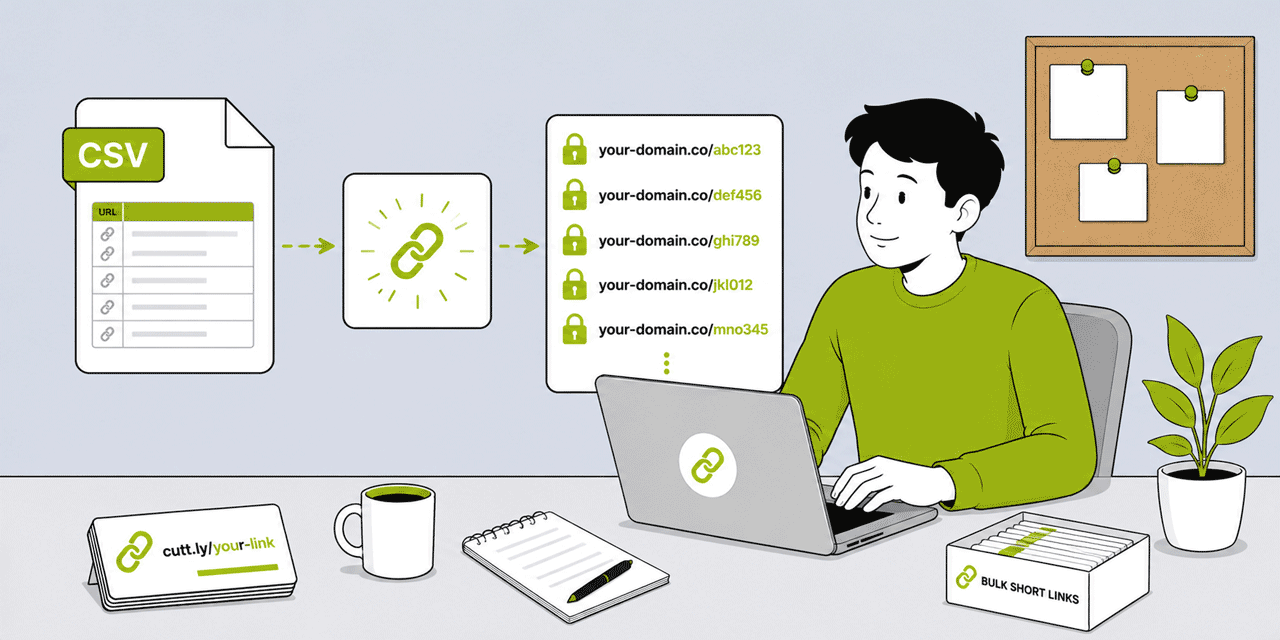
Use case A: Mass creation of individual short links. You have a list of destination URLs — 50, 200, 2,000 — and you want each one to become its own independent short link with its own alias, its own analytics, and its own QR Code. Each link is tracked separately. You can share each link individually. This is the use case for Cuttly's CSV bulk import (Link Importer). Each URL in the file becomes its own short link.
Use case B: Bundling multiple URLs behind a single shared link. You want to share a collection of links as a single package — one URL that, when visited, shows a list page containing all the links. The recipient clicks the single short link and gets access to the entire bundle. This is the use case for Cuttly's Bulk Short Links feature. One link, many destinations on a list page.
Most people asking about "bulk URL shortening" mean use case A. Some mean use case B. Identifying which you actually need before starting saves time and avoids frustration.
Bulk Shortening via CSV — The Link Importer
Cuttly's Link Importer is the dashboard-based tool for creating multiple individual short links from a CSV file upload. Each row in the CSV file creates one short link. If your CSV has 100 rows, you get 100 individual short links — each with its own analytics, its own alias (either auto-generated or specified in the CSV), and its own QR Code.
Plan Limits for CSV Bulk Import
CSV bulk import is available from the Single plan and above. Monthly limits:
- Single ($25/month): 100 links/month via CSV import
- Team ($99/month): 2,000 links/month via CSV import
- Enterprise ($149/month): 5,000 links/month via CSV import
These limits are monthly, resetting on the 1st of each month. They are separate from the plan's total monthly link allowance — a Single plan user can create 5,000 links per month in total (including manually created links), of which up to 100 can be imported via CSV. For bulk operations that require more than 5,000 imports per month, the API is the appropriate route.
CSV File Format
The CSV file for Cuttly's Link Importer is structured with one destination URL per row. The minimum required column is the destination URL. Additional optional columns allow you to specify a custom alias for each link and a tag to apply during import. The exact column structure and whether a header row is included should be verified in the Link Importer interface — the dashboard displays the expected format and provides a sample file for download before you import.
General principles for preparing the CSV:
Each URL must be a complete, valid URL including the protocol: https://yourdomain.com/product-page — not yourdomain.com/product-page. Invalid or incomplete URLs will cause import errors for the affected rows.
If specifying custom aliases: each alias must be unique within your Cuttly account's alias namespace for the selected domain. Duplicate aliases will cause import errors for the affected rows. Use a consistent naming convention — a common approach for product catalogues is product-sku-code (e.g. PRD-00123), which is memorable, unique, and ties directly to your inventory system.
If not specifying custom aliases: Cuttly auto-generates a random alias for each link. The random alias is short and functional but not memorable or descriptive. For links that will appear in print materials or be shared directly, specifying custom aliases during import is worth the additional preparation time.
Tags: applying a tag to the entire import batch makes the links findable and filterable in the dashboard after import. Use a tag that identifies the campaign, product line, or import date: catalogue-q3-2026, affiliate-batch-june, product-launch-a.
Step-by-Step: Importing a Bulk Link Batch via CSV
Step 1: Prepare the CSV. Create a CSV file with your destination URLs in the first column. Add custom aliases in the second column if desired. Add a tag in the third column if you want all imported links tagged with a common identifier. Save as .CSV format, not .XLS or .XLSX.
Step 2: Test with a small batch first. Before importing 500 URLs, import 5 to 10 as a test. Verify: all links were created successfully, the aliases are correct, the destination URLs work, and the QR Codes are generated. Resolve any format errors before scaling to the full batch.
Step 3: Navigate to Link Importer. In the Cuttly dashboard, find the Link Importer feature. Select the branded domain to use for the imported links (if you have a branded domain connected). Select the source domain for the short links.
Step 4: Upload the CSV. Upload the prepared CSV file. The importer shows a preview of the first few rows — verify the column mapping is correct. Confirm the import.
Step 5: Review imported links. After import, filter the dashboard by the tag you applied (or use the search to find links by partial alias or URL). Verify a sample of the imported links are working correctly by clicking them and confirming the correct destination loads.
Step 6: Export the created links if needed. From the Single plan, you can export your links from the dashboard to a CSV file. This export includes the short link URL, destination URL, alias, and creation date for each link — useful for building a link inventory spreadsheet alongside your product or campaign management tools.
Bulk Short Links: A Different Feature
Bulk Short Links is a distinct Cuttly feature that is frequently confused with bulk link creation. It is worth understanding clearly because it solves a different problem.
A Bulk Short Link bundles multiple destination URLs behind a single short link. When someone clicks or scans the Bulk Short Link, they see a dedicated list page — a page that displays all the included URLs as a collection, typically with labels. The user then clicks the specific link they want from the list.
The use case: sharing a curated collection of links as a single URL. A conference speaker who wants to share 8 resources from their presentation can bundle them into one Bulk Short Link and display it as a single QR Code at the end of their slides. An educator who wants to share a set of supplementary reading links can bundle them behind one URL and put it in the course handout. An HR team sharing onboarding resources can create one Bulk Short Link for the entire onboarding document set.
Plan limits for Bulk Short Links (URLs per single bulk link): up to 10 on Free and Starter, up to 15 on Single, up to 20 on Team, up to 25 on Enterprise. Each Bulk Short Link also has its own QR Code — useful for print contexts where the entire bundle is accessible from one scan.
The key distinction from CSV bulk import: a Bulk Short Link does not create individual tracked links for each destination URL. It creates one link that leads to a list of all included URLs. The analytics on a Bulk Short Link tracks total clicks on the bundle link, not individual clicks on each destination within the bundle.
API Bulk Shortening: High-Volume Automation
For teams that need to create short links at scale programmatically — thousands per day, integrated into an application, triggered by automated workflows — the Cuttly API is the appropriate bulk shortening mechanism.
The API allows programmatic creation of short links: send a POST request to the Cuttly API with the destination URL, optional alias, optional tag, and optional UTM parameters. The API responds with the created short link URL and its analytics endpoint. This can be called in a loop to create thousands of links from application code, a data pipeline, a middleware integration, or a workflow automation tool (Zapier, Make, n8n).
API rate limits determine the practical throughput: 60 calls/60 seconds on Single, 180 calls/60 seconds on Team, 360 calls/60 seconds on Enterprise. For context: at 180 calls/minute on the Team plan, you can create approximately 10,800 links per hour if all calls are link creation requests. Monthly link limits apply: 5,000 on Single, 20,000 on Team, 50,000 on Enterprise.
For branded domain links via API: the Single plan allows 1,000 branded domain links per month via API; Team allows 20,000/month. Free and Starter plan API access creates links on the cutt.ly domain only.
The Team API (Team plan+) authenticates at the workspace level rather than per individual user token. For production integrations — a CRM that automatically creates a tracked short link for every new client, an e-commerce platform that generates a short link and QR Code for every new product listing, a booking system that creates a unique tracked link for each confirmation email — the Team API is the correct foundation. It does not depend on any individual user's account status and provides shared ownership of the integration.
Use Cases for Bulk URL Shortening
E-Commerce Product Catalogues
An e-commerce retailer with 500 products needs a tracked short link for each product page — for use in email campaigns, printed inserts, partner promotions, and social media content. Creating 500 short links manually is impractical. CSV import creates all 500 in one upload. Each product gets its own short link (typically aliased to the product SKU), its own analytics, and its own QR Code for any print application.
When the product catalogue updates — new products added, discontinued products removed — a new CSV import (or API calls for newly added products) updates the link inventory. Cuttly's export function allows the current link inventory to be downloaded as CSV for reconciliation against the product database.
Affiliate Marketing
Affiliate marketers promoting products across multiple channels often manage hundreds of affiliate links simultaneously — different product links, different tracking parameters for different traffic sources, links for different markets. CSV import creates the entire affiliate link inventory in one batch. Each affiliate link gets a branded short link with a clean alias (replacing the long affiliate URL with its tracking parameters) and automatic click analytics.
UTM parameters can be added to each link during CSV import if the CSV format supports UTM columns, or applied to the entire batch post-import through the dashboard. Each link's analytics shows independent click volume per affiliate product — useful for identifying which products are generating the most engaged traffic from affiliate sources.
Large Marketing Campaigns
A marketing team running a multi-market campaign — the same offer promoted in 20 cities, each with a location-specific landing page — needs 20 short links with location-specific aliases. CSV import creates all 20 simultaneously: column 1 the destination URL (location-specific page), column 2 the alias (city name or code), column 3 a campaign tag. Post-import, each city's link is independently tracked. Campaign analytics compare engagement across cities without manual aggregation.
Publishing and Content Sites
Publishing organizations, directories, and content platforms that create high volumes of content URLs — news articles, guide pages, resource listings — benefit from automatic short link creation for each new piece of content. The API is the typical approach here: integrated with the CMS so that each new article automatically generates a short link on publication. The short link is used in social sharing, email newsletters, and press distribution — with all clicks tracked per article.
Retail Chains and Multi-Location Businesses
A retail chain with 50 store locations needs a unique short link per location for local SEO, local review generation, and location-specific campaign tracking. CSV import creates all 50 store links in one batch: column 1 the store's local landing page URL, column 2 an alias (store-manchester, store-edinburgh), column 3 a common tag (store-locations). Post-import, each store's link analytics tracks that location's campaign traffic independently.
Agency Link Management
Marketing agencies managing multiple client campaigns simultaneously use bulk CSV import to set up client campaign links at the start of each campaign cycle. A new campaign brief triggers a CSV preparation with all required links, which is imported in one batch. Links are tagged by client and campaign. The team can filter the dashboard to show only a specific client's links and review their performance independently.
Managing a Large Link Inventory
Bulk link creation generates a large link inventory quickly. Without organization, the dashboard becomes difficult to navigate. These practices keep a large link inventory manageable.
Tags are the primary organization mechanism. Apply a tag during CSV import that identifies the campaign, product batch, or client. Filter the dashboard by tag to show only the links for a specific context. Tags are searchable and filterable from the dashboard link list.
Consistent naming conventions for aliases. A naming convention that encodes the context in the alias makes individual links identifiable without opening them: product-SKU123, city-manchester-offer1, client-acme-campaign-q3. Inconsistent aliases make a large inventory opaque.
Hide inactive links. Cuttly allows individual short links to be hidden from the main dashboard view — they remain active and tracked, but do not appear in the default list. Archive completed campaign links by hiding them. The dashboard stays clean and shows only currently active links.
Export periodically for inventory management. Export the full link list to CSV from the dashboard (Single plan+) and store it alongside the source data (product catalogue, campaign brief, affiliate inventory). This cross-reference document makes it easy to look up any link by destination URL, alias, or tag without navigating the dashboard.
Link search (Single plan+). From the Single plan, Cuttly supports search by short link and long (destination) URL. For large inventories, search is faster than scrolling. Use the search to find any specific link by its destination URL or alias.
Common Mistakes in Bulk Link Creation
Not testing with a small batch first. CSV format errors — wrong encoding, missing protocol in URLs, duplicate aliases — only become visible when the import fails. A test import of 5 to 10 rows takes minutes and catches format issues before they affect a 500-row import.
Using auto-generated random aliases for links that will appear in print or be shared publicly. A random alias like cutt.ly/xKpQ7m conveys nothing and looks untrustworthy in print. Always specify custom aliases for any link that will appear in a public context — even for bulk imports, take the time to prepare meaningful aliases in the CSV.
No tagging on import. Without a tag, 200 imported links look identical to 200 manually created links from other campaigns in the dashboard. Always apply a batch-specific tag during import.
Confusing Bulk Shortening (CSV) with Bulk Short Links. These are two different features. CSV import creates individual links. Bulk Short Links bundles multiple URLs behind one link. Review the feature descriptions before choosing — use the wrong one and you will need to undo and redo the work.
Exceeding monthly import limits without noticing. CSV import limits reset monthly but do not carry over. A 100-link Single plan import limit means you can import 100 links in January; unused quota does not accumulate into February. Plan import batches around the monthly reset if you consistently need near the limit.
Frequently Asked Questions
Can I shorten multiple URLs at once in Cuttly?
Yes. Bulk Shortening via CSV creates multiple individual short links from a CSV file — each URL becomes its own tracked link. Limits: 100/month (Single, $25/month), 2,000/month (Team, $99/month), 5,000/month (Enterprise, $149/month). Bulk Short Links is a separate feature for bundling multiple URLs behind one link.
What is the CSV format for bulk URL import in Cuttly?
One destination URL per row in the first column. Optional second column for custom alias. Optional third column for a tag. Each URL must include the full protocol (https://). Always test with a small batch first and verify the format in the dashboard's Link Importer interface, which shows the expected structure.
What is the difference between Bulk Shortening (CSV) and Bulk Short Links?
Bulk Shortening (CSV) creates multiple individual short links — each URL gets its own separate tracked link with its own analytics. Bulk Short Links creates a single short link that, when clicked, shows a list page of all included URLs. Use CSV for mass creation of individual links; use Bulk Short Links for sharing a collection as a single package.
What is the fastest way to shorten thousands of URLs in Cuttly?
For thousands of URLs: use the Cuttly API. Team API: 180 calls/60s, 20,000 links/month. Enterprise API: 360 calls/60s, 50,000 links/month. CSV import is dashboard-based and limited to 2,000/month (Team) or 5,000/month (Enterprise). For production-scale automation, the API is the correct tool.
- Tools
- URL Shortener →
- Link Analytics →
- Related Guides
- URL Shortener API Guide →
- URL Shortener for Developers →
- UTM Strategy Complete Guide →
- Link Tracking 101 →
- URL Shortener with Zapier and Make →
- URL Shortener for Agencies →
- Encyclopedia
- Branded Links
- Start Here
- Create Free Account
- Plans & Pricing
URL Shortener
Cuttly simplifies link management by offering a user-friendly URL shortener that includes branded short links. Boost your brand’s growth with short, memorable, and engaging links, while seamlessly managing and tracking your links using Cuttly's versatile platform. Generate branded short links, create customizable QR codes, build link-in-bio pages, and run interactive surveys—all in one place.
Cuttly - Consistently Rated
Among Top URL Shorteners
Cuttly isn’t just another URL shortener. Our platform is trusted and recognized by top industry players like G2 and SaaSworthy. We're proud to be consistently rated as a High Performer in URL Shortening and Link Management, ensuring that our users get reliable, innovative, and high-performing tools.


