URL vs URI vs URN: What's the Difference?
If you have used a web browser, written code that makes HTTP requests, read an API specification, or worked with XML, you have encountered URI, URL, and possibly URN. Most of the time they appear interchangeably — a developer might say "pass a URL to the function" while the function's parameter is named uri in its signature. But the three terms are not synonyms, and the distinction is precise, well-defined in the relevant RFCs (Request for Comments — the internet standards documents), and genuinely useful to understand clearly, particularly for developers working with web standards, APIs, linked data, or document formats. This guide explains what each term means, how they relate to each other, where the boundaries are, and why the distinction occasionally matters in practical work. It also covers how URL shorteners and short links fit into the URI framework.
What This Guide Covers
- The simplest possible summary: the three terms in one sentence
- URI: the umbrella term — definition and structure
- URL: identification plus location — definition, structure, and examples
- URN: identification without location — definition, structure, and examples
- The relationship between URL and URN as subtypes of URI
- The RFC history: how the definitions evolved
- The anatomy of a URL: scheme, authority, path, query, fragment
- The anatomy of a URN: namespace and namespace-specific string
- Common URN namespaces: ISBN, ISSN, UUID, DOI, IETF
- Where the URL/URI distinction matters in practice
- Where it does not matter — and why the terms are used interchangeably
- URL encoding and percent-encoding
- Absolute vs relative URIs
- Short links and URL shorteners in the URI framework
- IRIs: the Unicode extension of URIs
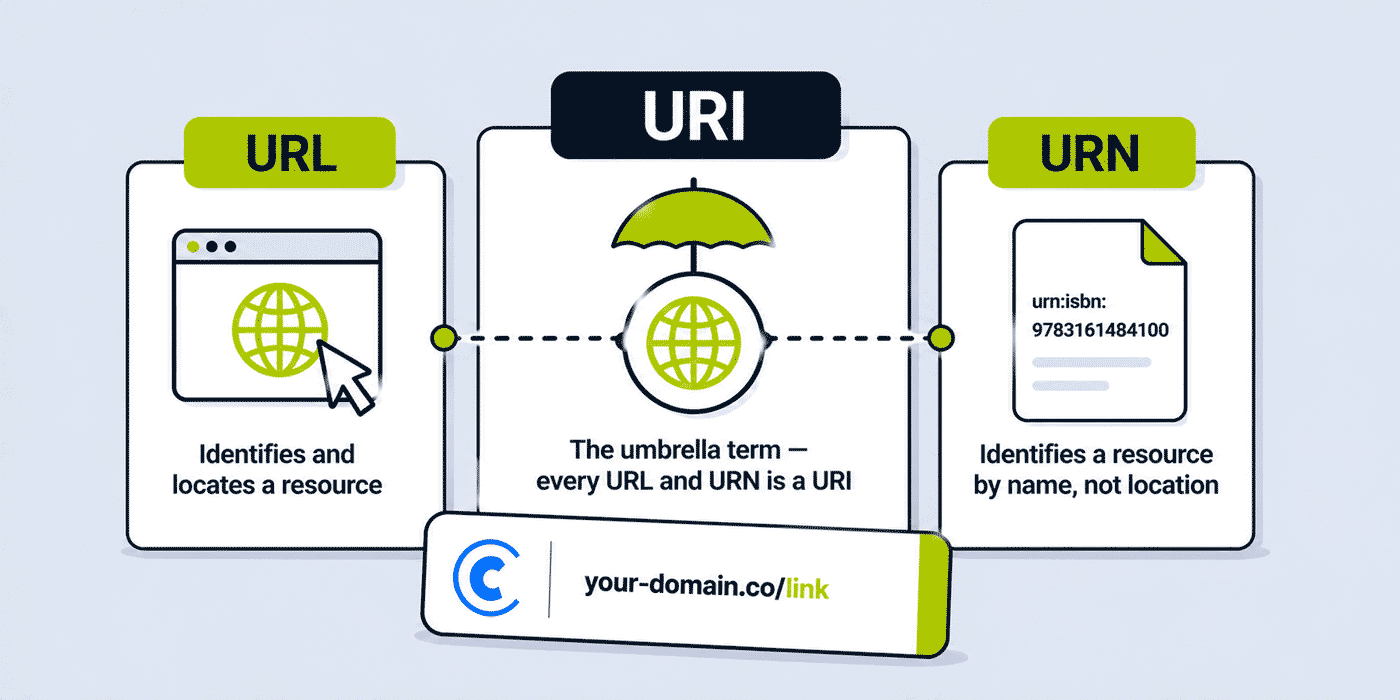
The Simplest Possible Summary
- URI (Uniform Resource Identifier) — the umbrella term for any string that uniquely identifies a resource. Every URL and every URN is a URI.
- URL (Uniform Resource Locator) — a URI that identifies a resource AND tells you how to locate or access it. Every web address you type in a browser is a URL.
- URN (Uniform Resource Name) — a URI that identifies a resource by name, persistently and independently of its location. It names but does not locate.
Set relationship: URI ⊃ URL ∪ URN — URIs are the superset; URLs and URNs are subsets.
Analogy: think of a person. Their name ("Alice Johnson") identifies them — it is like a URN. Their postal address ("123 Main Street, London") both identifies and locates them — it is like a URL. Both the name and the address are forms of identification — both are "identifiers," the umbrella category analogous to URI.
URI: The Umbrella Term
Definition
A URI is defined in RFC 3986 (published in January 2005, updating earlier RFC 2396) as "a compact sequence of characters that identifies an abstract or physical resource." The RFC defines the generic syntax that all URIs must follow, regardless of the scheme or subtype.
The key word in the definition is "identifies" — a URI provides a unique identifier for a resource. It does not necessarily say anything about how to access or retrieve the resource. That is what makes URI the umbrella category: it covers all forms of resource identification, whether or not they include access mechanism information.
URI Generic Syntax
RFC 3986 defines the generic URI syntax as:
URI = scheme ":" hier-part [ "?" query ] [ "#" fragment ]

where hier-part includes:
  "//" authority path-abempty
  / path-absolute
  / path-rootless
  / path-empty
In plain terms, every URI begins with a scheme (the part before the colon: https, mailto, urn, file, ftp, tel), followed by scheme-specific content. The scheme determines how the rest of the URI should be interpreted.
Examples of URIs that are not URLs or URNs — or that are not web addresses:
mailto:[email protected]— a URI that identifies an email address; clicking it opens an email client, but the URI itself is not a URL in the web-address sensetel:+44-20-1234-5678— a URI that identifies a telephone numberfile:///Users/username/documents/file.txt— a URI that identifies a local file by pathurn:isbn:978-0-306-40615-7— a URI identifying a book by ISBN (this is also a URN)
All of the above are URIs. Only mailto:, tel:, and file: are edge cases — they are technically URIs but are neither URLs (they do not identify web resources via HTTP/HTTPS in the traditional sense) nor URNs (they are not using the urn: scheme with a namespace). The urn:isbn: example is explicitly a URN.
URL: Identification Plus Location
Definition
A URL is a URI that, in addition to identifying a resource, also provides the means by which the resource can be accessed or located. RFC 3986 describes a URL as a URI that "identifies resources via a representation of their primary access mechanism (e.g., their network 'location'), rather than identifying the resource by name or by some other attribute(s) of that resource."
The "access mechanism" is typically a network protocol: HTTP, HTTPS, FTP, or others. When a URL specifies https:// as its scheme, it is telling the browser (or any HTTP client) both what the resource is (its path and domain) and how to access it (via HTTPS over the network).
The Anatomy of a URL
A complete URL has up to five components, defined in RFC 3986:
https://www.example.com:443/path/to/page?key=value&key2=value2#section

└──┬──┘ └───────┬─────────┘└────┬────────┘└────────┬─────────┘└──┬───┘
 scheme      authority         path               query        fragment
Scheme (https): the protocol or access mechanism. Common schemes: https, http, ftp, ws (WebSocket), wss (WebSocket Secure). The scheme is always followed by a colon.
Authority (www.example.com:443): identifies the server hosting the resource. Consists of an optional userinfo component (user:password@, rarely used in modern URLs), the host (domain name or IP address), and an optional port number. The authority is preceded by //.
Path (/path/to/page): identifies the specific resource on the server. Begins with a forward slash. Can be empty (the root path) or hierarchical (multiple path segments separated by forward slashes).
Query (key=value&key2=value2): optional additional parameters passed to the resource. Begins with a question mark. Multiple parameters separated by ampersands. This is where UTM parameters appear in a URL: ?utm_source=newsletter&utm_medium=email&utm_campaign=spring2026.
Fragment (section): optional identifier for a specific section within the document. Begins with a hash symbol. Processed entirely by the client (browser) — the fragment is not sent to the server in an HTTP request. Used for in-page navigation (linking to a heading with a matching id attribute).
URL Examples
https://cutt.ly/aBcDeF— a short link (also a URL)https://www.example.com/products/widget?color=blue#specifications— URL with path, query, and fragmenthttps://api.example.com/v2/users/123— REST API resource URLftp://files.example.com/downloads/document.pdf— FTP URLhttps://en.wikipedia.org/wiki/URL— standard Wikipedia article URL
URN: Identification Without Location
Definition
A URN is a URI that uses the urn: scheme to provide a persistent, location-independent identifier for a resource. URNs are defined in RFC 8141 (current standard, published 2017, obsoleting RFC 2141 from 1997).
The defining property of a URN is persistence: a URN is intended to remain globally unique and stable over time, independent of the resource's current location or accessibility. A book identified by its ISBN URN remains identified by that URN even if the book is out of print, its original publisher has ceased trading, and no copy exists in any online store. The identifier persists; the resource's location does not need to.
URN Syntax
urn:<NID>:<NSS>

where:
  NID = Namespace Identifier (the naming authority or system)
  NSS = Namespace-Specific String (the identifier within that namespace)
Example: urn:isbn:978-0-306-40615-7
urn— the scheme, indicating this is a URNisbn— the NID (Namespace Identifier): ISBN system978-0-306-40615-7— the NSS (Namespace-Specific String): this specific book edition
Common URN Namespaces
urn:isbn: International Standard Book Number. Uniquely identifies a specific edition of a book. urn:isbn:0451450523 identifies the first Signet Classic mass market paperback of George Orwell's 1984.
urn:issn: International Standard Serial Number. Identifies a serial publication (journal, magazine, newspaper). urn:issn:0028-0836 identifies the journal Nature.
urn:uuid: Universally Unique Identifier. A 128-bit number generated to be unique. urn:uuid:6ba7b810-9dad-11d1-80b4-00c04fd430c8. Used extensively in software systems to identify objects without requiring a central registry.
urn:doi: Digital Object Identifier. Identifies academic papers, datasets, and digital content with a persistent identifier. urn:doi:10.1000/182. DOIs are designed to persist as long as the associated metadata exists, even if the full text moves location.
urn:ietf: IETF (Internet Engineering Task Force) namespace. Identifies IETF documents. urn:ietf:rfc:3986 identifies RFC 3986 — the URI specification itself.
urn:lex: Legal documents. urn:lex:eu:council:directive:2012-11-06;2012-0044 identifies a specific EU Council Directive.
urn:oasis: OASIS (Organization for the Advancement of Structured Information Standards). Used in XML and web service standards.
The Relationship: URI Contains URL and URN
The formal set relationship between the three terms:
┌────────────────────────────────────────────────────────┐
│                        URI                             │
│  ┌────────────────────┐  ┌─────────────────────────┐  │
│  │        URL         │  │          URN             │  │
│  │  (has location)    │  │  (name only, urn: scheme)│  │
│  └────────────────────┘  └─────────────────────────┘  │
│                                                        │
│    Other URIs: mailto:, tel:, file:, etc.              │
└────────────────────────────────────────────────────────┘
Every URL is a URI — a URL is a URI that adds location information. Every URN is a URI — a URN is a URI using the urn: scheme. But not every URI is a URL or a URN — schemes like mailto:, tel:, and file: are URIs that are neither URLs (in the web-address sense) nor URNs.
The relationship is stated explicitly in RFC 3986: "A URI can be further classified as a locator, a name, or both. The term 'Uniform Resource Locator' (URL) refers to the subset of URIs that, in addition to identifying a resource, provide a means of locating the resource by describing its primary access mechanism."
The RFC History: How the Definitions Evolved
The relationship between URL, URI, and URN has evolved through a series of standards documents over three decades. Understanding this history explains why the terms are often used interchangeably in practice, despite being technically distinct.
1994: RFC 1630 — Tim Berners-Lee's original proposal for Universal Resource Identifiers. Introduced the URL concept as the primary mechanism for web addressing. The broader URI concept was introduced as the term for all identifiers.
1994–1995: RFC 1736, RFC 1737, RFC 1808 — Early functional requirements for URNs (persistent, location-independent identifiers) and relative URL resolution.
1997: RFC 2141 — Defined the URN syntax and the urn: scheme. Established the namespace identifier/namespace-specific string structure.
1998: RFC 2396 — Unified URI syntax covering both URLs and URNs. Explicitly established URI as the umbrella term. Defined the generic URI syntax that both URLs and URNs conform to.
2005: RFC 3986 — The current URI standard (superseding RFC 2396). Clarified and tightened the generic URI syntax. Defined the components (scheme, authority, path, query, fragment). This is the authoritative specification for URI syntax.
2017: RFC 8141 — Updated URN specification (superseding RFC 2141). Updated URN syntax and registration procedures.
The practical consequence of this history: in the early web era, "URL" was the dominant term because the web was the dominant context for resource identification. As web standards matured and URI was formally established as the umbrella term, technical documentation shifted toward URI. But colloquial usage retained URL as the common term for web addresses, which is why both appear in contemporary writing — often interchangeably, in contexts where the distinction does not matter.
Where the URL/URI Distinction Matters in Practice
For most web development work — writing HTML, making HTTP requests, building web applications — the URL/URI distinction rarely matters and the terms are safely interchangeable. But there are specific contexts where using the correct term and understanding the distinction is technically important.
XML Namespaces
XML namespaces use URIs (specifically specified as URIs in the XML Namespaces specification) to identify namespace definitions. A typical XML namespace declaration looks like:
<root xmlns:xsi="http://www.w3.org/2001/XMLSchema-instance">
The value http://www.w3.org/2001/XMLSchema-instance looks exactly like a URL. But in this context, it is used as a URI — a unique identifier for the namespace. It is not necessarily a URL that you can navigate to and retrieve a document from (though in many cases W3C namespace URIs do resolve to documentation). The XML specification is explicit: namespace names are URIs, not URLs — they identify the namespace, not necessarily a resource you can access.
OAuth and OpenID Connect (OIDC)
OAuth 2.0 and OIDC specifications use the term redirect_uri (URI) for the callback URL that the authorization server redirects to after authentication. In OAuth, the redirect_uri must be a URL (an actual accessible endpoint) — but the specification uses "URI" as the correct general term. API developers implementing OAuth flows encounter this terminology in specifications and need to understand that redirect_uri is, in this context, a URL that functions as the redirect destination.
REST API Design
RESTful API design distinguishes between resource identification (URI) and resource access (URL). A REST API resource is identified by its URI (its path); the URL combines that identifier with the host to provide the full access mechanism. Well-designed REST APIs use URIs to identify resources independently of deployment environment — the resource identifier /users/123 identifies the user resource; the full URL https://api.example.com/users/123 locates it in the production environment.
This distinction matters when writing API documentation, designing URL structures, or implementing resource identification systems that need to work across multiple environments (development, staging, production) — where the URI (path) is stable but the URL (host + path) changes per environment.
RDF and Linked Data
In RDF (Resource Description Framework) and Linked Data contexts — used in semantic web applications, knowledge graphs, and SPARQL-queried datasets — URIs are the fundamental mechanism for identifying concepts, entities, and relationships. An RDF triple (subject, predicate, object) consists of URIs identifying the subject entity, the relationship type, and the object value. These URIs may or may not be accessible URLs — they are identifiers first, access mechanisms second.
SPARQL Queries
SPARQL (the query language for RDF data) uses IRIs (Internationalized Resource Identifiers — the Unicode-aware extension of URI) to identify resources in queries. Understanding that these are identifiers, not necessarily web-accessible URLs, is important for working with RDF and SPARQL correctly.
Where the Distinction Does Not Matter
In the vast majority of everyday contexts, calling a web address a "URL" or a "URI" is equally correct and equally understood. HTML's href attribute documentation refers to URLs; the src attribute documentation also refers to URLs. The HTTP specification refers to URIs as the target of requests. The browser address bar shows URLs. In HTML, CSS, JavaScript, and most web framework documentation, URL is the standard term used.
Correcting someone who says "URL" when the term is technically "URI" in a casual conversation is pedantic unless the context makes the distinction operationally significant (as in the XML namespace or RDF contexts above). For practical web development work, the two terms are interchangeable for the type of web addresses that most developers work with.
URL Encoding and Percent-Encoding
URLs can only contain a limited set of characters directly — ASCII letters, digits, and a small set of special characters (- . _ ~ : / ? # [ ] @ ! $ & ' ( ) * + , ; =). Any other character — spaces, non-ASCII characters (accented letters, CJK characters, emoji), or characters with special meaning in the URL syntax — must be percent-encoded (also called URL-encoding).
Percent-encoding represents a character as a percent sign followed by its hexadecimal byte value in UTF-8. Examples:
- Space →
%20(or+in query strings specifically) - Ampersand (
&) →%26(when used in a query string value, not as a parameter separator) - At symbol (
@) →%40(when in the path or query, not in the authority) - Hash (
#) →%23(when literal hash is needed in a value, not as fragment delimiter) - Ö (U+00D6) →
%C3%96(two-byte UTF-8 encoding) - 中 (U+4E2D, Chinese character) →
%E4%B8%AD(three-byte UTF-8)
URL encoding is important for short link infrastructure: when a destination URL is passed as a parameter in an API call, it must be percent-encoded to prevent the URL's own query string characters from being misinterpreted as parameters of the API call. In the Cuttly API, the short parameter (the destination URL to shorten) should be URL-encoded before inclusion in the API request URL. As shown in the API developer guide: encodeURIComponent(destinationUrl) in JavaScript, or equivalent in other languages.
Absolute vs Relative URIs
A URI can be absolute or relative.
An absolute URI includes the complete scheme, authority (if applicable), and path required to identify the resource without any context: https://www.example.com/page.
A relative URI (also called a relative reference) specifies a resource relative to a base URI. It omits the scheme and optionally the authority, using only a path (and optionally query and fragment): /page (path-absolute), page (relative-path), #section (fragment only). Relative URIs are commonly used in HTML documents — the href="/about" in an anchor tag is a relative URI reference that resolves against the document's base URL.
Resolution of relative URIs against a base URI is defined in RFC 3986's Section 5. For URL shorteners, all short links are absolute URIs — they include the full scheme and authority (https://cutt.ly/alias or https://go.your-domain.co/alias) to be independently accessible from any context.
Short Links and URL Shorteners in the URI Framework
A short link — such as https://cutt.ly/aBcDeF or https://go.your-domain.co/campaign — is an absolute URL. It is also, by the broader definition, a URI. It uses the https scheme, identifies a resource (the redirect endpoint at Cuttly's or the brand's server), and provides the mechanism to access it (HTTPS over the network).
The resource that the short link URL identifies is the redirect itself — an HTTP response that returns a 301 status code and a Location header pointing to the destination URL. The short link URL identifies this redirect endpoint; the destination URL is where the redirect routes.
In URI terms: a short link is a URL (an absolute URI with location information). The redirect chain from short link to destination is a chain of two URLs. Short links are not URNs — they are not persistent name-based identifiers in the URN sense; they are access-mechanism URLs, just with shorter paths and a redirect infrastructure behind them. The branded domain in a branded short link (go.your-domain.co) is the authority component of the URL, and the alias (/campaign) is the path component.
When working with the Cuttly API, the API accepts a short parameter that is the destination URL — described as a URL in the API documentation. The created short link is returned as a URL in the shortLink field of the response. Both are URLs (absolute URIs with access mechanisms) in the standard RFC 3986 sense.
IRIs: The Unicode Extension of URIs
A URI can only contain ASCII characters (or non-ASCII characters that have been percent-encoded). As the web became global and non-ASCII domain names and path segments became common, a need arose for a URI-like identifier that could natively include Unicode characters without percent-encoding. This led to the IRI (Internationalized Resource Identifier) standard, defined in RFC 3987 (2005).
An IRI is a generalisation of a URI that allows any Unicode character (except certain reserved and control characters) in its components. For example, the IRI https://例え.jp/文字コード is a valid IRI even though it contains Japanese characters. A URI must percent-encode these characters: https://xn--r8jz45g.jp/%E6%96%87%E5%AD%97%E3%82%B3%E3%83%BC%E3%83%89 (using Punycode for the domain and percent-encoding for the path).
In practice: browsers and modern applications support IRIs transparently, displaying the human-readable Unicode form in the address bar while internally using the percent-encoded URI form when making HTTP requests and constructing headers. The W3C recommends using IRIs in HTML and in data that will be processed by IRI-aware systems, while continuing to use ASCII URIs for maximum compatibility with older systems.
How URL Schemes Work: A Practical Reference
The scheme is the first component of every URI — the part before the colon. Different schemes define different protocols or access mechanisms, each with its own syntax for the remaining URI components. Understanding the most commonly encountered schemes gives practical context to the URL/URI framework.
https and http: the dominant web schemes. https (HTTP Secure) transmits data over TLS-encrypted connections; http transmits unencrypted. Modern browsers actively warn about http connections for pages that handle any user data. All short links created through Cuttly (on branded domains with Let's Encrypt SSL, or with external SSL configured) use the https scheme — ensuring the redirect is served over an encrypted connection.
ftp and sftp: File Transfer Protocol and Secure FTP. Used for file transfers between systems. ftp://files.example.com/downloads/file.zip. Modern browsers have dropped or deprioritised FTP support; SFTP and HTTPS are preferred for file transfers in current practice.
mailto: identifies an email address. mailto:[email protected] — or with subject and body: mailto:[email protected]?subject=Hello&body=Message%20here. Clicking a mailto: URI in a browser opens the default email client. This is a URI that is not a URL (it does not provide a network access mechanism in the HTTP sense) and not a URN (it does not use the urn: scheme).
tel: identifies a telephone number. tel:+44-20-7946-0958. Clicking on mobile devices typically initiates a phone call. Widely used on mobile websites for click-to-call functionality.
file: identifies a local file system resource. file:///C:/Users/user/Documents/file.txt (Windows) or file:///Users/user/Documents/file.txt (macOS/Linux). File URIs are not accessible across networks — they refer to files on the local machine.
data: encodes small data directly in the URI itself. data:image/png;base64,iVBOR... — an entire image encoded as a Base64 string in the URI. Data URIs are used in HTML and CSS to embed small assets (icons, small images, fonts) without separate HTTP requests.
ws and wss: WebSocket and WebSocket Secure. Used for real-time bidirectional communication between clients and servers. wss://api.example.com/socket — the wss scheme initiates a WebSocket connection over TLS.
git: used for Git repository cloning. git://github.com/user/repo.git. Less common now that HTTPS is the standard for GitHub and GitLab repository access, but still encountered in older documentation and CI/CD configurations.
URL Structure in Practice: What Each Component Does in Web Applications
Understanding the practical function of each URL component is valuable for developers building web applications, designing APIs, managing short links, and implementing redirects.
The scheme in practice: browsers enforce scheme-specific behaviour. An http:// URL that contains a form requesting credentials triggers a browser security warning. An https:// URL is trusted for cookies with the Secure flag. Short links on HTTPS are served over encrypted connections — the redirect response and the Location header pointing to the destination are both transmitted encrypted.
The authority in practice: the domain in the authority component determines which server handles the request (via DNS resolution), which SSL certificate is validated, and which cookie domain the response cookies apply to. Branded short domains (go.your-domain.co) are registered domains with A records pointing to Cuttly's infrastructure and SSL certificates provisioned (either via Let's Encrypt automatically on the Single plan, or externally configured on Free/Starter plans).
The path in practice: the path is the primary mechanism by which web servers route requests to specific resources. In a URL shortener, the path is the alias — the short code after the domain slash. go.your-domain.co/summer-campaign has the path /summer-campaign, which Cuttly's server matches against its short link database to find the destination URL for the redirect.
The query string in practice: query parameters are name-value pairs that modify the request or pass additional information to the server. In the context of short links and link tracking, UTM parameters (?utm_source=email&utm_medium=newsletter&utm_campaign=spring) are query string parameters appended to the destination URL (not to the short link itself) that analytics tools use for attribution. The Cuttly API uses query string parameters to pass the API key and the destination URL: ?key=YOUR_KEY&short=DESTINATION_URL.
The fragment in practice: the fragment (#section-id) is processed entirely by the browser — it is never sent to the server. Clicking a link to https://example.com/page#section-3 sends a request to the server for /page (without the fragment) and the browser then scrolls to the element with id="section-3". For short link redirects, fragments in the destination URL are preserved through the redirect in most cases, but behaviour can vary by browser and redirect implementation.
Common Mistakes and Misconceptions About URL, URI, and URN
Misconception: "URI means just the path part of a URL." This is a common misunderstanding, particularly from seeing uri used as a variable name for the path component in web framework code. In RFC 3986, a URI includes the full scheme, authority, path, query, and fragment — not just the path. When a web framework variable is named uri and contains only the path, it is technically a relative URI reference, not a full URI.
Misconception: "URL and URI are completely different things." They are not completely different — they are in a subset relationship. Every URL is a URI. The distinction is that not every URI is a URL (some URIs are URNs, some are mailto: identifiers, etc.).
Misconception: "URNs are obsolete or theoretical." URNs are in active use — ISBN-based URNs are used in library cataloguing systems, DOI-based URNs identify academic papers in citation databases, UUID-based URNs are used in software systems and distributed databases, and IETF document URNs identify standards documents. The urn: scheme is a live, registered URI scheme.
Misconception: "A URL must start with http:// or https://." A URL can use any protocol scheme that provides access location information — ftp://, ws://, wss://, git://, and others are all valid URL schemes. http:// and https:// are the most common on the web, but they are not the only valid URL schemes.
Misconception: "Short links are not 'real' URLs." Short links are fully valid URLs — absolute URIs with scheme (https), authority (the short domain), and path (the alias). The fact that they redirect to another URL rather than serving content directly does not make them less valid as URLs. HTTP redirects are a standard, well-defined part of the web architecture.
Canonical URLs and URL Normalisation
Two URLs that appear different can identify the same resource. URL normalisation (also called canonicalisation) is the process of converting equivalent URL variants into a single canonical form. This matters for SEO (duplicate content from multiple URL forms), web crawling (avoiding redundant requests for identical content), and caching (ensuring cached resources are correctly identified).
Common URL normalisation transforms: converting the scheme to lowercase (HTTP:// → http://), converting the host to lowercase (Example.COM → example.com), adding a trailing slash to the path when the path is empty (https://example.com → https://example.com/), removing default ports (https://example.com:443/ → https://example.com/), removing dot segments (/a/./b/../c → /a/c), and percent-decoding unreserved characters (%41%42%43 → ABC).
For short link management: a consistent canonical URL form for destination URLs ensures that the same resource is not tracked as two different destinations. A short link to https://example.com/page and a short link to https://example.com/page/ (with trailing slash) may or may not route to the same destination depending on the server's redirect handling. Creating short links to the canonical form of each destination URL prevents analytics fragmentation from URL variant duplication.
Summary: URL vs URI vs URN at a Glance
| Term | Full name | Definition | Example | Is a URL? | Is a URN? |
|---|---|---|---|---|---|
| URI | Uniform Resource Identifier | Any identifier for any resource | Any URL, any URN, mailto:, tel: | Sometimes (if it's a URL) | Sometimes (if it's a URN) |
| URL | Uniform Resource Locator | URI that identifies AND locates a resource via an access mechanism | https://cutt.ly/aBcDeF |
Yes (it is a URL) | No |
| URN | Uniform Resource Name | URI that identifies a resource by persistent name, location-independent | urn:isbn:978-0-306-40615-7 |
No | Yes (it is a URN) |
The practical takeaway: for everyday web work, URL is the correct term for web addresses, and the distinction from URI rarely matters. For technical standards work, API specifications, XML processing, and linked data, understanding that URI is the superset — and that some URIs are not URLs — prevents subtle misunderstandings in specification interpretation and implementation. The three-decade evolution of these terms in the RFC series reflects the web's growth from a primarily location-based information system to one that encompasses persistent, location-independent identification as well.
Frequently Asked Questions
What is the difference between URL and URI?
URI is the umbrella term for any string that identifies a resource. URL is a specific type of URI that also provides the mechanism to locate or access the resource (via a protocol like HTTPS). All URLs are URIs, but not all URIs are URLs. A URI that only names a resource without location information is a URN.
What is a URN?
A URN (Uniform Resource Name) is a URI using the urn: scheme that identifies a resource by a persistent, location-independent name. A book's ISBN as a URN (urn:isbn:978-0-306-40615-7) identifies the book permanently regardless of where (or whether) it is currently available online. URNs name but do not locate.
Is every URL a URI?
Yes. Every URL is a URI. A URL is a subtype of URI — one that adds location information (protocol, host, path) to the identification. The set relationship: URIs ⊃ URLs. Saying "URI" when you mean a web address URL is technically correct; saying "URL" when the specification requires a URI is also typically fine for web addresses, but may be imprecise in XML namespace, RDF, or formal standards contexts.
Does the URL vs URI distinction matter in practice?
Rarely for standard web development. It matters specifically in: XML namespaces (namespace URIs are identifiers, not necessarily accessible URLs), OAuth specifications (redirect_uri uses URI terminology), RDF/linked data (URIs identify concepts), and formal standards contexts. For everyday web development, the terms are safely interchangeable.
- Tools
- URL Shortener →
- Related Guides
- What Is a URL Shortener? →
- Link Shortener vs URL Shortener →
- URL Shortener API Guide →
- How to Redirect a URL (SEO) →
- What Is a Branded Short Link? →
- URL Shortener & SEO →
- Encyclopedia
- Branded Links
- Dynamic QR Codes
- RFC References
- RFC 3986 — URI Syntax →
- RFC 8141 — URN Syntax →
- RFC 3987 — IRI →
- Start Here
- Create Free Account
- Plans & Pricing
URL Shortener
Cuttly simplifies link management by offering a user-friendly URL shortener that includes branded short links. Boost your brand’s growth with short, memorable, and engaging links, while seamlessly managing and tracking your links using Cuttly's versatile platform. Generate branded short links, create customizable QR codes, build link-in-bio pages, and run interactive surveys—all in one place.
Cuttly - Consistently Rated
Among Top URL Shorteners
Cuttly isn’t just another URL shortener. Our platform is trusted and recognized by top industry players like G2 and SaaSworthy. We're proud to be consistently rated as a High Performer in URL Shortening and Link Management, ensuring that our users get reliable, innovative, and high-performing tools.


