Dynamic QR Codes vs Static QR Codes: What's the Difference and When to Use Each
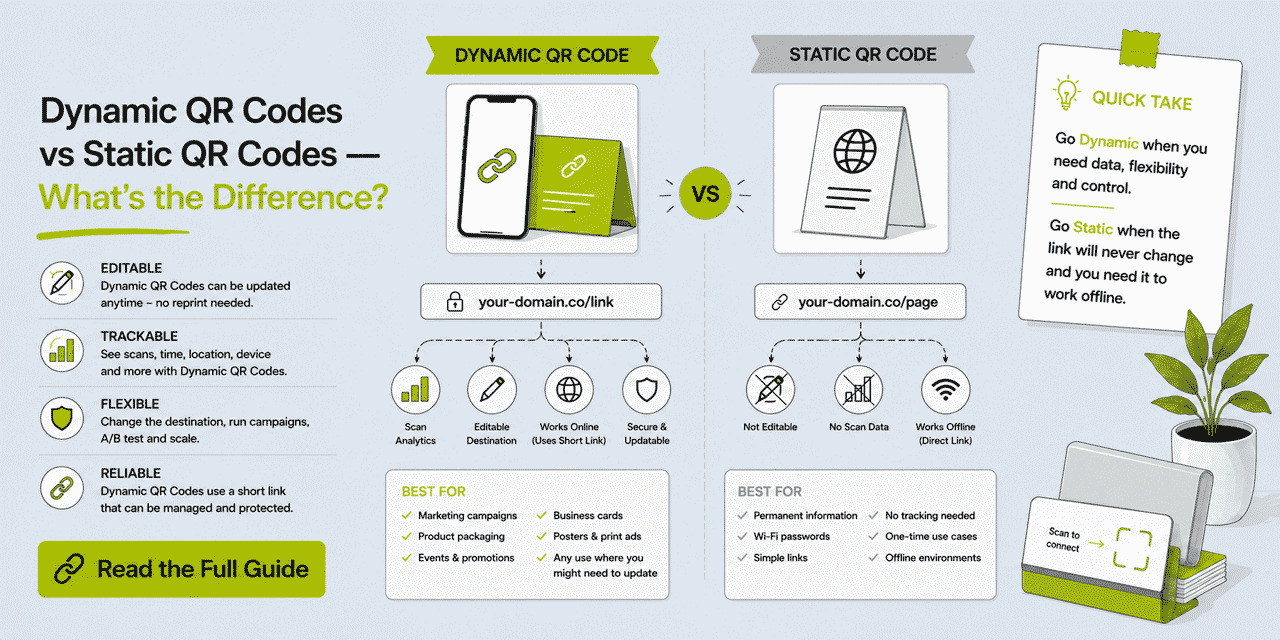
Most people encounter the question of dynamic versus static QR Codes when they are about to print something and someone — a designer, a supplier, a colleague — asks which type they want. The question sounds technical but the answer is practical: the two types behave differently in ways that matter significantly for anyone using QR Codes in professional or marketing contexts. A static QR Code links to a fixed destination that can never be changed and generates no analytics data. A dynamic QR Code links through a short link redirect, which means the destination can be updated at any time and every scan is tracked automatically. Understanding the full implications of this difference — for print production, for campaign measurement, for long-lived materials, for cost — is what this guide covers.
What This Guide Covers
- How a static QR Code works — technically and practically
- How a dynamic QR Code works — technically and practically
- The complete side-by-side comparison across every relevant dimension
- Matrix density: why dynamic QR Codes scan more reliably at small sizes
- The editability advantage: what it means in practice across different use cases
- The tracking advantage: what data dynamic QR Codes generate and how to use it
- Cost comparison: what dynamic QR Codes actually require
- When static QR Codes are genuinely appropriate
- When dynamic QR Codes are required — and the cases where static codes fail
- Specific use case decisions: business cards, packaging, menus, events, retail, digital
- Common misconceptions about both types
- How to create dynamic QR Codes with Cuttly
How a Static QR Code Works
A static QR Code encodes data directly in the QR matrix — the pattern of black modules on a white background that a camera reads and decodes. For a URL-based static QR Code, the full destination URL — every character, including the protocol, domain, path, and any query parameters — is encoded character-by-character into the matrix structure. The number of modules in the matrix, and therefore the visual density of the code, is determined by the length and complexity of the encoded data.
When someone scans a static QR Code, their device's camera decodes the matrix, extracts the URL string, and navigates to it directly. There is no intermediate server, no redirect, no database lookup. The destination URL is extracted entirely from the physical QR Code. The code functions entirely independently of any external service — which is why a static QR Code encoding WiFi credentials or plain text can work without an internet connection.
The consequence of this architecture is absolute permanence. The data in a static QR Code is fixed at the moment of creation, encoded into the physical or digital pattern, and cannot be altered after the fact. If the destination URL changes — or if the QR Code is printed and subsequently the destination needs to be updated — the only options are to create a new QR Code and reprint every material containing the old one, or to redirect the original URL at the server level (which requires technical access to the domain and is not always possible).
There is also no mechanism for tracking. A static QR Code does not pass through any monitoring infrastructure. When a user scans and navigates to the destination, the QR Code itself is not involved in the transaction — the device goes directly to the URL. The only way to measure traffic from a static QR Code is through web analytics on the destination page (GA4, for example), and even then you cannot distinguish static QR Code scans from any other source that arrives at the destination without referrer data.
How a Dynamic QR Code Works
A dynamic QR Code encodes a short link URL rather than the final destination URL. The short link — something like cutt.ly/your-alias or go.yourbrand.com/alias — is a brief, stable URL managed by a link management platform. The matrix encoded in the QR Code contains only this short link, not the actual destination.
When someone scans a dynamic QR Code, their device's camera decodes the matrix, extracts the short link URL, and makes a request to the link management platform. The platform — Cuttly URL Shortener, in this context — receives the request, records the scan event with its associated metadata (timestamp, device type, operating system, geographic location, referrer), and returns a redirect response pointing to the actual destination URL. The user's device follows the redirect and arrives at the destination. The entire process takes milliseconds.
The destination URL is stored in Cuttly's database, associated with the short link. It is not encoded in the QR Code matrix. This separation between the QR Code (which encodes only the short link) and the destination (which is stored in the platform) is the architectural basis of both the editability and tracking capabilities. The QR Code pattern can remain permanently unchanged while the destination behind it changes as often as needed.
Updating the destination of a dynamic QR Code is straightforward: log in to Cuttly, find the short link associated with the QR Code, edit the destination URL, and save. The change takes effect immediately. Every QR Code in existence — printed or digital — that encodes that short link now redirects to the new destination. No physical intervention, no reprinting, no delay.
The Complete Side-by-Side Comparison
| Dimension | Static QR Code | Dynamic QR Code |
|---|---|---|
| What is encoded in the matrix | The full destination URL (or other data) | A short link URL (redirect pointer) |
| Destination editable after creation | No — permanently fixed | Yes — update in Cuttly at any time |
| Destination editable after printing | No | Yes — all printed copies update simultaneously |
| Scan tracking | None | Full — every scan recorded automatically |
| Analytics data captured | None from the QR Code itself | Date, time, device, OS, location, unique vs total |
| Matrix density for long URLs | Increases with URL length — denser, harder to scan | Consistent — short link is always brief regardless of destination |
| Scannability at small print sizes | Reduces for long URLs — modules become very small | Better — less dense matrix, larger modules |
| Requires internet connection (URL use) | Yes | Yes |
| Works offline (non-URL data) | Yes — WiFi credentials, vCard, plain text | No — redirect requires server connectivity |
| Requires link management platform | No | Yes (Cuttly — free plan available) |
| Cost difference | None for basic QR generation | Free for basic; $25/month for full customization |
| Logo overlay possible | Yes (with H error correction) | Yes (with H error correction — Single plan+) |
| SVG export for print | Depends on generator used | Available from Single plan ($25/month) |
| Global style presets | N/A | Available from Single plan |
| Suitable for business cards | Only if URL will never change — rarely the case | Yes — standard professional choice |
| Suitable for product packaging | High risk for any run over 3 months | Yes — industry standard for professional packaging |
| Suitable for menus | Only if menu URL is permanently stable | Yes — destination updatable without reprinting |
| Suitable for WiFi access | Yes — credentials encoded directly, no internet needed | Not applicable — WiFi QR Codes don't use URL redirects |
| Suitable for vCard contact data | Yes — contact data encoded directly | Can link to a digital vCard URL instead |
Matrix Density: Why Dynamic QR Codes Scan Better at Small Sizes
This is a dimension of the comparison that is less commonly discussed but practically significant for anyone printing QR Codes at small sizes — on business cards, product labels, small packaging surfaces, or tickets.
A QR Code matrix is a grid of black and white modules (the small squares). The grid size is determined by the QR Code version, which is determined by the amount of data being encoded. More data requires a higher QR version, which means a larger grid (more modules), which at a fixed print size means each individual module is smaller.
For a static QR Code encoding a long URL — say, a 120-character destination URL with UTM parameters — this produces a high-version, dense matrix. At 2 cm × 2 cm print size, the individual modules may be as small as 0.3 mm. This is at the threshold of reliable scanning for mainstream smartphone cameras and becomes unreliable in suboptimal lighting or with lower-quality camera sensors.
A dynamic QR Code encoding a Cuttly short link URL — typically 20 to 35 characters — encodes far less data. This produces a lower-version, less dense matrix. At the same 2 cm × 2 cm print size, the individual modules are significantly larger — perhaps 0.5 to 0.7 mm — which scans reliably on every mainstream smartphone camera under a wide range of lighting conditions.
The practical implication: for QR Codes that will be printed at small sizes, dynamic codes are more reliably scannable than static codes encoding typical marketing URLs. This is particularly relevant for business cards (where space is constrained), product labels (where the QR Code area may be small), and ticket stubs or event badges (where tiny formats are common).
The difference narrows for long URLs with dynamic codes when error correction level H is used — H adds redundancy modules to the matrix, increasing density. But even at H level, a dynamic QR Code encoding a 25-character short link is significantly less dense than a static code encoding a 100-character URL with H error correction.
The Editability Advantage: What It Means in Practice
The ability to change the destination of a QR Code after printing is not an abstract technical feature — it has concrete implications across every use case where QR Codes appear on long-lived physical materials. Here is what editability actually means for each major application.
Business Cards
A batch of 500 business cards printed in 2026 might be distributed over 18 to 24 months. In that period, the professional who ordered the cards might change their booking platform (many people move from Calendly to an alternative), move their website to a new domain, update their LinkedIn profile URL (LinkedIn occasionally changes these), or decide to change the QR Code destination entirely — perhaps from a single LinkedIn profile to a Link in Bio page that aggregates multiple destinations.
With a dynamic QR Code, any one of these changes is handled by a single Cuttly dashboard edit. Every card in every wallet, conference bag, and drawer updates simultaneously. With a static QR Code, the first URL change renders the entire remaining card inventory functionally useless.
Product Packaging
As covered in the companion guide on packaging QR Codes, a packaging print run of 50,000 to 500,000 units may have a 18 to 30 month lifecycle from print approval to last unit sold. Video hosting URLs change. Product pages are restructured. Compliance documents are updated. Loyalty platform URLs change when platforms are migrated. A static QR Code on packaging has a significant probability of breaking during this period.
With a dynamic QR Code, any destination change is a single Cuttly edit. The packaging continues to work. No customer encounters a dead link. No reprint is required. The brand maintains continuous engagement capability through the entire print run's lifecycle.
Restaurant Menus
QR Code menus became standard in many restaurant and café environments following pandemic-era contactless adoption, and they have remained popular for digital menu access. A static QR Code on a printed menu tent or laminated table card links to a fixed menu URL. If the menu URL changes — and menu systems change when restaurants switch platforms, update CMS structures, or seasonally refresh their digital menus — the printed QR Code breaks.
With a dynamic QR Code, the destination can be updated to the new menu URL without replacing any printed material. The QR Code on the table card points to a short link; the short link redirects to the current menu. Update the menu URL in Cuttly and every table in the venue — and every menu in the stockroom — now links to the correct destination.
Event and Conference Materials
QR Codes on conference badges, event programmes, and speaker slide decks link to session materials, networking apps, sponsor pages, or post-event feedback surveys. These destinations are by definition time-limited — the session page is relevant during the event, the feedback survey is relevant immediately after, the recording link becomes relevant days later when the video is processed and uploaded.
With a static QR Code, the badge or programme links to one destination for the entire event and beyond — whatever was live at print approval. With a dynamic QR Code, the destination can be updated before the event (from a preview page to the live session), during the event (from the session page to the live Q&A form), and after (from the survey to the recording link). One physical QR Code, three different destinations across the event lifecycle, zero reprinting.
Retail Signage and POS Materials
Point-of-sale displays, shelf wobblers, window posters, and retail signage often contain QR Codes linking to promotional content. Promotions change weekly or monthly. Print materials like shelf wobblers and window posters have a longer print run lifecycle than the promotions they are designed to support.
With dynamic QR Codes on printed retail materials, the physical signs can be designed as evergreen assets — repositioned across campaigns — while the destination behind the QR Code is updated to each new promotion. A "Scan for this week's offer" QR Code on a permanent shelf wobbler updates to a new offer destination every week through a single Cuttly edit. The physical material stays in place; the content it links to is always current.
Print Advertising in Publications
Magazine and newspaper advertisements may run across multiple print runs over weeks or months. A QR Code in a print advertisement linking to a campaign-specific landing page will outlive the campaign's active phase — back issues are read for months after publication, and reprints or digital archiving may extend the lifespan further. A static QR Code that links to an expired campaign page is a poor experience for anyone who scans the ad after the campaign ends.
With a dynamic QR Code, the destination can be updated when the campaign ends — redirecting to the brand's main page, a newer offer, or a relevant product page — rather than leaving the advertisement permanently linking to an expired destination.
The Tracking Advantage: What Data Dynamic QR Codes Generate
Static QR Codes generate no scan data. Once printed and distributed, a static QR Code is invisible to any analytics infrastructure — there is no way to count how many times it was scanned, on what device, in what location, or at what time. The only visible evidence of a scan is an anonymous session in the destination page's web analytics, if the destination has analytics installed, and even then you cannot distinguish QR Code scans from any other traffic source without specific UTM parameters.
Dynamic QR Codes generate automatic, comprehensive scan analytics through the link management platform. Every scan of a Cuttly dynamic QR Code is recorded without any additional setup, tag, or integration. The analytics available per QR Code are:
Total and Unique Scan Counts
Total scans is the raw count of every request made to the short link encoded in the QR Code. Unique scans is a deduplicated count — multiple scans from the same device within a session window are counted once. For most QR Code use cases, unique scans is the more meaningful metric because it approximates the number of distinct individuals who scanned the code.
The ratio of total to unique scans is informative. A high ratio (many total scans, few unique) may indicate that a small number of users are scanning repeatedly — perhaps because the destination takes too long to load and they are attempting multiple times, or because the destination offers content that users return to repeatedly. A low ratio (total and unique counts close together) indicates each scanner is typically scanning once.
Geographic Location — Country and City
Cuttly records the country and city of each scan based on IP geolocation. For physical marketing materials distributed in a defined geographic area, this data confirms whether the distribution is reaching the intended audience. A QR Code on flyers distributed in London generating scans predominantly from London confirms effective local distribution. A QR Code on product packaging generating unexpected scan clusters from a specific city may indicate a retail partner in that city is driving unusually strong product engagement.
Geographic data is particularly valuable for multi-location businesses — retail chains, franchise operations, multi-site hospitality businesses — where QR Code scan patterns by location reveal which venues are generating the most digital engagement from physical materials. This data supports decisions about where to invest in additional QR Code-driven campaigns.
Device Type and Operating System
For QR Code scans, device type is almost exclusively mobile — desktop QR Code scans are rare to non-existent in most marketing contexts. The meaningful distinction within the mobile category is operating system: iOS versus Android. This split reflects the device preferences of your audience and is directly relevant if the QR Code destination includes app download links, mobile payment integrations, or any feature with platform-specific behavior.
A QR Code on product packaging with a 75% iOS scan rate tells you that the product's customer base skews heavily toward Apple device users — relevant context for mobile app development priority, Apple Pay integration decisions, and iOS-specific content formatting.
Time Patterns — Day of Week and Hour of Day
The distribution of scans across days of the week and hours of the day reveals when your audience is engaging with physical materials. A restaurant menu QR Code that generates scans predominantly on Friday and Saturday evenings between 7 PM and 9 PM confirms that your core scanning audience is weekend evening diners — which should inform when digital menu updates are most critical.
A business card QR Code that generates scans predominantly between 9 AM and 11 AM on weekdays reflects the follow-up behavior of professional contacts who review their card haul from the previous day's networking at the start of the next working day. This pattern, once identified, can inform the timing of follow-up email sends — reaching the prospect at the same high-intent time window.
How to Use QR Code Analytics in Practice
The operational value of QR Code analytics depends on what questions you are asking. Here are the most practical analytical applications across different QR Code use cases.
Measuring campaign effectiveness. A flyer campaign with a QR Code distributed to 5,000 households generates 200 unique scans — a 4% response rate. Compared to a previous campaign with 150 unique scans (3% response rate), the current campaign's creative or offer is performing better. This benchmark is only possible with scan tracking.
Comparing placement performance across materials. If you have the same QR Code on both a window poster and an in-store shelf talker, create separate short links and QR Codes for each placement. Comparing scan volume between the two reveals which placement is more effective — data that directly informs where to invest in future print production.
Identifying which retail locations are most engaged. A brand distributing product to 20 retail locations can create a separate QR Code per location (all linking to the same destination). Geographic scan data then reveals which locations' customers are most actively engaging with the product's QR Code — a proxy for customer engagement intensity per retail partner.
Validating distribution reach. Print materials with a QR Code generate zero scans in a specific city despite distribution records showing materials were delivered there. The scan data absence suggests the materials were not effectively displayed or the distribution was incomplete — an early signal to investigate before the campaign window closes.
Cost: What Dynamic QR Codes Actually Require
The most common misconception about dynamic QR Codes is that they are significantly more expensive than static ones. This conflates two separate costs: the cost of generating the QR Code (which is trivial in both cases) and the cost of the link management infrastructure that makes the dynamic code function (which is modest and often free).
Generating a QR Code — static or dynamic — costs nothing with most tools. The cost of a dynamic QR Code is the cost of a Cuttly account that keeps the short link redirect active. Cuttly's free plan generates dynamic, tracked QR Codes for every short link at no cost — no credit card required. A professional with 30 or fewer links per month and basic QR needs pays nothing.
The Single plan at $25/month is where full QR customization (brand colors, logo overlay, dots style, corner style, SVG export) and extended analytics history (1 year) become available. For businesses printing branded QR Codes for professional use — business cards, product packaging, store signage — $25/month for the full capability set is a marginal cost relative to the print production budget those materials represent.
The cost comparison should also account for the cost of reprinting caused by broken static QR Codes. A single reprint of business cards because a static QR Code's destination changed typically costs more than several months of a Cuttly Single plan subscription. A packaging reprint triggered by a broken static QR Code at commercial scale costs orders of magnitude more. When the total cost of ownership — including the risk-adjusted reprint cost — is considered, dynamic QR Codes are less expensive than static ones for any professional use case.
When Static QR Codes Are Genuinely Appropriate
The argument for dynamic QR Codes in URL-based marketing contexts is comprehensive. But there are genuine use cases where static QR Codes are not just acceptable but preferable.
WiFi Network Access
A QR Code that encodes WiFi credentials directly — SSID, password, encryption type — in the QR matrix using the WiFi QR format allows anyone to connect to a network by scanning without typing a password. This data is not URL-based; it is interpreted directly by the device's WiFi manager. It does not require an internet connection to work. A static QR Code for WiFi access in a café, office, or event venue is the correct format, provided the WiFi password does not change. If the password changes regularly (as it does in some security-conscious environments), a dynamic QR Code linking to a page that displays the current WiFi password is more practical.
vCard Contact Information Encoded Directly
A QR Code that encodes vCard data directly — name, phone, email, address in the vCard format — allows anyone to add the contact to their phone by scanning, without any internet connection or redirect. For professionals who specifically want an offline-compatible contact exchange mechanism, a static vCard QR Code is appropriate — provided the contact information is stable and will not change during the QR Code's use period.
For most professionals, linking to a digital contact page via a dynamic QR Code is more flexible — it can include a photo, a title, links to social profiles, and other content that a vCard format cannot accommodate, and the destination can be updated if contact information changes. But for specific offline-first use cases (events with poor connectivity, contexts where simplicity of the contact transfer mechanism is paramount), the static vCard approach has legitimate utility.
Plain Text and One-Time Use Cases
A QR Code encoding a short plain text message — a discount code, a product serial number, a one-time access code — where the data is permanent, the use case is one-time or very limited, and tracking is not needed, is appropriately handled with a static QR Code. These are niche cases in marketing contexts, but they exist.
Very Short Print Runs with No Reprinting Risk
A QR Code on a handful of prototype samples, a small run of test materials, or a single-event use case where the materials will be discarded immediately after the event and the destination URL is guaranteed to remain stable throughout — in these specific, limited circumstances, a static QR Code is acceptable because the risk of the destination changing before the materials are exhausted is negligible. This describes a narrow set of scenarios; most professional print applications do not meet all three conditions simultaneously.
When Dynamic QR Codes Are Required — and When Static Codes Fail
The following situations represent cases where static QR Codes have a significant probability of failure and dynamic QR Codes are the appropriate choice.
Any URL-based QR Code on print materials with a lifecycle exceeding 3 months. In 3 months, the probability of the destination URL changing is low but non-negligible. Beyond 6 months, it is a meaningful risk. Beyond 12 months, it is a near-certainty for most businesses undergoing any digital change — new website, new booking system, new menu platform, new campaign structure.
Product packaging with commercial print runs. The lifecycle, scale, and irreversibility arguments for packaging make static QR Codes operationally inappropriate for any professional packaging application. See the dedicated packaging guide for the full case.
Any QR Code for which scan analytics are needed. If you need to know whether anyone is scanning the code — and most marketing applications benefit from this knowledge — static is not an option. Scan tracking requires dynamic QR Codes.
QR Codes on materials that will be reprinted on different occasions. If you reprint your business cards, flyers, or menus at any future date, a dynamic QR Code means the new print run uses the same QR Code design. A static QR Code might need to be regenerated if the destination has changed. The dynamic approach is the more maintainable choice for materials with recurring print runs.
Any QR Code that might need to link to different content at different times. A trade show badge QR Code that needs to link to a pre-event networking profile, then to a session schedule during the event, then to post-event materials — this is only possible with a dynamic QR Code. The physical badge remains unchanged; the destination evolves with the event.
Common Misconceptions
"Dynamic QR Codes scan slower because of the redirect." The redirect added by a dynamic QR Code takes milliseconds — typically under 100ms for a Cuttly redirect from a nearby server. This is imperceptible to the user. The loading time of the destination page after the redirect is identical whether the user arrived via a static or dynamic QR Code. The perceived "slowness" of any QR Code scan is almost always the destination page load time, not the redirect.
"Static QR Codes are more reliable because they don't depend on an external server." The server dependency of a dynamic QR Code is real — if the link management platform is unavailable, the redirect fails. For a well-maintained platform like Cuttly, uptime is high and outages are rare. But more practically: a static QR Code that encodes a URL is also dependent on a server — the destination website's server. If that server is down, the user gets an error regardless of QR Code type. The platform server and the destination server are separate dependencies for dynamic codes; for static codes, only the destination server matters. For normal marketing use cases, the platform dependency difference is not operationally significant.
"You can just use a URL redirect on your own domain to get the same benefit as a dynamic QR Code without a platform." This is technically true — if you encode yourwebsite.com/qr in a static QR Code and configure a server-side redirect at that URL, you can update the redirect destination. But this requires server access, technical knowledge, and that your website and server remain operational for the QR Code's entire use period. For most marketers and small businesses, this is not a practical solution. A dynamic QR Code platform like Cuttly provides the same redirect management through a dashboard interface, with analytics, at a cost far lower than maintaining custom server redirect infrastructure.
"All QR Code generators produce dynamic QR Codes." Not true. Many free, browser-based QR Code generators produce only static codes. The generator does not disclose this — it simply creates a QR Code from the URL you provide, encoding that URL directly in the matrix. The resulting code is static. Only generators connected to a link management platform — like Cuttly's QR Code generator — produce dynamic codes. Check whether the generator creates a short link redirect or encodes your URL directly.
How to Create Dynamic QR Codes with Cuttly
Every short link created in Cuttly automatically generates a dynamic QR Code. The process: create a short link for your destination URL in the dashboard, open the QR Code editor for that link, configure the appearance, and download.
On the free plan (no credit card required), the QR Code is generated in a standard style and available in PNG, JPG, and WEBP formats. This is a fully functional dynamic QR Code — tracked, updatable, usable in any context. Register at cutt.ly to start immediately.
On the Single plan ($25/month), full customization is available: six dot styles (Square, Dots, Rounded, Extra Rounded, Classy, Classy Rounded), custom dot color, four corner square styles, three corner dot styles, custom corner colors, custom background color, logo/image overlay with size and margin control, custom width, quality level selection (L/M/Q/H), and SVG export for professional print production.
Global QR Code Settings (Single plan and above) allow you to set a default visual configuration — your brand colors, preferred dot style, logo — that applies automatically to every new QR Code generated in your account. For brands creating many QR Codes across a product line or marketing campaign, this eliminates repetitive manual configuration and ensures visual consistency across every code.
Team-level QR Code Settings (Team plan) allow separate default configurations per workspace — enabling agencies or brands managing multiple sub-brands to maintain distinct QR Code visual styles per brand without interfering with each other's configurations.
After configuration, the QR Code preview updates in real time in the editor — changes to dot style, color, or logo are visible immediately. Download the finalized code in SVG for print production or PNG/JPG/WEBP for digital use. The QR Code is immediately active — every scan is tracked from the moment of creation.
Frequently Asked Questions
What is the difference between a dynamic and static QR Code?
A static QR Code encodes the destination URL directly and permanently in the QR matrix — cannot be changed, no tracking. A dynamic QR Code encodes a short link URL instead. The destination is stored in a link management platform (Cuttly), can be updated at any time without changing the QR Code, and every scan is automatically tracked with analytics data.
Can I change the destination of a QR Code after printing?
Yes — if it is a dynamic QR Code. Update the short link destination in Cuttly and every printed copy immediately redirects to the new URL. No reprinting. Not possible with static QR Codes — the destination is permanently encoded in the matrix.
Do dynamic QR Codes cost more than static ones?
Cuttly's free plan generates tracked, updatable dynamic QR Codes at no cost — no credit card required. The Single plan ($25/month) adds full customization (colors, logo, SVG export). No incremental cost per scan or per code within your plan's link allowance.
Are static QR Codes ever the right choice?
Yes — for non-URL data that is permanent and never needs updating: WiFi credentials, vCard contact information encoded directly, or plain text. For any URL-based destination, dynamic QR Codes are the correct choice.
Which type of QR Code scans more reliably?
Dynamic QR Codes scan more reliably at small print sizes because they encode a short link URL (brief, consistent length), producing a less dense matrix with larger individual modules. Static QR Codes encoding long URLs produce denser matrices that are harder to scan at small sizes and in lower-quality lighting.
What analytics do dynamic QR Codes provide?
Every Cuttly dynamic QR Code scan records: total and unique scan count, date and time, geographic location (country and city), device type, operating system (iOS vs Android), and referrer. Bot filtering is automatic. Analytics history: 30 days on free plan, 1 year on Single ($25/month), 2 years on Team ($99/month).
- Tools
- QR Code Generator →
- URL Shortener →
- Link Analytics →
- Related Guides
- What Is a Dynamic QR Code? →
- QR Codes on Business Cards →
- QR Codes on Product Packaging →
- QR Code Generator Guide →
- QR Code with Logo Guide →
- Track QR Code Scans →
- Offline Attribution Guide →
- Why QR Codes Need a URL Shortener →
- Encyclopedia
- Dynamic QR Codes
- Verticals Hub
- URL Shortener for Every Industry →
- Start Here
- Create Free Account
- Plans & Pricing
URL Shortener
Cuttly simplifies link management by offering a user-friendly URL shortener that includes branded short links. Boost your brand’s growth with short, memorable, and engaging links, while seamlessly managing and tracking your links using Cuttly's versatile platform. Generate branded short links, create customizable QR codes, build link-in-bio pages, and run interactive surveys—all in one place.
Cuttly - Consistently Rated
Among Top URL Shorteners
Cuttly isn’t just another URL shortener. Our platform is trusted and recognized by top industry players like G2 and SaaSworthy. We're proud to be consistently rated as a High Performer in URL Shortening and Link Management, ensuring that our users get reliable, innovative, and high-performing tools.


