How to Use QR Codes on Product Packaging: Complete Brand Guide
Product packaging is among the highest-reach marketing surfaces a brand controls. It reaches every person who purchases the product, at the moment they are most engaged with it — unboxing, first use, reading the label, putting the product to work. A QR Code on that surface converts that engagement into a digital touchpoint: a tutorial video, a warranty registration, a loyalty programme signup, a brand story, an ingredient explainer. The opportunity is real and increasingly expected by consumers who have come to see packaging QR Codes as normal rather than novel.
But the execution determines whether the QR Code on your packaging delivers that value or creates frustration. A QR Code that does not scan reliably under retail lighting is a failure. A static QR Code whose destination URL changed six months into a two-year packaging run is a failure. A QR Code with no call to action, linking to a non-mobile-optimized destination, is a failure. This guide covers the complete execution: destination strategy by product category, the dynamic-versus-static decision and why it matters more for packaging than for any other print medium, design rules specific to packaging materials and finishes, placement and panel selection, the technical setup process, scan tracking and analytics interpretation, multi-SKU management, and regulatory considerations.
All QR Codes in this guide are generated with Cuttly's QR Code generator. Free plan available — no credit card required.
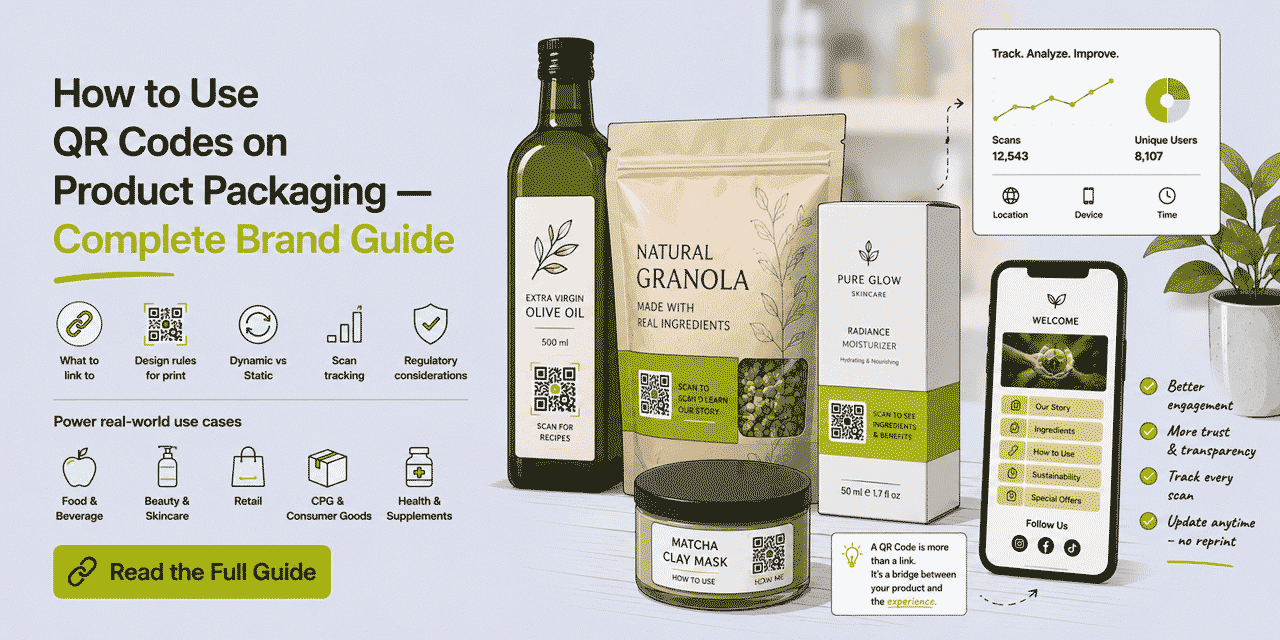
What This Guide Covers
- Why packaging QR Codes are a distinct use case from other print media
- Destination strategy by product category — food, beauty, electronics, health, retail
- Dynamic vs static: the packaging print run problem in full
- Design rules specific to packaging materials, finishes, and lighting environments
- Panel selection and placement strategy
- Call to action and printed URL requirements
- Technical setup: creating branded, tracked packaging QR Codes in Cuttly
- Print production workflow: files, proofing, working with pre-press teams
- Scan tracking: what data you capture and how to use it operationally
- Managing multiple SKUs and regional packaging variants
- Regulatory and disclosure considerations
- Common packaging QR Code failures and how to prevent them
Why Packaging QR Codes Are a Distinct Use Case
A QR Code on a business card, a flyer, or a poster has a short and predictable lifecycle. A print run of a few hundred cards or a few thousand flyers might circulate for weeks to months. The design can be updated relatively easily. The audience encounters the QR Code in controlled contexts — an office, a conference, a targeted distribution area.
Product packaging operates at an entirely different scale and with entirely different constraints. A mid-size consumer brand might print packaging in runs of 50,000 to 500,000 units. The lead time from design approval to product on shelf is typically 3 to 6 months. The product's shelf life — the period between manufacture and the last unit being purchased and opened — may be 12 to 24 months. Add distribution lead time and the total period from print approval to the last QR Code being scanned in the field can be 18 to 30 months or more.
In that timeframe, the destination URL behind a packaging QR Code will almost certainly need to change at some point. Video platforms restructure URLs. Product pages are migrated to new CMS systems. Compliance documents are updated and require new URLs. Loyalty platforms change their registration flow URLs. Seasonal content is refreshed. Any one of these changes, on a static QR Code, means every unit of packaging in every warehouse, in transit, on shelf, in a customer's home, waiting to be used — all of them now link to a broken or outdated destination. The brand has no way to fix this without a new packaging run.
The consumer context also sets packaging apart. A person scanning a QR Code on a product they have just purchased is in a specific mental state: high engagement, post-purchase justification mode, looking for reassurance and enrichment that they made a good choice. The content behind the QR Code does not need to sell — the sale has already happened. It needs to deliver immediate, specific value that matches what the call to action promised. Tutorial videos, extended ingredient information, recipe ideas, usage tips, and warranty registration are the content types that match this psychological moment. Generic homepage content, promotional material for other products, or social media profiles are mismatches that produce low scan-to-engagement rates and erode rather than build post-purchase brand satisfaction.
Destination Strategy by Product Category
The destination is the most critical decision — everything else in packaging QR Code execution is in service of getting the right person to the right content at the right moment. Here is the strategic framework by product category, with specific destination recommendations for each.
Food and Drink
The primary value drivers for food and drink packaging QR Codes fall into two categories: regulatory compliance content and engagement content. Regulatory content includes full nutritional information (particularly for products where pack space constrains the printed label), complete allergen declarations, country-of-origin information, and product traceability data where required or expected. Engagement content includes recipes, serving suggestions, producer stories, sourcing information, and sustainability data.
The highest-performing destination for food packaging is a dedicated recipe or usage page — one that is specific to the product variant, not generic. A QR Code on a specific olive oil that links to a recipe page designed for that oil — not all olive oils in the range — delivers a more relevant, more satisfying scan experience than a generic brand recipe hub. If resources allow, create per-SKU destination pages. If not, use a dynamic QR Code so the destination can be updated to seasonal or campaign-relevant content without reprinting.
For drinks: QR Codes linking to cocktail and mocktail recipes, serving temperature guidance, pairing recommendations, and sourcing stories are consistently high-engagement destinations. For premium products where provenance is a selling point — single-origin coffee, craft spirits, artisan cheese — the QR Code destination is part of the product's premium narrative. It should look and feel premium, load fast, and be visually consistent with the packaging aesthetic.
Regulatory note: in several markets, extended digital labeling via QR Code has specific rules about what information must remain on-pack versus what can be accessed digitally. In the EU, for example, digital labeling regulations for certain food categories have been evolving. Always confirm current requirements with a regulatory advisor before relying on a QR Code destination for mandatory compliance information.
Beauty and Personal Care
Tutorial and technique content is the highest-engagement destination for beauty packaging QR Codes across all product types. A foundation QR Code linking to a video tutorial showing multiple application techniques for different skin types — filmed in consistent brand aesthetic — delivers immediate post-purchase value and reduces product dissatisfaction from incorrect use. A skincare QR Code linking to a routine builder or ingredient explainer keeps the customer engaged with the brand beyond the transaction.
Full ingredient lists — with INCI names translated into comprehensible language, and with information about what each ingredient does — have become expected by the beauty consumer segment that actively reads ingredients. A QR Code destination that provides this in a clean, readable mobile format with links to source references builds brand credibility.
For cosmetics, the additional destination that consistently drives loyalty programme enrollments is a personalization tool — a shade finder, skin type quiz, or routine recommender — accessible via the packaging QR Code. The customer who has just purchased the product is the highest-intent audience for this type of tool; they are actively engaged with the brand and looking for guidance.
Electronics and Hardware
Setup and installation guides are the primary destination for electronics packaging QR Codes. A QR Code on the product box linking to a video or interactive setup guide replaces or supplements the printed quick start card, which is constrained by size and cannot include video, animations, or interactive troubleshooting. Customers who encounter setup difficulty and cannot immediately find help are disproportionately likely to return the product — a QR Code that immediately surfaces a helpful setup resource reduces returns.
Warranty registration via QR Code replaces or supplements the printed registration card. A QR Code linking to a streamlined mobile registration form — name, email, product serial number (pre-filled or scanned from packaging) — captures registrations at the highest-intent moment: unboxing. Registration data enables product recall communication, warranty claim processing, and post-purchase lifecycle marketing.
Product support links — FAQs, troubleshooting guides, firmware update pages, compatibility information — are high-value secondary destinations. A QR Code on the product itself (not just the box) or on the included documentation that links to the support hub reduces support ticket volume and improves the customer service experience.
Health and Wellness
For supplements, vitamins, and health products: a QR Code destination providing detailed usage guidance, ingredient sourcing information, scientific references (where applicable and accurate), and complementary product recommendations serves the audience that purchases health products with research intent. This audience specifically looks for detailed information that packaging space cannot contain.
For fitness equipment and sports nutrition: a QR Code linking to a workout programme, training guide, or nutrition protocol that integrates the specific product creates a value-added post-purchase experience. The customer feels they have purchased not just a product but access to expertise. This destination type drives social sharing and referral — customers share the guide content, and the QR Code association with the packaging creates organic awareness.
Regulatory consideration: for health products in regulated categories (supplements, medical devices, foods with health claims), the content accessible via packaging QR Code may need to comply with the same regulations as the printed label content in certain markets. Consult a regulatory advisor before using a QR Code destination for any health claim content.
Fashion and Apparel
Care instructions via QR Code replace or extend printed wash care labels — particularly useful for complex garments where the full care instruction set cannot fit on a standard label, or where care instructions in multiple languages would make the label impractically large. A QR Code linking to multilingual care instructions, fabric composition data, and garment-specific storage guidance reduces garment damage and associated customer returns.
Sustainability and supply chain transparency are increasingly expected by fashion consumers. A QR Code destination showing the garment's supply chain — country of origin, factory name, material sourcing, environmental certification — builds brand trust in a category where transparency claims are frequently skeptical. The destination content must be specific and verifiable, not generic sustainability marketing copy.
Style and outfit inspiration: a QR Code linking to curated styling content featuring the specific product generates post-purchase engagement and reduces the return rate driven by "I don't know how to wear this" regret. The destination should be product-specific, not a generic lookbook.
Retail and Consumer Goods (General)
Loyalty programme enrollment — a QR Code linking directly to a streamlined mobile enrollment form — captures loyalty signups at the highest-intent moment (first purchase, product in hand). The enrollment form should require minimum friction: name, email, optionally phone. Avoid requiring the customer to download an app as a prerequisite for enrollment; browser-based enrollment via the QR Code destination should always be the primary path.
Google Review requests — a QR Code linking to the brand's Google Business Profile review submission page — captures reviews from verified purchasers at the moment of first use, when satisfaction or dissatisfaction is clearest. For brands selling through retail channels where direct post-purchase communication is limited, packaging is often the most reliable touchpoint for review generation.
Dynamic vs Static: The Packaging Print Run Problem in Full
The distinction between dynamic and static QR Codes matters more for product packaging than for any other print application. The packaging print run problem has three dimensions: timeline, scale, and irreversibility.
Timeline. A packaging run approved in January 2026 may still be in active use in late 2027 or 2028. A destination URL that was live and correct in January 2026 has a meaningful probability of having changed — through website restructuring, platform migration, campaign refresh, or regulatory update — at some point during that 18 to 30 month period. Any URL change on a static QR Code breaks every unit in the run, with no recovery option short of a new print run.
Scale. A print run of 100,000 units with a broken static QR Code represents 100,000 potential customer engagements that return a broken link or a wrong destination. At any non-trivial scan rate — even 1% scan rate produces 1,000 failed experiences — this represents measurable brand damage. With a dynamic QR Code, one update in Cuttly repairs all 100,000 units simultaneously.
Irreversibility. Once a static QR Code is printed on packaging, it cannot be changed. The only options when a static destination URL breaks are: notify customers via other channels that the QR Code is broken (negative brand impression), attempt to preserve the original URL and redirect it via server-side rules (requires technical access to the original domain and URL structure), or absorb the loss and plan dynamic QR Codes for the next print run. None of these are good outcomes. Dynamic QR Codes make the problem non-existent.
A dynamic QR Code (generated by Cuttly) encodes a short link URL — typically a Cuttly branded domain alias like go.yourbrand.com/product-name or a cutt.ly alias. The short link URL is permanent and stable — it is the data encoded in the QR matrix, and it never changes. The destination that the short link redirects to is stored in Cuttly's database and updated through the dashboard as many times as needed. Every update propagates instantly to every printed unit in every location.
The operational workflow with dynamic QR Codes: the packaging designer is supplied with the QR Code SVG at the time of design (based on a short link that already exists in Cuttly), the destination URL is confirmed at that stage, and the QR Code is printed. If the destination URL needs to change at any future point — during the print run's active life — the update is made in Cuttly, not in the packaging design. No design change, no print production process, no lead time, no cost.
Design Rules Specific to Packaging
Packaging design involves constraints that do not apply to flat-sheet print media — surface curvature, material finish, lighting environment in retail settings, and the physical interaction of the product with scanners during normal handling. Each of these requires specific design decisions that go beyond the standard QR Code design guidance for flat print.
Size Rules by Scanning Distance
The fundamental sizing rule for QR Codes is that the minimum reliable scanning distance is approximately 10 times the width of the QR Code. A 2 cm QR Code scans reliably up to approximately 20 cm; a 3 cm code scans reliably up to approximately 30 cm; a 5 cm code up to approximately 50 cm.
Apply this rule to each packaging surface by considering the expected scanning scenario. A small cosmetic tube held in the hand while reading the back panel: the phone is 15 to 20 cm from the packaging. A minimum 2 cm QR Code is sufficient. A cereal box on a kitchen counter, scanned while standing: the phone is 30 to 40 cm from the box. A 3 cm QR Code is the minimum; 3.5 cm provides comfortable margin. A retail shelf-facing panel, scanned from a standing position: 40 to 60 cm scanning distance. 4 cm minimum.
The practical recommendation: err on the larger side. A QR Code that is slightly larger than the minimum is invisible to the consumer (they do not notice that it is 3 cm rather than 2.5 cm), but a QR Code that fails to scan is very visible — it is a negative experience that the consumer consciously notices and associates with the brand. The cost of an extra 0.5 cm of QR Code area on packaging is essentially zero. The cost of a scanning failure is a damaged brand impression.
Surface Finish and QR Code Scanning
Surface finish is the most frequently underestimated design variable in packaging QR Code production. Gloss varnish — the most common packaging finish — creates specular reflection under overhead lighting. In a retail environment with fluorescent overhead lighting, a gloss-varnished QR Code may produce a bright hotspot of reflected light on exactly the area the camera needs to read cleanest. This does not always prevent scanning, but it increases the number of attempts required and fails entirely for older or lower-quality cameras.
Spot UV varnish — a high-gloss lacquer applied to specific design areas for visual emphasis — should never be applied to the QR Code area. Spot UV creates a mirror-like reflective surface that effectively blocks camera-based scanning under any typical lighting condition. This is one of the most common causes of packaging QR Code failure, and it typically occurs when a packaging designer applies spot UV globally across the panel without considering the functional requirements of the QR Code.
Solutions: apply matte varnish specifically over the QR Code area while using gloss elsewhere on the panel. This requires a spot varnish specification in the print production instructions — a matt-over-QR-Code mask. Alternatively, design the QR Code area to avoid the gloss or UV zones entirely, positioning it on a panel that uses a different finish treatment. A third option: use an uncoated or textured stock for the QR Code background area, which diffuses light rather than reflecting it specularly.
Foil and metallic finishes present similar problems. If the QR Code area shares a surface with foil lamination or metallic ink, the reflective properties of those finishes interfere with scanning. The QR Code must be positioned on a non-foil, non-metallic zone with sufficient contrast.
Curved Surfaces
Bottles, tubes, cans, and cylindrical containers present a curved surface that distorts the appearance of a QR Code for a scanner approaching at normal angles. A QR Code printed on a highly curved surface — a slim bottle where 2 cm of the QR Code width spans significant curvature — may fail to scan because the scanner's perspective-correction algorithm cannot compensate for the distortion.
Rules for curved surfaces: use the flattest available panel. On a bottle, this is typically the front or back panel where the label's flat section is largest. Keep the QR Code within the flat zone of the label — not at the edges where the label curves around the container. Increase size: a QR Code on a curved surface should be at least 30% larger than the minimum for flat surfaces to compensate for the perspective distortion in scanning. A code that would be 2.5 cm on a flat surface should be at least 3.5 cm on a moderately curved one.
Color Rules for Packaging
The packaging QR Code does not need to be black on white — it can be brand-colored, and this integration often produces better consumer engagement (branded QR Codes look more intentional and trustworthy than generic black-on-white codes on designed packaging). The constraint is contrast: modules must be significantly darker than the background regardless of color.
A dark brand color (navy, forest green, burgundy, deep charcoal) works well against a white or light brand color background. A mid-weight brand color (medium blue, teal, medium green) may or may not meet the contrast threshold — test before approving. Avoid: low-contrast combinations (yellow dots on white background, light grey dots on any background, pastels on any background), reversed QR Codes (light dots on dark background), and complex gradient backgrounds behind the QR Code area.
The background of the QR Code area does not need to be white — it can be a brand's secondary color or a designated panel color. The requirement is that the dot color is sufficiently darker than the background. A warm off-white or cream background with dark navy dots: excellent. A medium blue background with dark navy dots: poor contrast, likely to fail.
The Quiet Zone on Packaging
The quiet zone — the clear border around the QR Code matrix — is required for scanner orientation. The QR Code standard specifies a minimum quiet zone of 4 module widths on all sides. In practical packaging design terms, this translates to approximately 2 to 4 mm of clear space around the QR Code at typical packaging QR Code sizes.
On packaging, the quiet zone is frequently violated in two ways. First, design elements from the packaging layout — text blocks, product imagery, decorative elements, nutritional panels — are positioned too close to the QR Code. Second, the QR Code is positioned at the edge of a panel where the panel fold or die-cut line falls within the quiet zone.
Both failures can be prevented by specifying the QR Code position and its required clear zone explicitly in the packaging design brief, and by verifying the quiet zone in a physical proof before approving the print run. In the proof review, look specifically at the QR Code with fresh eyes: is there visible, unobstructed clear space on all four sides?
Panel Selection and Placement Strategy
Where on the packaging the QR Code appears is a strategic decision that affects scan rates, brand perception, and the context in which consumers encounter it. The right answer depends on the product category, the packaging format, and the destination content.
Back Panel — The Standard for Most Products
The back panel is the standard location for packaging QR Codes, for the same reason it is standard for business cards: it reserves the front for brand identity and primary product communication, while the back is where consumers expect to find detailed information. Consumers who turn a product over to read the back are already in information-seeking mode — they are the highest-intent scanner audience.
Back panel placement works best when the QR Code is positioned within a visually defined zone — not floating in the middle of a dense nutritional panel, but in a dedicated area with clear space, a call to action, and a printed short URL. Bottom right or bottom left corner of the back panel is the conventional placement. It does not compete for prominence with the product name or primary claims, but it is clearly visible to a consumer reading the label.
Bottom Panel
For products displayed upright on shelves where the back panel is against the shelf backing, or for products with dense back panel content that leaves limited space, the bottom panel is a viable alternative. The consumer interaction with the bottom panel is at a different moment — typically when opening, storing, or disposing of the product — which changes the context of the scan. For loyalty programme enrollments and review requests, the bottom panel can be effective because the scan timing correlates with product completion (the consumer has fully used the product and is now disposing of the packaging). For tutorials and setup guides, the back panel or inside-the-box placement is more appropriate.
Inside the Box or Inside the Lid
For products in folding carton or retail box packaging, the inside of the lid is an underused QR Code location with excellent scan performance. The consumer encounters it at the moment of first opening — when product enthusiasm is highest and motivation to engage with brand content is at its peak. An inside-lid QR Code is protected from retail shelf damage, does not compete with external shelf presence for visual space, and creates a premium unboxing experience moment.
For e-commerce brands where unboxing is a significant consumer ritual — cosmetics, premium food, electronics, subscription boxes — the inside-lid QR Code linking to a "welcome to the brand" experience, a usage tutorial, or an exclusive customer benefit creates a differentiated post-purchase engagement moment that shelf retail cannot replicate.
Product Surface (Not Just Packaging)
For products where the packaging is discarded but the product itself is retained — a refillable canteen, a tool handle, a gym equipment item, a reusable container — printing the QR Code on the product surface rather than (or in addition to) the packaging extends its utility throughout the product's lifetime. A QR Code on a water bottle linking to hydration guides and product care instructions remains useful long after the packaging is gone. This requires the QR Code to be durable (laser etched, embossed, or pad-printed in a resistant ink), and the destination must be genuinely long-lived content.
Call to Action — Mandatory, Not Optional
Every packaging QR Code must be accompanied by a call to action. An unmarked QR Code on packaging is an unexplained symbol. A significant percentage of consumers will not scan a code whose destination is unclear — particularly for products sold to older demographics or in categories where QR Code adoption is still growing. The CTA should be specific: it tells the consumer exactly what they get when they scan.
Effective calls to action for packaging: "Scan for recipe ideas," "Scan for usage tutorial," "Scan to register warranty," "Scan for full ingredients," "Scan to join our loyalty programme," "Scan to find out how this was made." Generic CTAs — "Scan me," "Find out more," "Discover more" — perform measurably worse because they do not tell the consumer whether the content is worth the 3 seconds it takes to scan.
The CTA text should be set at a minimum 7pt print size and in a color that clearly contrasts with the packaging background. If the packaging background is busy or complex in the QR Code area, give both the QR Code and the CTA text a shared background field — a white or light-colored rectangular area that contains the QR Code, the CTA, and the printed URL as a visual unit.
Technical Setup: Creating Packaging QR Codes with Cuttly
The following workflow produces a dynamic, tracked, branded QR Code for a packaging application, export-ready in SVG format for professional print production.
Stage 1: Define the Destination and Create the Content
Before creating the QR Code, the destination content must exist and be accessible at a stable URL. This sounds obvious but is frequently a process bottleneck: the packaging design timeline and the digital content production timeline are often managed by different teams, and the packaging may go to print before the destination URL is confirmed. Build the content creation into the packaging development process as a dependency, not an afterthought.
Verify that the destination URL is mobile-optimized. Every packaging QR Code will be scanned on a mobile phone. The destination page must load in under 3 seconds on a 4G connection, display correctly on a 375px to 430px wide viewport, have tap-friendly interactive elements (buttons with minimum 44px touch targets), and not require pinch-to-zoom for any primary content. Test on both iOS Safari and Android Chrome before approving the destination.
Stage 2: Create the Short Link in Cuttly
In the Cuttly dashboard, go to the URL shortener. Paste the destination URL. Set a descriptive, product-specific alias — not a generic code, but something identifiable in the dashboard when you have QR Codes for multiple products. Use a consistent naming convention: product-name-action (e.g. vanilla-candle-tutorial, serum-a-ingredients, drill-xt200-register). If you have a branded domain connected (go.yourbrand.com), select it here.
Add tags to the short link for organizational purposes: the product line name, the SKU code, the campaign name. Tags enable grouped analytics and make dashboard navigation manageable across a large product portfolio.
Stage 3: Configure the QR Code
Open the QR Code editor. Set Quality to H — always H for packaging, as it provides the maximum error correction margin for print production variations, surface damage, and potential minor quiet zone issues. Set the dots style appropriate to your brand aesthetic. Classy and Rounded styles work well for premium products; Square dots produce a conventional, clean appearance for functional products. Set the dots color to your brand's primary dark color — ensure sufficient contrast against the intended packaging background.
If adding a logo: keep Image size at 0.35 or below for packaging use (slightly more conservative than the 0.4 maximum recommended for business cards, because packaging scanning conditions are less controlled). Set Image margin to 2. After adding the logo, physically print a proof-scale version of the QR Code and scan test before proceeding. Packaging print production is expensive; a scan failure discovered after print approval is costly.
Set Width to 2000px for raster export (for reference purposes) — but always download in SVG for actual packaging production. The SVG scales to any size without quality loss, which is essential for the range of packaging formats a brand may use — a small sachet (2 cm QR Code) and a 2-litre carton (5 cm QR Code) can both use the same SVG file, scaled appropriately in the production artwork.
Stage 4: Establish Global QR Code Settings (Single Plan)
If you have multiple products and packaging variants, Cuttly's Global QR Code Settings (available from the Single plan) eliminate the need to manually configure each code. In account settings under QR Codes Settings, set your brand's standard configuration — dots style, dot color, corner style, corner color, error correction level, logo — as the default. Every new QR Code generated in your account uses this configuration automatically.
This is particularly valuable for brands managing packaging across multiple SKUs with a marketing team rather than a single user: every team member generating a packaging QR Code produces a visually consistent, brand-compliant code without needing to manually configure each one.
Stage 5: Deliver to Pre-Press and Packaging Design
Deliver the SVG file to the packaging designer or pre-press team with clear specifications: final print dimensions (e.g. 30 mm × 30 mm), placement panel and position, quiet zone requirement (4 mm clear space on all sides), and instruction that the QR Code file must not be modified, filtered, scaled differently than specified, or have any effects applied. Deliver also the short URL for the call to action text and any additional text (CTA copy, any instructional text near the QR Code area).
Request a physical proof before approving the full print run. Scan test the proof under three conditions: under overhead fluorescent light (retail environment simulation), in softer ambient light (home environment), and outdoors in daylight. Test with two devices — iOS and Android. If any condition produces a scan failure, identify the cause and resolve it before approving production.
Scan Tracking: What Data You Capture and How to Use It
Every dynamic QR Code in Cuttly generates automatic scan analytics. For product packaging, this data is operationally valuable in ways that go beyond simple vanity metrics — it provides a measurable window into post-purchase consumer behavior that brands otherwise have limited visibility of.
Scan Volume and Rate
Total scan volume, tracked over time, gives you a scan rate when combined with estimated units distributed or sold. A product that has sold 10,000 units and generated 500 QR Code scans has a 5% scan rate. Whether 5% is good or poor depends on the category, the call to action, the destination content, and the placement quality — there is no universal benchmark. What matters is trajectory: is the scan rate increasing or decreasing over successive packaging versions? Is a specific packaging redesign correlating with a scan rate improvement?
Scan volume spikes reveal specific events. A spike coinciding with a product launch indicates the QR Code is engaging first-purchase customers. A spike coinciding with a retail promotion or influencer feature indicates the QR Code on packaging is being shared in content. A flat line with minimal scans indicates the QR Code is not visible, not compelling, or the call to action is not motivating scanning.
Geographic Distribution
For products distributed across multiple markets, geographic scan data shows which regions are generating the most post-purchase digital engagement. A product distributed equally in three markets where 70% of scans come from one market indicates that market's consumers are more digitally engaged with the packaging, or that the QR Code destination is more relevant to that market's consumer needs.
Geographic data also validates distribution reach. If your product is listed in a new retail channel and you see a geographic pattern shift in scan data that correlates with that channel's geographic footprint, it confirms product is reaching and engaging consumers in that area.
Device and OS Split
Packaging QR Code scans will be almost exclusively mobile. The iOS/Android split reflects your consumer base's device preferences. This split is directly relevant if your QR Code destination includes any app-download links, mobile payment integrations, or features with platform-specific behavior. A high iOS scan rate for a loyalty programme QR Code confirms that Apple Pay and iOS-specific features in the loyalty app are relevant and worth prioritizing.
Time and Day Patterns
Day-of-week and hour-of-day scan patterns reveal when consumers are engaging with your product. A food product that generates most scans on weekends at 11am to 1pm (pre-cooking, weekend meal prep time) versus weekday evenings (post-work cooking) provides insight into the consumer context that informs content strategy — recipe content for weekend scanning audiences versus quick weeknight meal content for evening scanners. These patterns become particularly useful when making content update decisions for a long-running packaging QR Code.
Per-SKU Comparison
Creating a separate short link and QR Code per SKU (rather than one shared code across all variants) enables direct comparison of scan performance across the product range. If a premium product variant generates 3x the scan rate of the standard variant despite similar sales volume, the premium customer's post-purchase behavior is meaningfully different — they are more engaged with the brand digitally. This insight should inform content strategy (invest more in destination content quality for the premium tier) and potentially inform packaging redesign decisions (the QR Code placement or CTA on the standard packaging may be underperforming).
Managing Multiple SKUs and Regional Variants
Brands with multiple product variants, size formats, and regional markets face a QR Code management challenge that scales with portfolio size. Without a systematic approach, a portfolio of 40 SKUs across 3 markets produces 120 QR Codes to create, track, and maintain — each potentially with different destinations, different design specifications, and different print run timelines.
Cuttly's organizational features address this at scale. Tags allow every short link to be tagged with the product line name, SKU code, market, and packaging format. The dashboard tag filter then shows all links for a specific product or campaign instantly — a request to update all links for a specific product line's destination can be fulfilled by filtering on that product's tag and updating the relevant links.
Use a naming convention for aliases that makes management clear: [brand]-[product-line]-[variant]-[action]. For example: yourbrand-serum-a-ingredients, yourbrand-serum-b-ingredients, yourbrand-moisturiser-tutorial. This convention makes dashboard identification unambiguous when looking at a list of 40 or 100 short links.
For regional variants: create separate short links per market with market-appropriate destination URLs. A UK product pointing to a UK regulatory compliance page and a US product pointing to a US equivalent are two separate short links — same QR Code visual configuration if packaging graphics are shared, different destinations, separate analytics. The geographic scan data per link then confirms which market is driving which volume.
Common Packaging QR Code Failures and How to Prevent Them
Spot UV varnish over the QR Code. The most common single-cause failure in professionally produced packaging. A spot UV layer creates a mirror-like surface that blocks camera-based scanning. Prevention: specify explicitly in print production instructions that the QR Code area is excluded from spot UV treatment. Verify this on the physical proof by attempting to scan under overhead lighting at a slight angle.
QR Code too small for the scanning distance. A 2 cm QR Code on the shelf-facing panel of a tall product, expected to be scanned from a standing position, will consistently fail. Increase size to match the expected scanning distance. Prevention: calculate the scanning distance for each placement surface and apply the sizing rule before finalizing specifications.
Static QR Code on a long-run packaging format. Any packaging with a print run exceeding a few thousand units or a projected shelf life exceeding 6 months should always use a dynamic QR Code. Prevention: make dynamic QR Codes the default for all packaging — there is no additional cost and the operational flexibility is always valuable.
Destination URL confirmed too late in the production process. The QR Code is created and printed before the destination content is fully built or the URL is stable. The packaging prints with a QR Code that links to an unfinished page or a placeholder URL. Prevention: make destination content production a dependency that must be completed before the QR Code creation stage of the packaging design process.
Quiet zone violated by adjacent design elements. A nutrition panel, a barcode, or a design border element placed too close to the QR Code interferes with scanner orientation. Prevention: specify the quiet zone requirement in the design brief and verify it on the physical proof.
Non-mobile-optimized destination. The destination page requires desktop-scale fonts or interactions, loads slowly on mobile, or requires horizontal scrolling. Prevention: test the destination on mobile specifically, on both iOS and Android, before approving the packaging artwork.
No call to action or generic call to action. An unlabeled or vaguely labeled QR Code on packaging generates significantly fewer scans than a specifically labeled one. Prevention: use a specific CTA that tells the consumer exactly what they get by scanning. Write the CTA before the packaging design is finalized so it is integrated into the design rather than added as an afterthought.
Ready to create your first packaging QR Code? Start with a free Cuttly account — no credit card required. Create a short link for your destination, configure your branded QR Code, and download in SVG for your packaging designer. Registration required; free plan available with no credit card needed.
Frequently Asked Questions
What should a QR Code on product packaging link to?
Best destinations by category: tutorial or how-to video (beauty, electronics, cleaning), extended nutritional or ingredient information (food and drink), warranty registration (hardware, appliances), loyalty programme signup (repeat-purchase products), review requests, or sustainability and brand story content. Use a dynamic QR Code so the destination can be updated without reprinting as content changes over the packaging run's lifecycle.
What is the minimum size for a QR Code on product packaging?
Minimum 2 cm × 2 cm for primary packaging held in hand. For shelf-facing panels: 3 cm × 3 cm. For outer cartons: 4 cm × 4 cm. Sizing rule: QR Code width in cm ÷ 10 = approximate maximum reliable scanning distance in meters. Always use error correction level H when adding a logo overlay.
Can I update a QR Code on packaging without reprinting?
Yes — with a dynamic QR Code. Update the destination in Cuttly and every printed package redirects to the new URL immediately. No reprinting required. This is the critical advantage of dynamic QR Codes for packaging with long print runs and multi-year shelf lifecycles.
Do I need to disclose what a QR Code on packaging links to?
No universal legal requirement, but best practice is always to include a specific CTA: "Scan for tutorial," "Scan for full ingredients," "Scan to register." For regulated products (food, cosmetics, supplements), consult a regulatory advisor — digital labeling has market-specific rules.
How do I track QR Code scans from product packaging?
Every Cuttly dynamic QR Code is automatically tracked — every scan appears in analytics with date, time, location, device, and OS. Create separate short links per SKU for per-variant comparison. Use tags to group and analyze performance across product lines. Analytics history: 30 days on free plan, 1 year on Single ($25/month), 2 years on Team ($99/month).
What finish should I avoid when printing a QR Code on packaging?
Avoid spot UV varnish over the QR Code area — it creates a mirror-like glare that prevents scanning. Gloss varnish reduces scan reliability under overhead retail lighting. Solution: specify matte finish over the QR Code zone specifically, or position the code on a panel that avoids the primary varnish treatment area.
- Tools
- QR Code Generator →
- URL Shortener →
- Link Analytics →
- Related Guides
- QR Codes on Business Cards →
- Dynamic vs Static QR Codes →
- What Is a Dynamic QR Code? →
- QR Code Generator Guide →
- Track QR Code Scans →
- Offline Attribution Guide →
- Encyclopedia
- Dynamic QR Codes
- Branded Links
- Verticals Hub
- URL Shortener for Every Industry →
- Start Here
- Create Free Account
- Plans & Pricing
URL Shortener
Cuttly simplifies link management by offering a user-friendly URL shortener that includes branded short links. Boost your brand’s growth with short, memorable, and engaging links, while seamlessly managing and tracking your links using Cuttly's versatile platform. Generate branded short links, create customizable QR codes, build link-in-bio pages, and run interactive surveys—all in one place.
Cuttly - Consistently Rated
Among Top URL Shorteners
Cuttly isn’t just another URL shortener. Our platform is trusted and recognized by top industry players like G2 and SaaSworthy. We're proud to be consistently rated as a High Performer in URL Shortening and Link Management, ensuring that our users get reliable, innovative, and high-performing tools.


