What Is a Dynamic QR Code? Complete Guide 2026
A dynamic QR Code is the standard for any professional or marketing use of QR Codes in 2026. The term refers to a specific technical architecture — a QR Code that works through a short link redirect rather than encoding the destination URL directly — that produces two capabilities that static QR Codes cannot provide: the destination can be edited at any time after printing, and every scan is automatically tracked with analytics data. This guide explains the full picture: the exact definition, the technical mechanism in detail, the editability advantage across specific use cases, the analytics data captured by every scan, the customization options available, how to create one for free, and the complete answers to every common question about dynamic QR Codes.
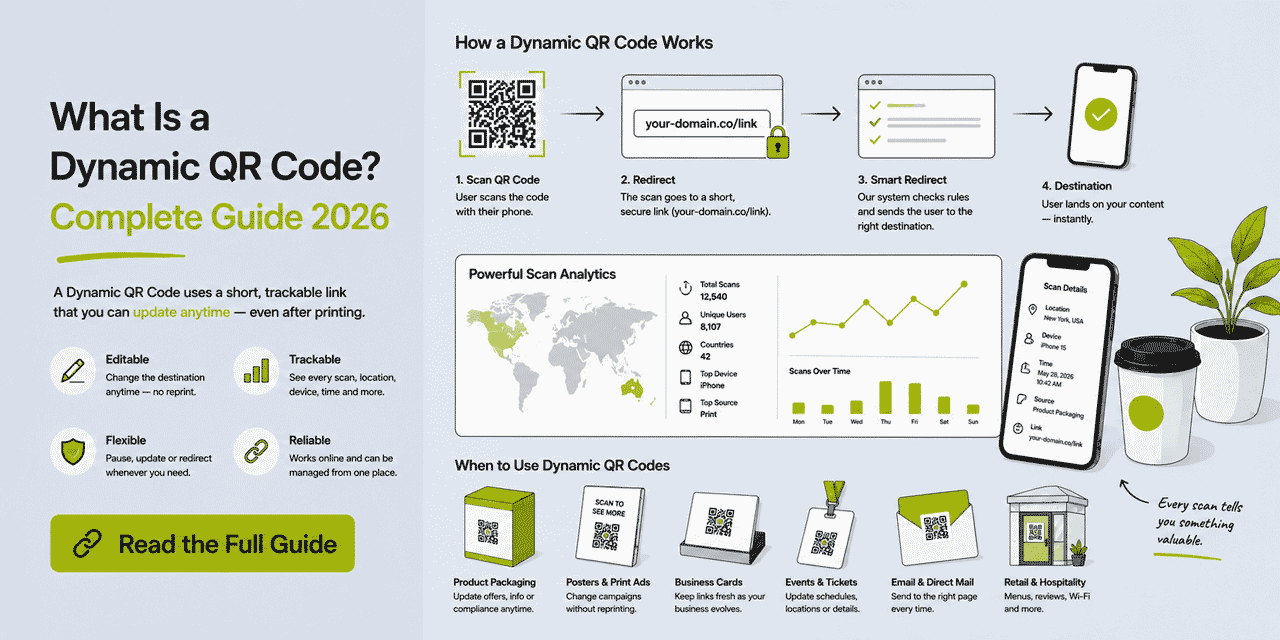
What This Guide Covers
- The precise definition of a dynamic QR Code
- How the short link redirect architecture works — step by step
- Why the destination is editable: the architectural explanation
- How scan tracking works at the infrastructure level
- The analytics data captured by every scan
- Matrix density: why dynamic QR Codes scan better at small print sizes
- The editability advantage: examples across business cards, packaging, menus, events
- Dynamic QR Codes vs static QR Codes — the key distinctions
- Customization options in Cuttly: dots, colors, logo, SVG export
- Error correction levels: L, M, Q, H — what they mean and when to use each
- Global QR Code settings and team settings
- How to create a dynamic QR Code with Cuttly — step by step
- Use cases where dynamic QR Codes deliver specific value
- Common questions and misconceptions
The Precise Definition
A dynamic QR Code is a QR Code in which the encoded data is a short link URL — not a final destination URL. The short link serves as an indirect pointer to the actual destination, which is stored and managed in a link management platform. When the QR Code is scanned, the device navigates to the short link, and the link management platform performs a redirect to the final destination.
The word "dynamic" refers specifically to the variability of the destination. Because the destination is stored in the platform rather than in the QR matrix, it can be changed — dynamically — at any time. The QR Code matrix remains fixed. The short link URL encoded in it remains fixed. The destination URL that the short link resolves to is the dynamic component.
This is the complete and precise definition. A common misconception is that "dynamic" refers to the QR Code itself changing in appearance, or to the content at the destination being dynamic. Neither is correct. The dynamism is in the editability of the redirect destination — and only in that.
The contrasting type — a static QR Code — encodes the final destination URL directly in the matrix. The destination is the same as the encoded data. It cannot be changed without creating a new QR Code. It generates no analytics data because there is no redirect infrastructure to record scans.
How the Short Link Redirect Architecture Works — Step by Step
Understanding the technical mechanism makes the capabilities of dynamic QR Codes intuitive rather than abstract. Here is exactly what happens from creation through scanning to destination arrival.
Creation
You create a short link in Cuttly. You choose a destination URL — for example, https://yourdomain.com/tutorial-video — and a short alias: go.yourbrand.com/tutorial or cutt.ly/tutorial. Cuttly stores this in its database: the short link URL is the key, the destination URL is the value. Cuttly generates a QR Code that encodes the short link URL — go.yourbrand.com/tutorial — as a text string in the QR matrix, using the standard URL QR format. The destination URL is not in the QR Code at all.
Printing
The QR Code is downloaded (as PNG, JPG, WEBP, or SVG) and printed on a business card, product label, menu, flyer, or any other material. The printed pattern contains only the short link URL in its matrix. The destination URL — which may be 80 or 150 characters long — is not visible in or derivable from the printed QR Code. The printing process adds no intelligence to the QR Code; it is a precise reproduction of the matrix pattern at the specified size.
Scan
A user points their smartphone camera at the QR Code. The camera's image processing identifies the QR Code pattern — locating the three corner finder patterns and the alignment pattern, correcting for any perspective distortion or damage using the error correction data, and decoding the data modules. The decoded string is go.yourbrand.com/tutorial — the short link URL. The device recognizes this as a URL and prepares to navigate to it.
Short Link Request
The user's device sends an HTTP request to go.yourbrand.com/tutorial (via Cuttly's servers, since the branded domain is managed through Cuttly). The request arrives at Cuttly's infrastructure with the following information available: the short link alias requested (tutorial), the requesting device's IP address (from which geographic location is derived), the User-Agent string (from which device type, operating system, and browser are derived), the Referer header (from which referrer source is derived, when available), and the timestamp of the request.
Analytics Recording
Before responding to the request, Cuttly's server records the scan event. It logs the timestamp, derives geographic location from the IP address (to country and city precision), parses the User-Agent to identify device type (mobile, tablet, desktop) and OS (iOS, Android, Windows, macOS, other), determines whether the request is from a human user or an automated bot (bot filtering runs automatically on all plans), and increments the total click counter. If this device has already scanned this code within the current session window, the scan is counted as a repeat (total) but not as a new unique scan.
All analytics data is aggregated and anonymized — individual users are not identified, profiled, or tracked across sessions or across different QR Codes. The data captured is at the aggregate level (how many scans, from which countries, from which device types) rather than the individual level.
Redirect and Destination
After recording the scan, Cuttly's server returns an HTTP 301 or 302 redirect response to the device, pointing to the destination URL: https://yourdomain.com/tutorial-video. The device follows the redirect and requests the destination page. The destination page loads in the user's browser. From the user's perspective, the entire process from scan to destination page appears as a single, instantaneous navigation. The short link and the redirect are invisible.
Destination Update
Six months later, the tutorial video moves to a new URL: https://yourdomain.com/product-tutorials/tutorial-v2. In Cuttly's dashboard, you navigate to the short link go.yourbrand.com/tutorial, click the edit button, change the destination URL to the new address, and save. Cuttly updates its database. From that moment forward, every request to go.yourbrand.com/tutorial — from any device, anywhere in the world, through any printed QR Code that encodes that URL — redirects to https://yourdomain.com/product-tutorials/tutorial-v2. Every previously printed QR Code continues to function correctly, now pointing to the updated content. No reprinting, no new QR Code, no communication required.
Why the Destination Is Editable: The Architectural Explanation
The editability follows directly from the architecture. A static QR Code encodes the destination in the matrix — the destination is physically part of the QR Code's printed structure. Changing the destination would require changing the matrix, which requires reprinting. The destination and the code are the same object.
A dynamic QR Code encodes a stable pointer — the short link URL. The pointer and the destination are separate objects. The pointer is physical (embedded in the printed matrix, permanent). The destination is digital (stored in Cuttly's database, mutable). Editing the destination changes the database entry, not the physical object. The pointer continues to exist and to function — it now resolves to a different destination.
This separation is the core architectural principle. The physical QR Code is permanent. The digital destination is not. The QR Code refers to a name (the short link), not an address (the destination URL). The name is stable; the address behind the name can change.
An analogy: a person's phone number is a stable identifier for that person, even as they move house, change jobs, or update their contact details. The phone number does not contain the person's address — it contains an identifier that is used to look up the current address. A dynamic QR Code works the same way: the short link is the stable identifier, Cuttly's database is the lookup system, and the destination URL is the current address.
How Scan Tracking Works at the Infrastructure Level
The tracking capability of dynamic QR Codes is a byproduct of the redirect architecture, not a separate system. Because every scan routes through Cuttly's servers as part of the redirect, the data required for analytics is available at the infrastructure level — the device type, IP-derived location, and User-Agent are all present in the HTTP request that every scan generates.
This is fundamentally different from JavaScript-based tracking (like GA4), which requires a tracking script to fire on the destination page. JavaScript tracking depends on the destination page loading fully, the browser executing JavaScript, no tracking blockers being active, and the user not navigating away before the script fires. Cuttly's QR Code tracking is at the redirect layer — it occurs before the redirect is performed, regardless of what happens at the destination. A user who scans a QR Code and closes the app before the destination page loads is still counted as a scan in Cuttly's analytics, because the request to the short link server occurred and was recorded.
This is why Cuttly scan counts are typically higher than GA4 session counts for the same QR Code destination. Both numbers are accurate — they measure different things. Cuttly counts every short link request. GA4 counts every session where its tracking script fired on the destination page. The difference is explained by users who scan but don't fully load the destination, users with ad blockers or tracker prevention, and users on browsers with strict privacy settings.
Bot filtering is applied automatically on all Cuttly plans. Automated crawler traffic, link health check bots, and other non-human requests are identified and excluded from scan counts. The analytics counts reflect genuine human scan events rather than automated noise.
The Analytics Data: What Every Scan Records
For every scan of a Cuttly dynamic QR Code, the following data is recorded and made available in the analytics dashboard.
Scan Count — Total and Unique
Total scans is the raw count of every HTTP request received by the short link. Every tap of the camera on the QR Code that results in a request to the short link server is counted. Unique scans deduplicates within a session window — multiple scans from the same device within the same session are counted as one unique scan. Unique scans better approximates the number of distinct individuals who scanned the code.
Geographic Location — Country and City
Cuttly derives geographic location from the scanning device's IP address using IP geolocation data. The result is a country-level classification (high accuracy) and a city-level classification (good accuracy for most major urban areas; lower precision for rural or mobile IP addresses). The country and city data appears in the analytics dashboard as geographic distribution breakdowns.
Geographic data is particularly valuable for physical marketing campaigns — it confirms whether materials distributed in a specific area are generating scans from that area, identifies unexpected scan clusters from locations outside the distribution plan, and supports multi-region campaign performance comparisons.
Device Type
Device type is derived from the User-Agent header in the HTTP request. Cuttly classifies devices as mobile, tablet, or desktop. For QR Code scans, the vast majority are mobile — QR Code scanning via desktop is extremely rare in practice, so desktop QR Code scans indicate unusual use cases (screenshare scanning, specialized software) rather than typical consumer behavior.
The mobile classification is useful for confirming that your destination is serving a primarily mobile audience — which should inform mobile-first design decisions for the destination page.
Operating System
Within the mobile category, the iOS versus Android breakdown is the most actionable dimension. This reflects the device preferences of your scanning audience. For QR Codes that link to app download pages or app-specific content, the OS split informs which platform's experience to prioritize. A product packaging QR Code with 80% iOS scans tells you that the product's customer base is heavily Apple-device-oriented — relevant for any iOS-specific features in accompanying apps or loyalty platforms.
Referrer Source
The Referer header is recorded when available. For QR Code scans from a phone camera, the referrer is typically empty — the device's QR scanner doesn't pass a referring URL. Referrer data becomes more meaningful for QR Codes that appear in digital contexts (embedded in web pages, shared in messaging apps where the platform passes a referrer) rather than physical print materials.
Time Patterns
Scan volume is distributed across timestamps, enabling day-of-week and hour-of-day analysis. These patterns are displayed in the analytics dashboard as a click timeline and can be aggregated into day-of-week and hour-of-day heatmaps. For physical marketing materials, time patterns reveal when your audience is engaging with the QR Code — which is a proxy for when they are engaging with the physical material (holding the product, visiting the store, using the service).
Analytics History by Plan
Analytics data is retained and queryable for different periods depending on the Cuttly plan. The free plan retains the last 30 days of scan data. The Single plan ($25/month) retains 1 year. The Team plan ($99/month) and Enterprise plan ($149/month) retain 2 years. For packaging QR Codes and business cards with long lifecycles, the longer analytics history on paid plans is meaningful — a QR Code scan pattern from 8 months ago may be relevant context for a current campaign decision.
Matrix Density: Why Dynamic QR Codes Are More Scannable at Small Sizes
QR Codes encode data by converting it into a binary representation that maps to a grid of black and white modules. The grid size (version) is determined by the amount of data and the error correction level. More data at a given error correction level requires a higher version (larger grid with more modules).
A typical destination URL in a marketing context — with UTM parameters — might be 100 to 180 characters. A Cuttly short link URL is typically 20 to 35 characters. At the same error correction level (say, M), encoding a 150-character URL requires approximately a Version 9 to 11 QR Code (45×45 to 57×57 modules), while encoding a 25-character short link requires approximately a Version 3 to 4 QR Code (29×29 to 33×33 modules).
At a print size of 2 cm × 2 cm, a Version 9 code has modules approximately 0.44 mm wide. A Version 3 code has modules approximately 0.69 mm wide. The larger modules of the dynamic code are significantly easier for camera-based scanners to read accurately, especially on lower-quality cameras, in suboptimal lighting, or at slight angles.
When error correction level H is used — which adds redundancy modules and increases the grid size — both code types become denser, but the dynamic code remains proportionally less dense because its underlying data is shorter. The density advantage of dynamic QR Codes persists across all error correction levels.
For practical print applications — business cards, product labels, small packaging areas, event badges — the dynamic code's lower density translates to more reliable scanning at the minimum print sizes those applications require. This is a technical advantage that compounds the operational advantages of editability and tracking.
The Editability Advantage in Specific Use Cases
The ability to update a dynamic QR Code's destination after printing is most valuable in use cases where the physical material has a longer lifespan than the certainty of the destination URL's stability. Here are the most common and consequential examples.
Business Cards: The 18-Month Print Run Problem
A batch of 500 business cards ordered in May 2026 might be distributed until October 2027. In those 18 months, a professional might change their booking platform, update their website domain, restructure their LinkedIn profile, or decide to change the QR Code destination from a single link to a Link in Bio page. With a static QR Code, any one of these changes breaks every remaining card.
With a dynamic QR Code, the destination change is one Cuttly edit. The cards continue to work correctly with the new destination. The professional does not need to order a new batch of cards, does not need to notify every person who already has a card, and does not experience a period where distributed cards link to a broken or outdated URL.
Product Packaging: The Commercial Print Run Risk
Commercial packaging print runs for mid-size consumer brands range from 50,000 to 500,000 units or more. The lead time from design approval to retail shelf is 3 to 6 months. The shelf life before the last unit is sold may be 12 to 18 months after that. Total window from QR Code design to last scan: potentially 18 to 30 months.
In this window, the probability that the destination URL needs to change — due to a website migration, a video platform change, a compliance document update, a loyalty platform migration, or a campaign refresh — is substantial. A static QR Code on packaging of this scale creates a significant operational liability: hundreds of thousands of units potentially linking to broken or outdated content.
A dynamic QR Code on the same packaging maintains the same printed physical code across the entire lifecycle while allowing the destination to be updated as many times as needed. Every update costs one Cuttly dashboard edit. The packaging investment is protected throughout its lifecycle.
Restaurant Menus: The Seasonal Update Cycle
A restaurant using QR Code menus — whether on table tents, laminated cards, or window displays — needs the QR Code to link to the current menu. Menus change seasonally at minimum (quarterly menu refreshes), often more frequently (weekly specials, price updates, item availability changes). A static QR Code that links to a specific menu URL will break every time the menu URL changes — which occurs whenever the restaurant's menu management system is updated, when the restaurant migrates to a new ordering platform, or when a new menu season is published under a new URL structure.
With a dynamic QR Code, the restaurant updates the short link destination in Cuttly to the new menu URL whenever the menu changes. Every table tent, laminated card, and window sticker in the venue — and every one stored in the supply cupboard — now links to the current menu. No reprinting of physical materials, no disruption to table service during the update.
Event Materials: Content That Evolves With the Event
Conference badges, event programmes, and speaker slide decks contain QR Codes that link to content with a defined lifecycle. Before the event: the QR Code might link to a preview schedule or networking profile. During the event: it links to the live agenda, a session join link, or a real-time Q&A form. After the event: it links to a recording, a post-event survey, or a resource library.
With a static QR Code, the badge or programme links to one destination forever. With a dynamic QR Code, the destination evolves with the event lifecycle. One physical QR Code on the badge, three different destinations across three phases of the event, no reprinting. Attendees who scan the badge link on day three of a conference reach the post-event resources rather than the pre-event preview they would have reached on day minus one.
Retail Signage: Evergreen Physical Assets, Dynamic Content
Point-of-sale displays, shelf talkers, window graphics, and in-store signage can be designed as evergreen physical assets that carry dynamic QR Codes. A "Scan for this month's offer" shelf talker with a dynamic QR Code can remain in place for 12 months while the destination is updated monthly to reflect each new promotion. The physical sign is reprinted once; the destination changes 12 times. The cost of 12 Cuttly destination updates is zero.
Customization Options in Cuttly
Cuttly's QR Code editor provides the following customization capabilities, available from the Single plan ($25/month). On the free plan, a standard-style QR Code is available in PNG, JPG, and WEBP formats.
Dots Style
The dots style controls the visual shape of the data modules — the individual elements that make up the QR Code pattern. Options: Square (conventional square modules), Dots (circular modules), Rounded (slightly rounded square modules), Extra Rounded (more pronounced rounding), Classy (diagonal elements with a distinctive visual style), Classy Rounded (Classy style with rounded edges). Each style scans reliably at H error correction level. Square is the most conventional and most universally recognized. Rounded and Classy styles produce a more refined visual appearance that integrates better with design-conscious brand applications.
Dots Color
The color of the data modules is fully configurable — any hex color or palette selection. The constraint is contrast with the background: dots must be significantly darker than the background for reliable scanning. Dark navy, forest green, burgundy, charcoal, and other deep colors work well against white or light backgrounds. Mid-tones (medium grey, medium blue) reduce scan reliability and should be avoided or tested thoroughly before use. Light colors cannot be used as module colors against white backgrounds.
Corners Square Style and Corners Dot Style
The three finder patterns in the corners of the QR Code — the large squares that help scanners orient the code — have separate style controls. Corners Square Style controls the outer frame shape: None (no outer frame), Square (conventional), Dot (circular outer frame), Extra Rounded. Corners Dot Style controls the inner fill: None, Square, Dot. Matching corner styles to dots styles creates visual coherence. For example, Rounded dots look most natural with Extra Rounded corners; Square dots look best with Square corners.
Corner Colors
Corner Square color (the outer frame) and Corner Dot color (the inner fill) can be set independently of the dots color. This allows two-color branded QR Codes — for example, dark navy dots with gold corner frames — without compromising the contrast requirements for scanner readability.
Background Color
The background color of the QR Code area defaults to white. It can be changed to match a brand's secondary color or a packaging background — provided the dots color maintains sufficient contrast against the chosen background. Dark dots on a white background remain the most reliable configuration; any deviation should be scan tested under realistic conditions.
Logo and Image Overlay
A logo, monogram, or any image can be uploaded to appear in the center of the QR Code. Cuttly's editor accepts standard image formats. The Image size setting controls what percentage of the QR Code area the logo occupies — the recommended default is 0.4 (40% of area). The image size should not exceed this threshold when error correction level H is used; above 40%, the logo obscures more of the code than the H error correction can compensate for.
Image margin sets a buffer zone between the logo and the surrounding QR modules — a value of 1 to 2 is recommended to prevent the logo from touching the nearest modules. After adding a logo, always scan test the QR Code in the editor before downloading and using in production.
Error Correction Level — L, M, Q, H
QR Codes have four error correction levels that determine how much of the code can be obscured or damaged while still being readable:
- L (Low) — approximately 7% of data modules can be lost. Smallest code for a given data payload. Appropriate only for digital contexts with no damage risk.
- M (Medium) — approximately 15% loss tolerance. Good balance of size and resilience. Appropriate for standard print use without logo overlays.
- Q (Quality) — approximately 25% loss tolerance. More resilient; larger code than M. Appropriate for print materials with some damage risk.
- H (High) — approximately 30% loss tolerance. Most resilient; largest code for a given data payload. Required when adding a logo overlay. Recommended for all print use where reliability is important — business cards, packaging, signage.
The practical guidance: use H for any QR Code that will be printed. The increase in code size relative to M or Q is small and has no perceptible visual impact at typical print sizes. The increase in reliability is significant — H level provides comfortable margin above the minimum for reliable scanning in a wide range of lighting and distance conditions.
Size (Width)
The Width field controls the pixel dimensions of raster format exports (PNG, JPG, WEBP). For SVG export, the Width setting is not functionally relevant — SVG scales infinitely without quality loss. For raster exports, set Width to a minimum of 800 px for digital use and 1000 px or higher for print use. For print production, SVG is always preferred over raster; the Width setting matters only when SVG is not available to the production workflow.
Download Formats
All plans including free: PNG, JPG (JPEG), WEBP. Single plan and above: SVG (Scalable Vector Graphics). SVG is the correct format for any print production application. It renders at perfect quality at any size, requires no resolution decision, and integrates cleanly with design software (Adobe Illustrator, InDesign, Figma, Affinity Designer). PNG at 1000px+ is a viable alternative when SVG is not supported by the production tool.
Global QR Code Settings
Available from the Single plan. In account settings under Other Settings → QR Codes Settings, you can define a default visual configuration — dots style, dot color, corner style, corner color, background color, logo, quality level — that applies automatically to every new QR Code generated in your account. This eliminates repetitive manual configuration for brands creating many QR Codes across a product portfolio or marketing campaign, and ensures visual consistency across every code without requiring conscious configuration.
Team-level QR Code Settings (Team plan) allow separate default configurations per team workspace. An agency managing QR Codes for multiple clients can configure distinct default styles per client workspace — each client's QR Codes are consistently styled to their brand without any team member needing to manually configure each code.
How to Create a Dynamic QR Code with Cuttly — Step by Step
Step 1: Create a Free Cuttly Account
Go to cutt.ly/register. Enter your email and create a password. Verify your email. The dashboard is immediately accessible. No credit card required for the free plan.
Step 2: Create a Short Link
In the dashboard, find the URL shortener input. Paste your destination URL. Set a custom alias — the back-half of the short link. Use a descriptive, memorable name that identifies what the QR Code is for: tutorial, menu-spring, yourname-card, product-register. If you have a branded domain connected, select it here. Click Shorten. Your short link is created.
Step 3: Open the QR Code Editor
In the dashboard link list, find the short link and click the QR Code icon. The QR Code editor opens in a side panel. The QR Code preview is shown at the top of the panel, updating in real time as you make changes.
Step 4: Configure Quality and Style
Set Quality to H. Set Dots Style to your preferred module shape. Set Dots color to your brand color or a suitable dark color with adequate contrast. Set Corner styles and colors consistent with the dots configuration. Set Background color if needed. These settings are saved automatically as you make them — no manual save required.
Step 5: Add Logo (Optional, Single Plan+)
Upload your logo. Set Image size to 0.4 or below. Set Image margin to 1 to 2. Immediately scan the QR Code preview with your phone to verify scannability. If it does not scan, reduce Image size or simplify the logo.
Step 6: Download
For print use: download as SVG. For digital use: download as PNG or WEBP at 1000px+ width. The downloaded file is your dynamic QR Code — tracked, updatable, branded, and ready for production use.
Step 7: Use and Monitor
Place the QR Code in your print or digital materials. Every scan from this point forward is recorded in the Cuttly dashboard under the short link's analytics. Check analytics periodically to monitor scan volume, geographic patterns, device split, and time patterns. Update the destination URL in the dashboard whenever needed — no new QR Code required.
Frequently Asked Questions
What is a dynamic QR Code?
A dynamic QR Code encodes a short link URL rather than a final destination URL in its matrix. The short link redirects to the actual destination, stored in Cuttly's platform. The destination can be updated at any time without changing or reprinting the QR Code. Every scan is automatically tracked with analytics data including date, time, device, OS, and geographic location.
How does a dynamic QR Code work?
When scanned, the device reads the encoded short link URL and requests it from Cuttly's server. Cuttly records the scan data and returns a redirect to the final destination. The user arrives at the destination. The process takes milliseconds and is invisible to the user.
Can I edit a dynamic QR Code after printing?
You can edit the destination URL at any time — as many times as needed. The printed QR Code pattern remains unchanged. Update the short link destination in Cuttly's dashboard and every printed copy immediately redirects to the new URL. No reprinting required.
What analytics does a dynamic QR Code provide?
Every scan records: date and time, total and unique scan count, geographic location (country and city), device type, operating system (iOS vs Android), and referrer. Bot filtering is automatic. Analytics history: 30 days on free, 1 year on Single ($25/month), 2 years on Team ($99/month).
Is a dynamic QR Code free to create?
Yes. Cuttly generates a dynamic, tracked QR Code for every short link on the free plan at no cost — no credit card required. Full customization (colors, logo, SVG export) is available from the Single plan ($25/month).
What makes a QR Code "dynamic" versus "static"?
A static QR Code encodes the final destination URL directly in the matrix — permanently fixed, no tracking. A dynamic QR Code encodes a short link (stable pointer) with the destination stored separately in Cuttly — editable, tracked, and more scannable at small sizes due to a less dense matrix.
What is the difference between a dynamic QR Code and a regular QR Code?
A "regular" or static QR Code encodes the destination URL directly — permanently, with no tracking. A dynamic QR Code encodes a short link, making it editable after printing and tracking every scan automatically. For any professional or marketing URL use case, dynamic is the appropriate standard.
- Tools
- QR Code Generator →
- URL Shortener Tool →
- Link Analytics →
- Related Guides
- Dynamic vs Static QR Codes →
- QR Codes on Business Cards →
- QR Codes on Product Packaging →
- QR Code Generator Guide →
- QR Code with Logo Guide →
- Track QR Code Scans →
- Offline Attribution Guide →
- Why QR Codes Need a URL Shortener →
- Encyclopedia
- Dynamic QR Codes
- Branded Links
- Verticals Hub
- URL Shortener for Every Industry →
- Start Here
- Create Free Account — No CC
- Plans & Pricing
URL Shortener
Cuttly simplifies link management by offering a user-friendly URL shortener that includes branded short links. Boost your brand’s growth with short, memorable, and engaging links, while seamlessly managing and tracking your links using Cuttly's versatile platform. Generate branded short links, create customizable QR codes, build link-in-bio pages, and run interactive surveys—all in one place.
Cuttly - Consistently Rated
Among Top URL Shorteners
Cuttly isn’t just another URL shortener. Our platform is trusted and recognized by top industry players like G2 and SaaSworthy. We're proud to be consistently rated as a High Performer in URL Shortening and Link Management, ensuring that our users get reliable, innovative, and high-performing tools.


