Action Pages in Cuttly —
Your CTA Landing Page. One Link.
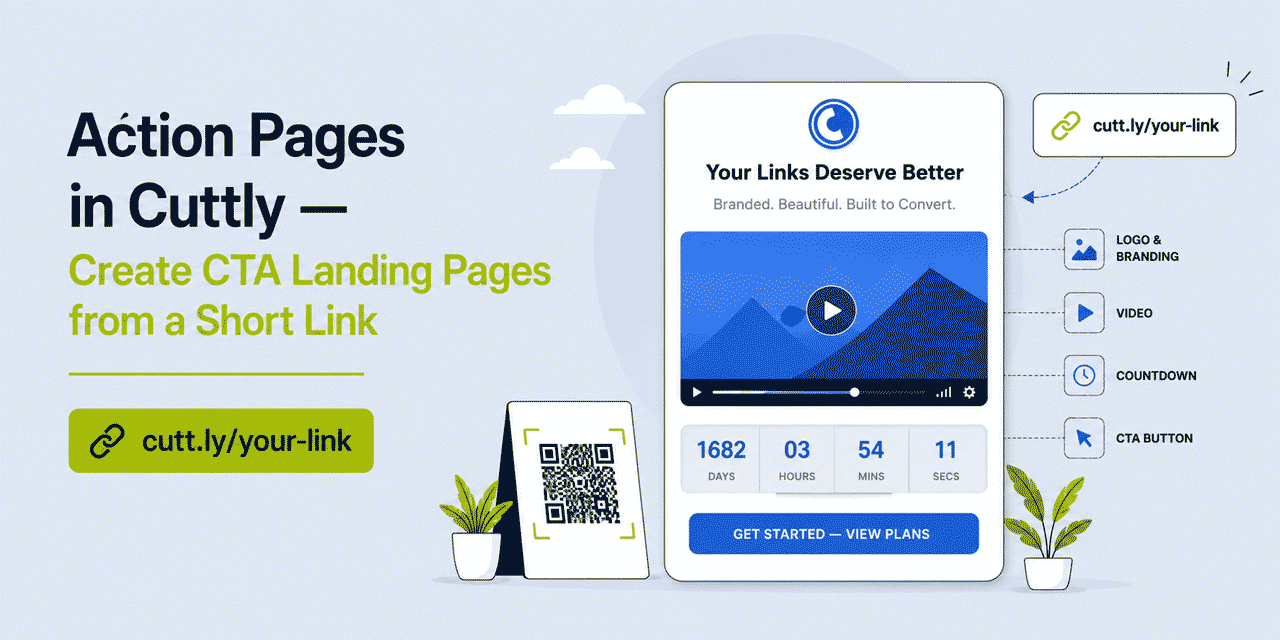
Most link shorteners do one thing: they take a long URL and make it shorter. That is useful. But it leaves a gap — the gap between clicking a link and actually converting. Action Pages in Cuttly close that gap. Instead of sending someone directly to a full website where they might get distracted, you send them to a focused, purpose-built page with one clear message and one button to click.
Action Pages are now live in Cuttly. You can see an example right now at cutt.ly/c/cuttly. This is a real Action Page — built in minutes using the same tools available to every Cuttly user on the Single plan or above.
What This Guide Covers
- What Action Pages are and how they work
- What you can put on an Action Page (every element explained)
- Real use cases — when and why to use one
- How to create your first Action Page in Cuttly
- Customization: background, template, logo, video, countdown
- Branded domains and the /c/ namespace
- QR codes for Action Pages
- Analytics and CTR tracking
- Which Cuttly plan includes Action Pages
- FAQ
What Is an Action Page?
An Action Page is a standalone, single-purpose landing page you create inside Cuttly and share as a short link. It is not a full website. It is not a link-in-bio profile with multiple destinations. It is one focused page with one goal: getting the person who opens it to click your CTA button.
Think of it as a micro landing page that lives behind a short link. You send the link in an email, a DM, a social post, or print it on a flyer — and whoever opens it sees a clean, branded page with your message, your offer, and one button to click. No navigation bar. No distractions. Just the action you want them to take.
The URL format is cutt.ly/c/your-alias — or, if you have a branded domain connected to Cuttly, your-domain.co/c/your-action. The /c/ path is the dedicated namespace for Action Pages across the entire Cuttly platform.
See a live example: cutt.ly/c/cuttly
What Makes Action Pages Different from a Regular Short Link
A regular short link takes someone directly to a destination. That destination might be a homepage, a product page, a checkout, a PDF — anything. The short link is just a redirect. What happens after the click is entirely up to the page it lands on.
An Action Page is the destination. Instead of redirecting someone to an existing page you do not control, you create the page yourself — in Cuttly, in minutes. You control what they see, what they read, what video plays, how much time is left, and what the button says. The short link still exists (it is how people reach the page), but what is behind the link is now yours.
This distinction matters in practice. If you are running a limited-time offer and you send people directly to your e-commerce store, you are hoping the store does the convincing. With an Action Page, you present the offer first — with a countdown, a video if you have one, and a single button — and then send them to the store when they are ready to buy.
Every Element of an Action Page
When you create an Action Page in Cuttly, you start with a blank page and a single destination URL. From there, you can add and customize any of the following elements using the editor toolbar.
Logo
Upload your logo or any brand image (JPG, PNG, or GIF, up to 960×960px). It appears at the top of the page, above the title. This is the first thing visitors see — make it your brand.
Title
The main headline of the page. Keep it short, direct, and benefit-focused. This is not the place for a paragraph — three to eight words that tell visitors exactly what this page is about and why it matters to them.
Description
A short supporting text below the title. Use it to add context, explain the offer, or address the most likely question a visitor has before clicking. The description is optional — some Action Pages work better without one, especially when the title and CTA button are self-explanatory.
Video
Embed a YouTube or Vimeo video directly on the page. The video appears between the description and the countdown/CTA section. This is one of the most powerful elements available — a short product demo, a testimonial, or a personal message from the team can significantly increase the likelihood of someone clicking through.
Countdown Timer
Set a deadline. The countdown displays the time remaining — in days, hours, minutes, and seconds — until the date and time you specify (in UTC). You can also check a box to automatically disable the CTA button when the countdown reaches zero, which is useful for enforcing offer expiry without having to manually update the page.
CTA Button
The main action element. You set the button label (for example: "Get Started", "Claim Your Offer", "See Pricing", "Book a Demo") and the destination URL the button points to. The destination URL is automatically shortened by Cuttly when the page is created, so the underlying link is tracked.
Background
Four options: predefined gradient styles, a custom solid color you choose from a color picker, an image from the Cuttly background library (updated regularly), or your own uploaded background image. Cuttly dynamically adjusts the color scheme to maintain readability — but you can always fine-tune text and button colors manually in the template editor.
Visual Template
Control the shape of the CTA button (Rounded, Square, Oval), the fill mode (Filled with dark, Filled with white, Outline dark, Outline white, Outline grey), the header alignment (Center, Left, Right), the header text color (Light, Dark, Grey), and the font family (Ubuntu, Open Sans, Fuzzy Bubbles, Signika, Inconsolata — with more being added).
Privacy and Terms URLs
Optionally add links to your own privacy policy and terms of service. These appear at the bottom of the page. Both fields are optional — add them when your campaign requires it.
Real Use Cases — When Action Pages Work Best
Action Pages are not for everything. They work best in specific situations where a full website is either too much or not fast enough, and a plain short link redirect is not enough.
Limited-Time Offers and Flash Sales
A countdown timer combined with a single CTA button is a proven combination for time-sensitive offers. Create an Action Page with your offer headline, a brief description, the countdown set to when the sale ends, and a button that says "Shop the Sale" or "Get 30% Off" — and send the link across every channel you have. When the timer hits zero, the button can disable automatically. The page stays live and can be repurposed for the next campaign.
Product Launches
Before launch day, create an Action Page with a teaser — your logo, a short description, a product video if you have one, and a countdown to launch. The CTA button can point to a waitlist form, a pre-order page, or simply your product page once it goes live. You send one link; the page does the work.
Event Registration
Replace the generic event platform link with an Action Page that shows the event name, a short description of what attendees will get, an optional promotional video, and a countdown to the registration deadline or event date. The CTA button points to your registration form. Cleaner, more branded, more convincing.
Campaign-Specific Landing Pages for Paid Ads
Running a paid campaign and want the destination to match the ad creative exactly? Create an Action Page per campaign with the exact headline and offer from the ad. This increases message match — one of the most underrated factors in conversion rate optimization — without requiring a developer to spin up a new landing page.
Influencer and Partnership Promos
Give each influencer or partner a unique Action Page with a custom alias — for example your-domain.co/c/partner-name. Same offer, different tracking. Each page has its own analytics and CTR, so you can measure exactly which partnership is driving results.
Direct Mail and Print Campaigns
Print a short URL or QR code on a flyer, postcard, or product insert. When someone scans the QR code or types the URL, they land on a focused page that matches what the printed material promised — not a homepage where they have to figure out what to do next. The Action Page bridges the gap between offline and online.
Internal Links in Newsletters and Emails
Instead of linking a text CTA in an email directly to your destination, link to an Action Page that reinforces the message. The reader clicks, sees the page with the full context of the offer, and then clicks through. This extra step can improve conversions when the email itself does not have enough space to tell the full story.
How to Create Your First Action Page in Cuttly
Creating an Action Page takes under two minutes if you know what you want. Here is the process step by step.
Log in to your Cuttly account and go to the Action Pages section in the left sidebar. Click "Create new CTA link". A panel will slide out asking you to paste the destination URL — this is the URL your CTA button will point to. Cuttly will shorten it automatically.
Then choose your domain: cutt.ly/c/name for the standard Cuttly domain, or your-domain.co/c/name if you have a branded domain connected to your account. Click to create, and your Action Page appears in the list.
Click the settings icon to open the editor. On the left side of the editor you will see a vertical toolbar with icons. Each icon opens a different editing panel: alias, background, template, countdown, privacy/terms, logo, title, description, video, CTA button label, and target URL.
Start with the elements that matter most for your goal. For a flash sale: set the title, description, countdown, and CTA button. For a product launch: add the logo, a video, the countdown, and the button. Each change saves immediately when you click the Save button in the panel — the live preview on the left updates in real time.
Once the page is ready, copy the short link and share it. You can also generate a customizable QR code directly from the Action Pages list by clicking the QR code icon next to the page.
Custom Alias — Make the URL Work for Your Campaign
By default, Cuttly generates a random alias for your Action Page. But you can change it to anything you want — as long as it is not already taken. A good alias makes the link easier to share, easier to remember, and more trustworthy.
For a spring sale: cutt.ly/c/spring-sale
For a product launch: your-domain.co/c/launch2026
For a partner promo: your-domain.co/c/partner-name
One important rule: set the alias before you share the link or generate the QR code. Changing the alias after sharing changes the URL — the old link stops working, and any QR code generated for the old URL will break. Finalize the alias first, then distribute.
Branded Domains and the /c/ Namespace
One of the strongest features of Action Pages in Cuttly is that they work on branded custom domains. If you have a domain connected to your Cuttly account — say your-domain.co — your Action Pages are available at your-domain.co/c/your-alias. The same domain you use for your branded short links now also hosts your mini landing pages.
This is significant. A link like your-domain.co/c/spring-sale is something you can print on packaging, include in a TV ad, put on a billboard. It is short, branded, and memorable — and it goes directly to a focused page you control, not a homepage.
The /c/ path is the dedicated namespace for Action Pages across the entire platform. It works on cutt.ly and on every branded domain connected to Cuttly.
QR Codes for Action Pages
Every Action Page in Cuttly can have a QR code generated and downloaded directly from the dashboard. Click the QR code icon next to any page in the Action Pages list, and a panel opens showing a live preview with full customization options.
You can set the quality level (L, M, Q, H), the output width in pixels, the margin, the dot style, background and dot colors, and the corner square and dot styles. The preview updates as you adjust the settings. When satisfied, download the QR code.
Use Q or H quality for print — especially for larger formats where the code may be partially obscured. For digital use, M quality is sufficient. The default width of 512px works for most use cases; increase it for large-format print.
The QR code is tied to the Action Page URL. If you change the alias after generating the QR code, the code becomes invalid — so always finalize your alias and page content before generating and distributing the QR code.
Analytics and CTR Tracking
Every Action Page tracks click statistics and CTR (click-through rate). In the Action Pages list, you can see the current CTR for each page at a glance. Click the Analytics button next to any page for a detailed view of click data over time.
CTR in the context of Action Pages measures the ratio of visitors who clicked the CTA button compared to total visits to the page. It is the key metric for understanding how effective your page and offer are at converting attention into action.
Analytics retention depends on your plan: 180 days on the Single plan, one year on the Team and Team Enterprise plans. All analytics data in Cuttly is aggregated and anonymized — individual visitor data is not tracked or stored.
Action Pages vs. Link in Bio — What Is the Difference?
Both are features in Cuttly that create pages behind short links. But they serve different purposes and are designed for different situations.
| Link in Bio | Action Pages | |
|---|---|---|
| Purpose | Share multiple links from one profile page | Drive one specific action via one CTA button |
| Links per page | Many (multiple destinations) | One (single CTA button, single destination) |
| Best for | Social media bio, content creators, brands | Campaigns, offers, launches, events |
| URL format | cutt.ly/bio/alias or cutt.bio/alias | cutt.ly/c/alias or domain.co/c/alias |
| Video | Yes | Yes |
| Countdown timer | No | Yes |
| Availability | Free plan (basic); full features from Starter | Single plan and above |
Use Link in Bio when you want to give someone one URL that takes them to a list of your most important links — your YouTube channel, your latest product, your newsletter, your social profiles. Use an Action Page when you want to create urgency, present a specific offer, and drive a single action.
Cuttly Plan Guide for Action Pages
Action Pages are available from the Single plan. Here is how the feature scales across plans:
The Free plan ($0) does not include Action Pages.
The Starter plan ($12/month) does not include Action Pages.
The Single plan ($25/month) unlocks Action Pages with up to 3 pages. You get full editing capabilities — logo, title, description, video, countdown, background, template, CTA button, QR code — on the Cuttly domain and on up to 5 branded custom domains. Analytics retention: 180 days. This is the entry point and it covers the vast majority of individual use cases.
The Team plan ($99/month) increases the limit to 10 Action Pages per account, with up to 10 branded domains and one year of analytics retention. Ideal for marketing teams running multiple concurrent campaigns.
The Team Enterprise plan ($149/month) provides up to 20 Action Pages, up to 99 branded domains, and one year of analytics retention — suitable for agencies, large marketing departments, and organizations managing campaigns across multiple brands or clients.
Why Action Pages Belong in Your Toolkit
The standard workflow for a marketer who needs a landing page looks something like this: brief the dev team, wait for the page to be built, wait for QA, wait for deployment — or alternatively, pay for a dedicated landing page tool, learn it, integrate it with your stack, and manage yet another subscription.
Action Pages in Cuttly eliminate that workflow for a significant class of use cases. If your goal is a focused, time-sensitive, single-action page that you need live in minutes rather than days, Action Pages deliver that without any additional tools, without a developer, and without leaving the platform you already use to manage your links.
They are not a replacement for a full landing page builder when you need complex forms, A/B testing at scale, or deep CRM integration. But for the everyday marketer who needs to turn a campaign idea into a live, shareable link before the end of the day — they cover exactly that.
The short link and the landing page were always separate problems. Action Pages make them one.
See it in action: cutt.ly/c/cuttly
Get Started with Action Pages
Action Pages are available from the Single plan ($25/month). If you already have a Cuttly account on the Single plan or above, the feature is live in your dashboard — go to the Action Pages section in the left sidebar and click "Create new CTA link" to build your first one.
If you are not yet on Cuttly, create a free Cuttly account and explore the platform. Registration required; free plan available with no credit card needed. Upgrade to the Single plan when you are ready to use Action Pages.
Full documentation for Action Pages is available in the Action Pages Knowledge Base.
Frequently Asked Questions
What is an Action Page in Cuttly?
An Action Page is a standalone call-to-action landing page you create directly in Cuttly and share as a short link. It includes a logo, title, description, optional video, countdown timer, and a CTA button pointing to any destination URL you choose.
Which Cuttly plan includes Action Pages?
Action Pages are available from the Single plan ($25/month) and above. The Single plan includes up to 3 Action Pages; the Team plan up to 10; the Team Enterprise plan up to 20. They are not available on the Free or Starter plans.
Do I need a separate landing page builder?
No. Action Pages are built entirely inside Cuttly. You create the page, set your CTA button destination, and Cuttly generates a short link for it — no third-party tool, no developer, no additional subscription.
Can I use my own branded domain for an Action Page?
Yes. If you have a custom domain connected to your Cuttly account (available from the Single plan), you can publish Action Pages under your own domain — for example your-domain.co/c/your-action.
What URL format do Action Pages use?
Action Pages use the /c/ path. On the Cuttly domain: cutt.ly/c/your-alias. On a branded custom domain: your-domain.co/c/your-action. You can set a custom alias to make the URL more memorable and campaign-specific.
Can I add a video to an Action Page?
Yes. You can embed a YouTube or Vimeo video directly on your Action Page. The video appears between the description and the CTA button section.
How does the countdown timer work?
You set a specific date and time (in UTC) when the countdown should end. The page displays the remaining time in days, hours, minutes, and seconds. You can also choose to automatically disable the CTA button when the countdown reaches zero — useful for enforcing offer expiry.
Does Cuttly track analytics for Action Pages?
Yes. Cuttly tracks clicks and CTR for every Action Page. Analytics retention is 180 days on the Single plan and one year on the Team and Team Enterprise plans. All data is aggregated and anonymized.
Can I generate a QR code for an Action Page?
Yes. Click the QR code icon next to any Action Page in the list to open the QR code panel. You can customize quality, size, dot style, colors, and corner styles — then download the QR code. Generate it only after the alias is finalized, as changing the alias will break previously generated QR codes.
How is an Action Page different from Link in Bio?
Link in Bio is a profile-style microsite with multiple links — designed for social media bios. An Action Page is a focused single-goal page with one CTA button, a countdown timer, and optional video — designed to drive a specific action like signing up, buying, or registering. Different tools for different situations, both available in Cuttly.
- Cuttly Tools
- URL Shortener →
- Link in Bio Builder →
- QR Code Generator →
- Action Pages
- Knowledge Base →
- What is an Action Page?
- How to Create an Action Page
- QR Codes for Action Pages
- Countdown Timer
- Encyclopedia
- Branded Links
- Dynamic QR Codes
- Link in Bio
- Verticals Hub
- URL Shortener for Every Industry →
- Start Here
- Create Free Account
- Plans & Pricing
URL Shortener
Cuttly simplifies link management by offering a user-friendly URL shortener that includes branded short links. Boost your brand’s growth with short, memorable, and engaging links, while seamlessly managing and tracking your links using Cuttly's versatile platform. Generate branded short links, create customizable QR codes, build link-in-bio pages, and run interactive surveys—all in one place.
Cuttly - Consistently Rated
Among Top URL Shorteners
Cuttly isn’t just another URL shortener. Our platform is trusted and recognized by top industry players like G2 and SaaSworthy. We're proud to be consistently rated as a High Performer in URL Shortening and Link Management, ensuring that our users get reliable, innovative, and high-performing tools.


