URL Shortener for Stadiums and Arenas The Complete Guide
A stadium or arena is a physical environment that hosts dozens or hundreds of events per year, each with its own specific content, its own ticketing pages, its own catering arrangements, its own sponsor activations and its own attendee experience requirements. The permanent physical infrastructure — signage, seatback panels, concourse displays, LED boards, printed materials — stays in place between events. The digital content behind that infrastructure changes with every single event on the calendar.
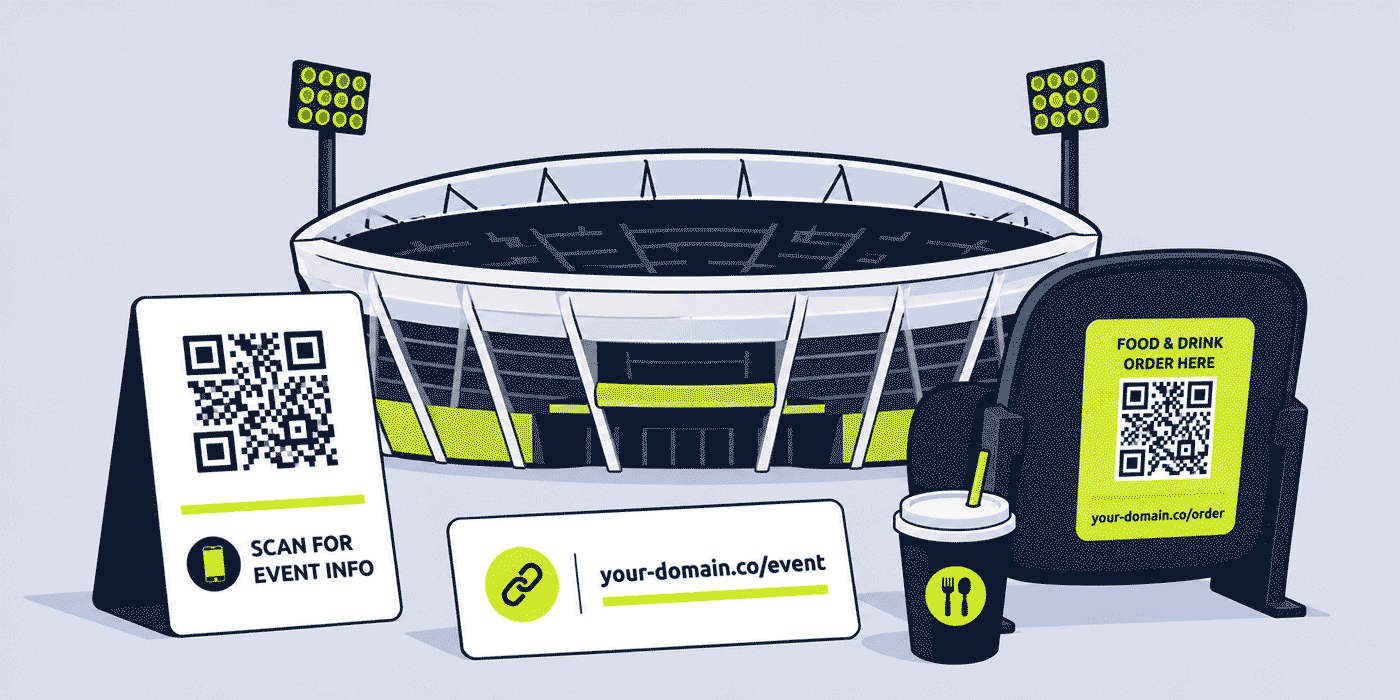
This guide covers how stadiums, arenas, indoor entertainment venues and multi-use event spaces use a URL shortener, branded custom domain, dynamic QR Codes and click analytics to manage every link across permanent signage, event-specific digital content, food and beverage operations, sponsor activations, attendee experience features and post-event measurement. The core principle throughout is the same: the physical installation never changes, but the digital destination behind it can be updated for every event in seconds.
What This Guide Covers
- The stadium link problem: permanent signage, changing events
- Seatback and concourse QR Codes — food and beverage ordering, event content
- Wayfinding and accessibility links
- Event-by-event link management — one infrastructure, many events
- Sponsor and commercial partner activation links
- Post-event surveys and attendee feedback
- Ticketing and hospitality links for multi-event venues
- Branded QR Codes and venue identity in physical spaces
- A worked example: a multi-use arena's link stack across a week of events
- Common mistakes with venue QR Codes and event link management
- A Cuttly plan guide for stadiums and arenas
- Frequently asked questions
The Stadium Link Problem: Permanent Signage, Changing Events
Every stadium and arena faces a fundamental tension between physical permanence and digital dynamism. The physical environment — the seats, the concourses, the signage gantries, the LED boards, the printed materials in hospitality suites — represents substantial capital investment that changes slowly. The digital content that environment needs to serve changes with every event: a football match on Saturday, a music concert on Tuesday, a corporate conference on Thursday, a graduation ceremony on the following Sunday.
A QR Code printed on a seatback panel in 2024 needs to remain functional and relevant through every event the venue hosts until the seat is replaced — potentially for five to ten years. If that QR Code encodes a direct destination URL, it is functional only as long as that specific URL remains valid. The first time the venue changes their website, switches their mobile ordering platform, or updates their digital content architecture, every printed QR Code becomes a dead link.
A QR Code generated from a dynamic short link — linking through your-venue.com/seat-info rather than directly to a destination URL — remains functional indefinitely because the destination can be updated in the link dashboard for each event. The same QR Code that showed a football club's digital programme on Saturday shows a concert's set list and merchandise catalogue on Tuesday, and the venue's general event information page on non-event days.
Seatback and Concourse QR Codes
The most physically visible and most frequently scanned QR Code surface in any stadium or arena is the seatback panel — the surface directly in front of every seated attendee throughout an event. A QR Code on a seatback is seen by thousands of people for the duration of every event in the venue, making it one of the highest-potential digital touchpoints in any physical venue.
Food and Beverage Ordering
The primary practical use case for seatback QR Codes in most stadiums and arenas is food and beverage ordering. A QR Code linking to a mobile ordering platform allows attendees to order from their seat without queuing, improving both attendee experience and venue revenue per head. The challenge for any venue operating a seatback ordering system is that the menu, the platform, and the ordering flow change depending on the event type: a sporting event has different catering requirements from a music concert, which has different requirements from a corporate conference.
A dynamic short link behind each seatback QR Code means the ordering destination can be updated for each event in the hours before doors open. The same physical QR Code that shows a sports catering menu on a matchday shows a concert bar menu on a gig night and a conference lunch menu for a daytime corporate event, without any physical change to the seatback installation.
Event Content and Digital Programme Links
Beyond ordering, seatback QR Codes can link to event-specific digital content: a digital matchday programme for a sports event, a set list and artist biography page for a concert, a speaker schedule and floor plan for a conference. Each event's specific content destination is set in the link dashboard before the event begins. Between events, the same QR Code can be redirected to the venue's general information page, upcoming events calendar, or ticket purchase page.
Concourse Signage QR Codes
Concourse signage QR Codes serve a slightly different purpose from seatback QR Codes: they are scanned by people in transit rather than seated, which means the destination needs to be immediately actionable and relevant to someone who is moving through the venue. Common destinations for concourse QR Codes include: the food and beverage ordering platform (for attendees who have left their seats), the venue's Wi-Fi access page, the event programme or schedule, and the venue's accessibility information.
Because concourse signage is even more permanent than seatback panels — large-format prints and illuminated signage are typically in place for several years — the case for dynamic short links behind concourse QR Codes is even stronger. A concourse sign installed in 2023 with a static QR Code encoding a specific URL will have that URL embedded in a physical installation until the sign is replaced. A concourse sign with a dynamic QR Code can continue serving relevant content indefinitely.
Wayfinding and Accessibility Links
Wayfinding is one of the most practical and underserved link management use cases in large venues. A stadium with 60,000 seats, multiple entrances, dozens of concession points, multiple hospitality levels and thousands of first-time visitors at every event benefits significantly from QR Code-based wayfinding that gives attendees an immediate path to the information they need at the moment they need it.
QR Codes at entrances pointing to an interactive venue map, QR Codes at accessibility points linking to an accessibility guide and contact information, QR Codes in hospitality suites pointing to the evening's specific event schedule and host information — each of these is a practical convenience that also provides click analytics showing which wayfinding points are most used, which can inform physical signage and staff deployment decisions at future events.
For venues hosting events with specific accessibility requirements — British Sign Language interpretation for a theatre event, audio description for a sports broadcast, wheelchair user services for a concert — an accessibility QR Code updated for each event to reflect the specific accessibility services available reduces the staffing overhead of answering accessibility queries at access points and gives attendees with accessibility needs a self-service way to get accurate, current information before and during an event.
Event-by-Event Link Management
The operational model for a multi-use venue's link management is straightforward: a small set of permanent short links, each corresponding to a specific function in the venue, with destinations updated in the link dashboard before each event begins.
The Permanent Link Set
A typical multi-use venue needs the following permanent short links, each with a consistent slug that appears on the relevant physical installation:
your-venue.com/order— food and beverage ordering platform (updated per event)your-venue.com/programme— event programme or digital content (updated per event)your-venue.com/map— venue map and wayfinding (stable, updated occasionally)your-venue.com/access— accessibility information (updated per event)your-venue.com/wifi— Wi-Fi access page (stable)your-venue.com/feedback— post-event survey (updated per event)your-venue.com/tickets— upcoming events and ticket purchase (stable, updated as events sell out)
These seven links cover the primary digital needs of any attendee at any event in the venue. Each is physically installed once — on seatbacks, concourse signs, suite information cards, exit signage — and maintained by updating the dashboard destination before each event. The operations team can update all seven destinations in approximately fifteen minutes before each event.
Per-Event Link Creation
Beyond the permanent link set, specific events may require additional short links for event-specific content: a headline act's merchandise page for a concert, a specific sponsor's activation landing page for a corporate event, a voting or competition link for a specific sporting fixture. These per-event links are created as needed and deactivated or redirected after the event, keeping the link library organized around the venue's event calendar rather than accumulating as a growing list of outdated event-specific links.
Sponsor and Commercial Partner Activation Links
Stadiums and arenas typically operate their own commercial partnerships separately from those of the resident sports team or entertainment act. The venue itself may have naming rights sponsors, official suppliers, food and beverage partners, technology partners and hospitality sponsors, each of whom wants their association with the venue to generate measurable fan engagement rather than just brand visibility.
Venue-Level Sponsor Links
A separate short link for each venue-level sponsor — your-venue.com/naming-sponsor, your-venue.com/official-supplier — allows the venue to provide each partner with engagement analytics showing how many attendees interacted with their brand's call to action across all events at which they were activated. This data, aggregated and anonymized across the venue's full event calendar, gives sponsors a measurement of their venue partnership value that attendance figures alone cannot provide.
Event-Specific Sponsor Activation Links
For sponsors activated at specific events — a concert tour sponsor, a championship event title sponsor — a per-event sponsor link allows the venue and the event organizer to provide separate engagement data for the specific event's audience rather than blending it with general venue audience data. For touring events or annual championships where the same sponsor activates at multiple venues, this per-venue, per-event data structure allows comparison of how different venue audiences engage with the same sponsor activation.
Post-Event Surveys and Attendee Feedback
Post-event feedback is operationally valuable for any venue, and the gap between asking for feedback and actually receiving it is one of the most consistent challenges in event management. A short link to a post-event survey — your-venue.com/feedback — placed at exit points as a QR Code and included in post-event communications gives attendees two separate opportunities to provide feedback without requiring them to navigate to a specific URL. A survey tool behind the short link keeps responses in the same dashboard as link analytics, giving the operations team both the click data (how many people engaged with the feedback link) and the response data (what they said) in one view.
For venues hosting a mix of event types — sports, concerts, conferences, graduation ceremonies — per-event-type survey templates allow the operations team to ask questions relevant to each specific event while maintaining a consistent short link and QR Code for the feedback destination. Comparing satisfaction scores across event types helps the venue understand where its attendee experience is strongest and where investment in operations, catering or facilities would generate the most improvement.
Ticketing and Hospitality Links for Multi-Event Venues
A multi-use venue managing ticketing across dozens of different events per year — each on a different ticketing platform or in partnership with a different event promoter — faces a complex ticket link landscape. Using a single branded short link for the venue's general events and ticketing page — your-venue.com/events — provides a stable reference for anyone seeking information about upcoming events, regardless of which specific ticketing platform each event uses.
For hospitality and premium experiences, a dedicated short link — your-venue.com/hospitality — pointing to the venue's hospitality sales page or a specific event's hospitality enquiry form provides a professional, branded access point for corporate buyers whose first interaction with the venue's hospitality product is typically through a link in an email or a document.
A Worked Example: A Multi-Use Arena's Link Stack Across a Week of Events
Consider a 20,000-capacity multi-use arena using a branded domain such as your-venue.com, connected through Cuttly's custom domain setup (an A record and a TXT record — see the custom domain setup guide).
The arena has seven permanent short links installed on physical signage across the venue. On Monday morning, the operations team spends fifteen minutes updating the five event-specific destinations for that week's first event (a basketball game on Wednesday). /order points to the basketball catering menu. /programme points to the digital match programme. /access points to the match-specific accessibility services page. /feedback points to the post-match survey. A sponsor-specific link, /title-sponsor, points to the title sponsor's matchday landing page.
After the basketball game, the operations team updates all five destinations again for Friday's concert. /order now points to the concert bar menu. /programme points to the artist's set list and biography page. /access points to the concert accessibility information. /feedback points to the post-concert survey. The concert title sponsor gets their own link: /concert-sponsor, used in LED perimeter board CTAs during the show.
Saturday hosts a corporate awards ceremony. The permanent links are updated again. /order points to the dinner menu for the awards banquet. /programme points to the evening's running order and table plan. The feedback link points to a post-event survey specific to the corporate event format, with questions about venue service, catering quality and AV setup.
Three events, three sets of destination updates, one set of physical QR Codes. Post-week analytics: the basketball seatback QR Code was scanned 4,200 times (21% of attendance), the concert equivalent 8,900 times (44% of attendance), and the corporate event 340 times (17% of attendance). These engagement rates inform decisions about where to invest in improving the mobile ordering experience and which event types most benefit from seatback QR Code infrastructure.
Common Mistakes With Venue QR Codes and Event Link Management
Encoding Destination URLs Directly in Physical QR Codes
The single most costly mistake any venue can make with QR Code installation is generating QR Codes from destination URLs rather than from dynamic short links. Every seatback, every concourse sign, every suite information card, and every printed material that carries a static QR Code becomes a permanent liability the first time any destination URL changes. This is not a question of if but when — every venue's website changes, every ordering platform's URL structure changes, every digital programme platform generates different URLs. Dynamic short links eliminate this liability entirely.
No Event-Specific Feedback Link
A venue that uses the same generic feedback survey for every event type misses the opportunity to collect event-specific feedback that is actually actionable. A basketball match attendee has different concerns from a concert attendee, who has different concerns from a conference delegate. Per-event-type survey templates behind a single permanent feedback QR Code give the operations team specific data without requiring any additional physical installation.
Not Updating Link Destinations Between Events
A seatback QR Code that still points to Saturday's basketball match programme during Tuesday's concert, or a concourse ordering QR Code that points to a closed kitchen, is worse than no QR Code at all: it creates a negative experience for the attendee who scans it and finds something irrelevant or non-functional. The event-by-event link update routine — fifteen minutes before each event — is the operational commitment that makes a venue's QR Code infrastructure genuinely useful rather than just visually present.
Cuttly Plan Guide for Stadiums and Arenas
- The Free plan ($0) provides 30 short links per month, one branded custom domain, full click analytics, dynamic QR Codes and a survey tool, with no credit card required. Suitable for a smaller venue or stadium with a limited event calendar setting up its first permanent QR Code link set.
- The Starter plan ($12/month) adds 300 short links per month and 30 custom aliases per month — practical for a mid-size venue managing a busy event calendar with per-event link updates and sponsor activation links for each event.
- The Single plan ($25/month) adds up to 5 branded domains, fully customizable QR Codes with venue logo and brand colors for professional on-brand installations, 1,000 API-created links per month and a full year of analytics history — relevant for large venues wanting branded QR Codes across all physical installations, API integration with event management systems, or long-term analytics for sponsor reporting across a full season.
- The Team plan ($99/month) suits large stadium groups and multi-venue operators managing multiple sites from a shared dashboard, with Campaign tag analytics for aggregated event-type and seasonal reporting, multiple branded domains per venue, and shared workspaces for operations, commercial and marketing teams across all sites.
Create a free Cuttly account to set up your venue's permanent QR Code link set and your first event-specific survey link. Registration is required for all plans, including free. No credit card is needed for the free plan.
Frequently Asked Questions
How do stadiums use QR Codes for food and beverage ordering?
A stadium places QR Codes on seatbacks, armrests, concourse signage and food outlet menus — each linked through a dynamic short link to the venue's mobile ordering platform. Because the QR Code is dynamic, the destination can be updated to the correct menu for each event type without reprinting the physical QR Code. Click analytics show how many seats are engaging with the mobile ordering system per event.
Can a stadium use the same QR Codes for different events?
Yes. Because all stadium QR Codes are generated from dynamic short links, the same physical QR Code can point to a different destination for each event. A seatback QR Code that leads to a football match programme on a Saturday can be redirected to a concert set list or conference page for the following Tuesday's event. The QR Code itself never changes; only the destination behind the short link is updated.
How do arenas track sponsor activation engagement?
An arena creates a separate short link for each commercial partner's activation — venue.com/sponsor-name — used across LED perimeter boards, concourse signage and digital displays. Click analytics for each link, aggregated and anonymized, show how many attendees engaged with each sponsor's call to action across the event, providing measurable engagement evidence for sponsors.
How do venues use QR Codes for post-event surveys?
A venue places QR Codes at exit points and on post-event email communications — both linked to a short survey collecting attendee experience feedback. The short link can be redirected to different survey forms for different event types, or to a general feedback page between events. Survey responses combined with click analytics give the operations team a view of both engagement and satisfaction per event.
How do stadiums manage links across multiple events in the same week?
A stadium hosting multiple events in the same week uses permanent short links per function — venue.com/order, venue.com/programme, venue.com/feedback — with destinations updated for each event in the hours before it begins. The same physical signage and QR Codes serve every event; only the dashboard destination needs to change between events, which takes a few minutes per link.
- Get Started
- Create Free Account
- Plans & Pricing
- Platform Tools
- URL Shortener
- Link Analytics
- QR Code Generator
- Survey Tool
- Campaign Analytics
- Related Guides
- URL Shortener for Professional Sports Teams
- URL Shortener for Sports Events & Marathons
- URL Shortener for Entertainment Venues
- URL Shortener for Events
- Short Links for Offline Campaigns
- Encyclopedia
- Dynamic QR Codes
- Branded Links
- Setup Guides
- Custom Domain Setup
- Track Link Clicks
- Industry Hub
- Sports & Stadiums
- All Industries →
URL Shortener
Cuttly simplifies link management by offering a user-friendly URL shortener that includes branded short links. Boost your brand’s growth with short, memorable, and engaging links, while seamlessly managing and tracking your links using Cuttly's versatile platform. Generate branded short links, create customizable QR codes, build link-in-bio pages, and run interactive surveys—all in one place.
Cuttly - Consistently Rated
Among Top URL Shorteners
Cuttly isn’t just another URL shortener. Our platform is trusted and recognized by top industry players like G2 and SaaSworthy. We're proud to be consistently rated as a High Performer in URL Shortening and Link Management, ensuring that our users get reliable, innovative, and high-performing tools.C


