Password-Protected Surveys with a URL Shortener The Complete Guide
Some questions can only be asked behind a door. How is the new manager working out. What would make you cancel your membership. Where did our proposal fall short. The answers exist — every employee, member and client has them ready — but they surface only when the person answering knows two things for certain: that outsiders cannot wander in, and that candor will not travel back with a name attached. An open survey link can promise neither. A password-protected one is built to promise both.
This guide covers closed-audience research on top of a URL Shortener: how password protection works in Cuttly Surveys, the distribution pattern that makes the link public and the audience private, the full trust stack behind the password — encrypted open answers, your own privacy policy, aggregated and anonymized analytics — and the playbooks for the audiences that need it most: employees, beta testers, paying members, students and clients. It is the fifth guide in our surveys series, standing on the Online Surveys pillar and the program design of the customer feedback guide.
What This Guide Covers
- What goes wrong with open survey links — leaked samples, diluted data, uninvited answers
- How password protection works in Cuttly Surveys, on every plan including Free
- The two-channel pattern: share the link widely, share the password narrowly
- The trust stack: 256-bit encrypted open answers, your privacy policy, anonymized analytics
- Anonymity as a design decision — what to promise on the Start page and how to keep it
- Playbooks: employee pulses, exit interviews, beta panels, paid communities, course cohorts, client research
- Password logistics: choosing, rotating and retiring passwords per survey wave
- Research windows: active periods, question budgets and languages for sensitive topics
- Who sees the answers: exports, role-based access and handling sensitive results
- A worked example: the quarterly employee pulse at a small company
- A plan-by-plan guide for closed-audience research
What an Open Link Cannot Protect
An unprotected survey link is a door that opens for whoever holds the address, and addresses travel. The employee survey forwarded to a friend "just to show them the questions." The beta panel link posted in a public community by an enthusiastic tester. The client study address sitting in a forwarded email chain three companies deep. None of it is malicious, and all of it damages the research the same way: the sample stops being the audience you defined, and every conclusion drawn from the answers inherits the doubt.
The failure modes are worth naming, because each one argues for the password on its own. Dilution: outsiders answering a members-only survey blur the distributions the membership decisions depend on. Distortion: a leaked internal survey invites answers from people with agendas about the company rather than experience inside it. Exposure: the questions themselves can be sensitive — an internal survey's question list reveals what leadership is worried about, and a client study's options reveal a roadmap. And chill: respondents who suspect the door is open answer as if in public, which defeats the entire purpose of asking privately.
Every one of these is a link-layer problem, which is why the fix lives at the link layer too. The survey's short link keeps doing what short links do — travel well, read cleanly, carry your domain. The password decides who gets past it.
None of this argues against open surveys — the first four guides in this series are built on them, rightly, because reach is the correct priority when the audience is "our customers" and the questions are about a purchase. It argues for matching the door to the room. Research defined by membership in something — a payroll, a cohort, a client roster, a paid community — carries an implicit promise that the conversation stays inside that something, and the survey's access model either keeps the promise or quietly breaks it before the first question loads.
How Password Protection Works in Cuttly Surveys
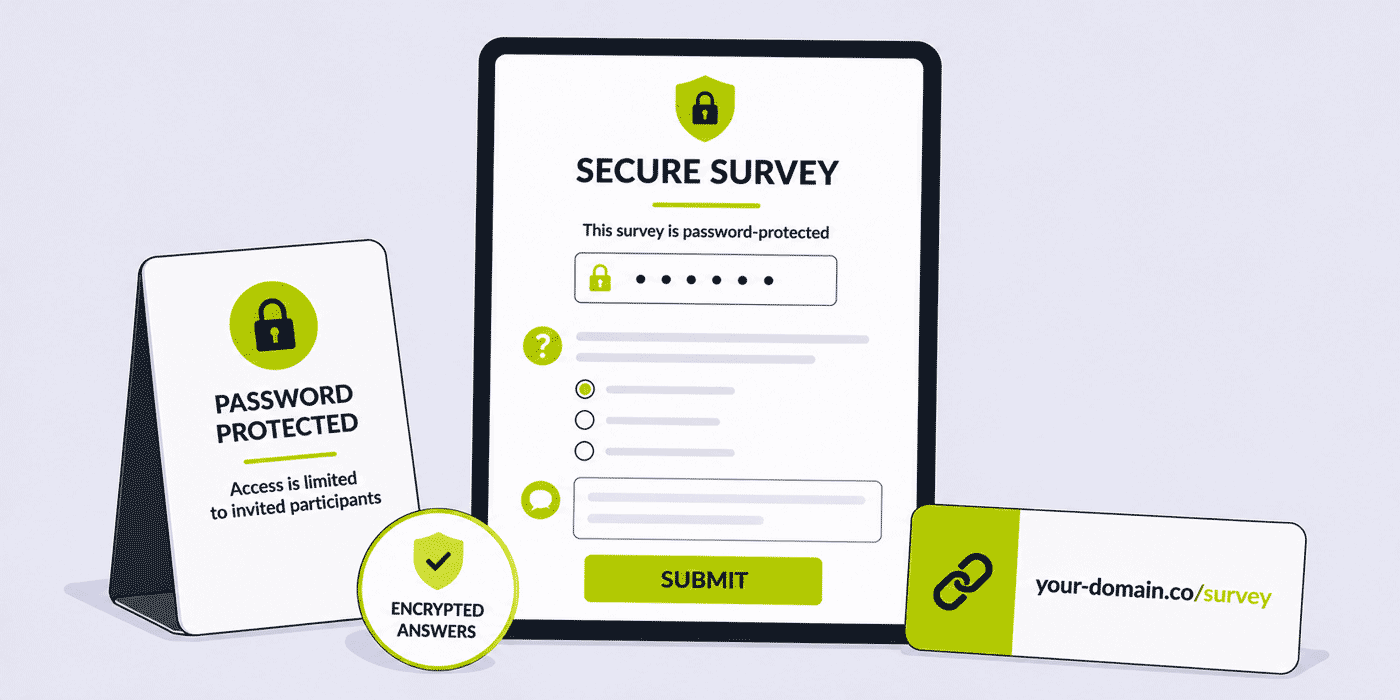
The mechanics are deliberately simple. When building a survey, you set a password in its settings; from then on, anyone opening the survey's link — cutt.ly/s/team-pulse, or your-domain.co/s/team-pulse on a branded domain — is asked for the password before the survey opens. Without it, the questions stay closed. With it, the survey proceeds exactly as any other: steps or one page, your Start page, your styling, your question set.
Two facts about availability shape how you can use this. First, password protection is on every plan, including Free — Cuttly does not treat closed research as a premium tier's privilege. What scales with plans is capacity: 1 survey with 10 responses on Free, up to 50 surveys with 5,000 responses each on Team Enterprise, with question counts, option counts and active periods rising in step. Second, the password protects the survey rather than the link, which is what makes the distribution pattern in the next section possible: the address can appear anywhere without opening the door anywhere.
Cuttly applies the same principle to regular short links — the password-protected short links guide covers that side — so organizations running gated content and gated research can hold both behind one consistent mechanism, on one account.
When the Password Earns Its Friction — and When It Doesn't
Every gate costs some entrants, so the password should be a decision, not a default. The test is whether an uninvited answer would damage the results. For the customer feedback programs of the earlier guides — post-purchase pulses, event exits — it would not: an occasional stray response disappears into volume, and the gate would cost more genuine answers than it excludes stray ones. Open those. For the audiences in this guide, a single uninvited respondent can matter — a diluted membership vote, a leaked question list, an employee survey answered by someone with a grudge and no badge — and the password's friction buys certainty that is worth it.
A useful habit is to name, in one sentence, who the password keeps out and why that matters: "non-members would skew the renewal vote," "the question list reveals the Q4 roadmap," "staff need to know outsiders cannot read over their shoulder." If the sentence writes itself, protect the survey. If it comes out strained — "someone random might answer, I suppose" — the survey probably wants reach more than it wants a gate, and the trust stack behind the password (which every survey gets regardless) is doing the real reassurance work anyway.
The same sentence, kept, becomes Start-page copy. Respondents who understand why the door exists — "this survey is for members, so the results reflect members" — read the password as respect for the room rather than suspicion of them, which is exactly the posture closed research needs to open with.
The Two-Channel Pattern: Link Wide, Password Narrow
The counterintuitive strength of a protected survey is that its link stops needing protection. Once the password is the gate, the address can travel through every convenient channel — the all-hands slide, the printed card in the welcome kit, the pinned message, the email signature — chosen purely for reach and convenience. The password travels separately, through exactly one channel: the one that defines your audience.
- Employees — the password goes in the internal newsletter or the intranet post only staff can read. The link can sit on a poster in the kitchen.
- Beta testers — the password ships inside the beta build's release notes or the testers' private channel. The link can be public documentation.
- Paying members — the password lives behind the login, on the members' dashboard. The link can go in the public newsletter as proof the community's voice is asked for.
- Course cohorts — the password appears in the course platform's announcement, reaching exactly the enrolled. The link goes on the closing slide.
- Clients — the password arrives in the project channel or from the account manager personally. The link can be in the standard report template.
The pattern's elegance is that eligibility is enforced by a channel you already maintain. You are not building an access system; you are borrowing the one implicit in "people who can read our internal newsletter" or "people logged into the course." The survey inherits the audience definition of wherever the password lives — which also means choosing that channel is the audience decision, and deserves a deliberate moment rather than a reflex.
The Trust Stack: What Sits Behind the Password
The password answers "who can get in." Closed-audience research lives or dies on a second question — "what happens to what I write" — and here the platform's standing features assemble into a stack worth stating in full, because every layer is on every plan:
- Encrypted open answers. Free-text responses — the resignation-risk comment, the blunt assessment of the proposal — are encrypted with 256-bit encryption before being saved to the database. Not a setting; the default.
- Your privacy policy, attached. The survey can carry your organization's own privacy policy link, so respondents can read your actual commitments — retention, access, purpose — before typing a word.
- Aggregated, anonymized analytics. The link layer's click data is aggregated and anonymized by design, consistent with how Cuttly handles analytics across the platform.
- EU infrastructure. Cuttly is operated by a company with servers in the EU — a sentence that matters materially to European HR departments and any organization with GDPR obligations running employee or client research.
- Your domain on the door. From the Starter plan, the protected survey arrives at
your-domain.co/s/pulse— and people type passwords for addresses they recognize far more readily than for addresses they don't.
The stack does its best work when it is visible. One plain sentence on the Start page — "answers to the open questions are encrypted, we don't ask who you are, and our privacy policy is linked below" — converts the architecture into candor. Respondents cannot see a database's encryption; they can read a sentence that tells them it is there.
For organizations whose research falls under GDPR or similar regimes, the stack also changes who has to sign off. Internal and client research routinely stalls in review because the survey tool cannot answer basic questions about storage, access and data handling; a platform that can state its posture plainly — EU company, EU servers, encryption at rest for open answers, aggregated and anonymized analytics, the organization's own policy attached to the instrument — gives privacy reviewers the sentences they need. It does not replace the review (and this guide is not legal advice), but it turns the conversation from investigation into confirmation, which for a quarterly instrument is the difference between a program and a pilot that never graduates. The platform-level view is in the secure URL shortener guide.
Anonymity Is a Promise You Design, Then Keep
A careful distinction, because closed research often advertises "anonymous" and the word deserves precision. Anonymity in a survey is first and foremost a design decision made by the survey's author: a survey is anonymous when it does not ask who is answering — no name field, no email question, no "which team are you on" in a company where teams have three people. No platform feature substitutes for that discipline, and the fastest way to break an anonymity promise is a demographic question that narrows the field to one.
Design it with care and the platform holds up its side: the open answers are encrypted at rest, the analytics are aggregated and anonymized, and your privacy policy — the document that states what you collect — is right there on the survey. The Start page then says only what is true. "This survey doesn't ask who you are" is a checkable claim when the questions visibly don't; respondents notice the consistency, and consistency is what candor is paid in. Where you do need segmentation — department-level results in a large company — say that instead, plainly, and keep the segments wide enough that no answer can be walked back to a desk.
Writing Questions for Rooms Where Honesty Has a Price
Closed audiences differ from customers in one structural way: they have a continuing relationship with the asker, and every answer is written with that continuation in mind. An employee rating leadership, a client scoring the partnership, a member voting on direction — each is calculating, at some level, what candor costs. Question design either lowers that price or raises it, and three moves lower it reliably.
Ask about the work, not the person. "How well do our meetings use your time?" collects what "rate your manager's meeting skills" cannot, because the first can be answered bluntly without indicting anyone by name. Framing questions at the level of systems, processes and defaults gives respondents a way to deliver hard news that lands on the thing rather than a colleague — and it produces findings leadership can act on without a witch hunt, which is what makes the next wave answerable too.
Let the scale carry the negative. A rating question does the criticizing so the respondent doesn't have to compose it: tapping two stars is psychologically cheaper than writing "this is going badly," which is why the frozen rating opens every pulse in this series. The open question then invites the willing deeper — "what's behind your rating?" — without requiring anyone to volunteer prose they'd rather not sign, even unsigned.
Make the choice options do no harm. In a closed room, option lists are read as leadership's map of acceptable answers. A "biggest obstacle this quarter" question whose options are all external — market, tooling, timelines — tells staff that internal obstacles are off the menu, and they will notice. Include the uncomfortable options; their mere presence signals the survey can hear them, and their share of the distribution is precisely the number worth having.
Cadence Inside Organizations: Rhythm Without Surveillance
Internal research walks a line customer research never faces: asked too rarely, it reads as indifference; too often, as monitoring. The workable rhythm for most organizations is the quarterly pulse as the spine — frequent enough that no single wave carries existential weight, spaced enough that each arrives as an event — with targeted instruments (the exit survey, the post-project retro, the pre-decision consultation) attaching to their triggering moments the way transactional surveys attach to purchases. The fatigue budget from the customer feedback guide applies with the volume turned up, because employees cannot unsubscribe: one relationship-level ask per quarter, moment-triggered instruments exempt, and never two open instruments in the same room at once.
Rhythm also protects the data. A pulse that lands the same week each quarter, holds the same frozen rating, and closes on the same fourteen-day clock produces waves that compare cleanly — the trend line the whole exercise exists for — while ad-hoc timing folds seasonal noise into every comparison. The active period is the metronome here: set it once, calendar it forever, and let the survey's structural deadline do the enforcement no reminder email enjoys doing.
Closed-Audience Playbooks
The Employee Pulse
The recurring internal survey — quarterly for most organizations — is the canonical protected survey: a frozen rating on how work feels, one or two choice questions on the quarter's live topic, one encrypted open question. The password rides the internal newsletter; the link lives on the intranet and the kitchen poster; the active period gives the pulse a real deadline. The wider internal-communication patterns — links for handbooks, announcements, onboarding — are in the HR and internal communications guide.
Global workforces add the language layer: one pulse per language with matching interface buttons — 16 available on every plan — under back-halves like cutt.ly/s/pulse-de, each language wave keyed by the local newsletter's password. The per-language trend lines that result are worth the extra slots, because "how work feels" moves differently across offices, and a single blended number hides exactly the divergence a people team most needs to see. Where slots are scarce, prioritize the languages of the deskless populations first — they are the staff for whom a native-language survey most changes participation.
Exit and Stay Interviews
The structured exit survey — sent individually, password shared by HR in the offboarding conversation — collects the departure honesty that exit meetings often soften. Its quieter sibling, the stay interview survey, asks tenured employees what keeps them and what almost hasn't, and is arguably the more valuable instrument since its findings still have someone to retain. Both draw on the recruitment-side patterns in the recruitment and HR guide.
Beta Panels and Early-Access Research
Product research among testers is double-sensitive: the answers matter and the questions leak roadmap. The password keeps both inside the panel, and per-wave passwords — a fresh one with each beta build — quietly expire the access of testers who drifted out of the program. Question budgets stay small and specific to the build; the open question ("what broke, what surprised you?") does the heavy lifting, encrypted at rest.
The per-wave password doubles as version hygiene: because each build's survey wave carries its own code, answers cannot straggle in from testers running last month's build against this month's questions — a quiet data-quality win, since "the crash on the settings screen" means nothing if you cannot pin which settings screen. Where the panel spans platforms, per-platform back-halves (cutt.ly/s/beta-ios, cutt.ly/s/beta-android) split the opens the way the earlier guides split channels, and the platform whose testers go silent is the platform whose build note buried the ask.
Paid Communities and Memberships
For memberships, the protected survey is both instrument and perk: asking members what the community should become — behind a members-only password — performs the exclusivity the membership sells. The renewal-season survey earns its slot every year: one choice question on what members value most (its distribution is the retention strategy), one on what is missing (the roadmap), one open question. The Finish page points at the next members' event.
Course Cohorts and Education
Course feedback wants cohort isolation — this group's answers about this run — and the password delivers it with a fresh code per cohort while the survey itself persists for year-over-year comparison. Educators running end-of-course surveys, module pulses and instructor feedback will find the surrounding link workflows in the online courses guide, the education guide and the schools and universities guide.
Client Research for Agencies and Consultancies
Two protected instruments serve professional services. The client relationship survey — annual, password from the account lead — asks the questions retainers depend on: where the partnership delivers, where it grinds. And the stakeholder study run for a client — surveying a client's own customers or staff as part of an engagement — inherits confidentiality obligations the password materially supports, with the client's privacy policy attached and results exported to PDF for the deliverable. Agency-side link operations are covered in the agencies guide and the consultancies guide.
The Pre-Decision Consultation
A pattern that cuts across every closed audience: the one-off protected survey run before a consequential decision — the office move, the pricing change, the community rule rewrite. Its shape is fixed: one choice question laying out the real options under consideration, one open question for what the options miss, a short window with a stated decision date, and a Start page that commits to publishing the outcome. The password matters here because the question list is the announcement that the decision is live, and rooms deserve to hear that from the instrument itself rather than a screenshot. Run well, the consultation is the highest-trust survey an organization can field — the room was asked before it was told — and its participation number will exceed every routine pulse around it.
Boards, Volunteers and Nonprofits
Governance feedback — board self-assessments, volunteer experience surveys, member consultations before a strategic decision — is small-audience, high-sensitivity work where the password and the anonymity design carry equal weight: a twelve-person board needs no demographic questions at all. Nonprofit link patterns beyond research live in the nonprofits guide.
Password Logistics: Small Craft, Real Consequences
The password is the smallest moving part of the operation and the one whose handling most shapes the experience. The working rules:
- Make it typeable. Respondents enter it on phones, sometimes from a poster across the room. A readable word-pair beats a cipher; the password gates eligibility, not state secrets — the encryption behind it does the heavy security work.
- One password per wave. Each survey cycle gets a fresh one, which cleanly expires last quarter's access, keeps forwarded old passwords harmless, and tells you — if the old password's wave stays quiet — that the leak you worried about didn't matter.
- Never in the same breath as the link. The two-channel pattern collapses if the all-hands slide shows both. The slide shows the address; the sentence spoken over it says where the password lives.
- Plan the "I lost it" path. Someone always does. The answer is the channel itself — "it's in Tuesday's newsletter" — which re-verifies eligibility in the same motion.
- Retire deliberately. When the wave closes, the survey's active period ends anyway; the password's afterlife is zero. That is the design working, not a loose end.
Shaping the Research Window
Closed research borrows every discipline established earlier in this series and tightens two of them. The active period becomes the research window: a pulse collecting for one crisp week (any plan covers it) reads as an event with a deadline, where a month-long internal survey reads as wallpaper — and the per-plan windows of 7, 15, 30, 60 and 90 days let the deadline be structural rather than honor-system. The question budget shrinks under sensitivity: every additional question in an employee or client survey raises the felt cost of candor, and the three-question pulse — frozen rating, one live choice question, one encrypted open field — is the format that sustains quarterly rhythm for years. Button languages complete the fit for international workforces: 16 options on every plan, one survey per language with its own back-half — cutt.ly/s/pulse-de, cutt.ly/s/pulse-fr — and per-language passwords if the waves differ.
Protected Surveys in Physical Space
The password unlocks a placement style the open-survey guides could not recommend: putting a sensitive survey's door in plain sight. The kitchen poster, the warehouse breakroom board, the back-of-house QR code — placements from the QR surveys guide — can carry an employee pulse precisely because scanning the code only reaches the door; the newsletter still holds the key. For deskless workforces this is not a nicety but the whole distribution: retail floor staff, drivers, kitchen teams and site crews often have no work inbox worth relying on, and the poster-plus-payroll-note pattern (code and link on the wall, password in the payslip message or the shift-briefing sheet) reaches them where email never will.
Print discipline follows the earlier guide's rules — contrast, size, the printed your-domain.co/s/pulse beside the code — with one protected-specific addition: the poster states, in its one line of framing, that the survey is anonymous by design and where the password lives. "Quarterly pulse — no names asked. Password in Monday's newsletter." Fourteen words that carry the trust stack, the two-channel pattern and the eligibility rule to someone reading a wall.
Running Protected Research for Others
Agencies, consultancies and fractional HR providers operate this entire guide one level up: the instruments are theirs, the rooms are their clients'. The mechanics scale cleanly — each client engagement gets its own surveys, back-halves and per-wave passwords, and the Team plan's 20-survey capacity with role-based access lets each account lead see their clients' instruments and no one else's — but two practices matter more at arm's length. The privacy policy attached to each survey should be the one the respondents actually sit under, which in stakeholder studies means the client's; and the deliverable discipline sharpens, with the PDF export as the client-facing artifact and the raw XLS governed by whatever the engagement's confidentiality terms say. Run this way, a research practice's whole client portfolio lives in one account, each room's door keyed separately, each wave's record dated and final.
Who Sees the Answers
Sensitive collection deserves sensitive handling on the reading side, and the account structure is part of the promise. On the Team plan, role-based multi-user access means the HR lead who reads pulse answers, the account manager who reads client studies and the product manager who reads beta panels each work under their own login, seeing their own instruments — no shared credentials, no incidental browsing of a colleague's sensitive results. Exports follow the same care: the PDF that summarizes for leadership can carry distributions without verbatim open answers where the answers are raw; the XLS that carries everything stays in the folder with access to match; and the export-at-close habit from the rest of the series doubles here as records discipline, since each wave's file is dated, complete and final.
Retention deserves one deliberate sentence in the program's design: decide, before the first wave, how long raw exports live and where, and put that answer in the privacy policy the survey links to. Closed research accumulates the most sensitive archive an organization voluntarily creates — years of candid open answers — and "we keep wave exports for X, then keep only the summaries" is a policy respondents can weigh, where silence is one they will weigh against you. The dashboard's per-survey summaries support the graduated approach naturally: the trend survives forever, the verbatims only as long as stated.
And the loop still closes — carefully. Closed research earns its next wave the same way open research does, by visibly changing something, but the "you said, we did" sentence is written at the pattern level, never the quote level: "several of you flagged the on-call rotation" is loop-closure; quoting the flag verbatim in the all-hands is a breach of the room's trust, even anonymized. The craft is compressing findings to the altitude where everyone recognizes the theme and no one recognizes the voice.
Reading Participation as a Result
In closed research, the response count is not just a denominator — it is a finding. The audience is enumerable (staff, members, the cohort), so participation is a real percentage, and its movement between waves says things the answers themselves cannot. A pulse whose participation climbs is a room deciding the instrument is safe and worth it; participation that sags after a wave whose findings visibly went nowhere is the room pricing in futility. Track it beside the rating trend, wave over wave, with the same seriousness.
The link layer refines the reading. Opens versus completions — the diagnostic carried through this whole series — has a sharpened meaning behind a password: people who opened the link but never entered the password met the door and turned back, which in an internal context is itself a signal about trust or about password findability, two very different fixes. And because participation is a percentage of a known room, the response arithmetic runs in reverse at plan-selection time: the ceiling must clear the audience's full size, not a forecast, because a protected survey that locks out the last third of a willing staff is a trust incident, not a capacity hiccup.
One caution completes the discipline: never chase participation individually. "We noticed you haven't filled in the pulse" — technically possible in any organization that controls its own reminder lists — converts an anonymous instrument into attendance-taking in one sentence, and the room will remember it for years. Reminders go to everyone or to no one; the channel that carries the password carries them; and low participation gets fixed the honorable way, by making the previous wave visibly matter.
The First Wave: Launching Protected Research from Zero
The first protected survey an organization runs sets the reputation all successors inherit, so it deserves deliberate staging. Announce before asking: a short note from whoever owns the instrument — what will be asked, why now, what happens to answers, when results will be shared — lands a few days before the link does, so the survey arrives explained rather than appearing as a curiosity to be screenshotted and speculated about. Start small and safe: the first wave's questions should be ones whose honest answers the organization can visibly absorb — meeting culture, tooling, communication — not the rawest nerve available, because the room is testing whether candor is survivable before it spends any.
Then over-deliver on the close. The first wave's results summary should arrive faster and fuller than promised, with the one chosen change named and dated. Nothing establishes an instrument like the sequence asked Tuesday, heard Friday, changed by month's end happening once, in public, on schedule — and nothing kills one faster than a first wave that vanishes into silence. The second wave's participation number will tell you, precisely, which of the two happened.
A Worked Example: The Quarterly Pulse at an 80-Person Company
Assembled end to end, on the Single plan. The people team builds one survey: a frozen star rating ("how has work felt this quarter?"), one choice question that rotates with the quarter's live topic — this cycle, three candidate changes to the meeting culture — and one open question, its encryption noted in the description. Steps layout, company accent color, the company privacy policy linked, no identifying questions anywhere, and a Start page that says exactly that in one sentence.
The link — your-domain.co/s/pulse on the Starter-carried domain — goes on the intranet homepage and the kitchen poster with its QR code. The password, a fresh word-pair each quarter, appears only in Monday's internal newsletter. The window is fourteen days inside Single's 30-day allowance; a single reminder rides the second Monday's newsletter. Eighty staff sit comfortably under the plan's 100-response ceiling — the arithmetic check done at plan-selection, as ever.
At close: XLS exported, the people lead and the site lead read the open answers in one sitting, the choice distribution picks the meeting-culture change, and the next all-hands carries one pattern-level sentence about what the pulse moved. The survey's summary stays in the dashboard beside the previous quarters', the rating's trend line now four points long. Total quarterly cost: an hour of building the first time, twenty minutes of operating every time after.
Year two, briefly: by the fourth wave the operation is furniture. The rating trend is a slide leadership expects; the choice question's rotation is planned two quarters out; a new office's staff learn about the pulse from the poster before anyone briefs them. The only deliberate act remaining is the one that started it — each wave still closes with a change and a sentence — because that, not the password, was always the mechanism keeping the room's side of the bargain alive.
Common Mistakes in Protected Research
- Promising anonymity while asking identifying questions. The demographic battery that narrows to one person breaks the promise regardless of any platform feature. Design first.
- Link and password in the same message. One forwarded email opens the door. Two channels, always.
- The immortal password. Reused across waves, it accumulates holders forever. Fresh per wave.
- Ceremony without the stack. A password on the door and silence about encryption and policy inside. State the trust stack on the Start page — it is why people answer candidly.
- Quoting the room. Verbatim open answers in the all-hands, "anonymized." Patterns, never quotes.
- The month-long pulse. Sensitivity plus sprawl reads as surveillance. One crisp week, a real deadline, a visible close.
- Shared dashboard logins. Sensitive results readable by whoever holds the house password. Team-tier roles exist for exactly this.
- Skipping the response arithmetic. A company-wide pulse against a 10-response Free ceiling closes by lunch. Size the plan to the audience.
The Protected Program on One Page
Compressed for the wall: gate the surveys where an uninvited answer would damage the result, and name that reason on the Start page. Move the link through whatever channel reaches best and the password through the one channel that defines the room, fresh per wave. Design anonymity into the question list before promising it in the copy, ask about systems rather than persons, and let the encrypted open question carry what the ratings cannot. Hold the quarterly spine steady — same week, same frozen rating, same fourteen-day clock — read participation as a finding beside the answers, and close every wave the same way: export dated at the deadline, one change chosen, one pattern-level sentence delivered to the room that answered.
Every element runs on the platform's stated dimensions — protection and encryption on all plans, capacity and role separation scaling up through the tiers — which keeps the program honest in both directions: nothing promised to respondents that the system does not do, and nothing in the system left unstated that would help them believe you.
Cuttly Plan Guide for Closed-Audience Research
The Free plan ($0) includes password protection outright, with pilot dimensions: 1 survey, 5 questions, 10 responses, a 7-day window. A board self-assessment, a small team's retro, a proof-of-concept pulse — covered at zero cost. Registration is required; no credit card is needed.
The Starter plan ($12/month) adds the branded domain that puts your name on the door — your-domain.co/s/pulse — with 3 surveys, 30 responses and 15-day windows: a small organization's pulse plus an exit survey plus one seasonal instrument, under its own address.
The Single plan ($25/month) is the small-company research tier of the worked example: 5 surveys, 100 responses each, 30-day windows, and customized QR codes for the poster placements. Teams up to the response ceiling run their whole internal program here.
The Team plan ($99/month) carries organizational research: 20 surveys, 2,000 responses each, 60-day windows, and — decisive for sensitive work — role-based multi-user access separating who reads what. HR's pulses, product's panels and account leads' client studies coexist in one account with proper walls.
The Team Enterprise plan ($149/month) serves large organizations running closed research at scale — 50 surveys, 5,000 responses each, 90-day windows — where company-wide pulses, multi-market studies and per-department instruments share the platform's highest limits.
The first protected survey takes an evening: create a free Cuttly account, build the three-question pulse, set the password, and let the next newsletter carry it. Registration required; free plan available with no credit card needed.
Frequently Asked Questions
Is password protection for surveys available on the Cuttly free plan?
Yes — on every plan, Free included. Plans differ in capacity (surveys, questions, responses, active days), not in access to protection: Free's 1 survey with 10 responses covers a pilot, while Team Enterprise's 50 surveys with 5,000 responses each carry organization-wide programs.
How does a password-protected survey work for respondents?
They open the short link — cutt.ly/s/team-pulse or your branded equivalent — and are asked for the password before the survey opens. Without it, the questions stay closed, which is what lets the link travel freely while the password defines the audience.
Are answers to a protected survey encrypted?
Open-question answers are encrypted with 256-bit encryption before storage, on every plan and for every survey, protected or not. Stating this in one Start-page sentence is the single cheapest candor improvement available.
Can employees answer an internal survey anonymously?
Anonymity is a design decision you make and keep: ask no identifying questions, keep any segmentation wide, and say plainly what is and is not collected. The platform supports the posture — encrypted open answers, your own privacy policy on the survey, aggregated and anonymized analytics — but the promise itself lives in your question list.
How should I distribute the survey password?
Through a different channel than the link, and specifically through the channel that defines your audience — the internal newsletter, the members' dashboard, the course announcement, the client portal. Fresh password per wave; lost-password requests get pointed back at the channel, which re-verifies eligibility for free.
Can I run a password-protected survey on my own domain?
Yes — surveys serve on your branded custom domain from the Starter plan, so the protected pulse arrives at your-domain.co/s/pulse. A recognized address matters doubly here: people type passwords for domains they trust.
What happens when the survey's active period ends?
Collection closes on schedule — 7 to 90 days depending on plan — which is a feature for closed research: the wave has a real deadline, the export marks the record, and the password's afterlife is zero. The dashboard keeps the closed survey's summary for trend comparison against the next wave.
- SURVEYS
- URL Shortener →
- QR Code Generator →
- Link in Bio Builder →
- This Series
- Online Surveys — The Pillar Guide
- QR Code Surveys
- Customer Feedback Programs
- Post-Event Surveys
- Related Guides
- Password-Protected Short Links
- Secure URL Shortener
- Custom Domains for Short Links
- Similar Verticals
- HR & Internal Comms
- Recruitment & HR
- Agencies
- Online Courses
- Encyclopedia
- Branded Links
- Link in Bio
- Verticals Hub
- URL Shortener for Every Industry →
- Start Here
- Create Free Account
- Plans & Pricing
URL Shortener
Cuttly simplifies link management by offering a user-friendly URL shortener that includes branded short links. Boost your brand’s growth with short, memorable, and engaging links, while seamlessly managing and tracking your links using Cuttly's versatile platform. Generate branded short links, create customizable QR codes, build link-in-bio pages, and run interactive surveys—all in one place.
Cuttly More Than Just a URL Shortener
Cuttly is a comprehensive, ever-evolving platform for link shortening that combines innovation and user-friendliness to deliver a seamless experience in managing and shortening URLs.


