How to delete an Action Page?
1. Log in to your Cuttly account and go to the Action Pages section in the left sidebar.
2. In the CTA Links list, find the Action Page you want to delete.
3. Click the trash / delete icon — it is the last icon in the row of action icons displayed below each Action Page link.
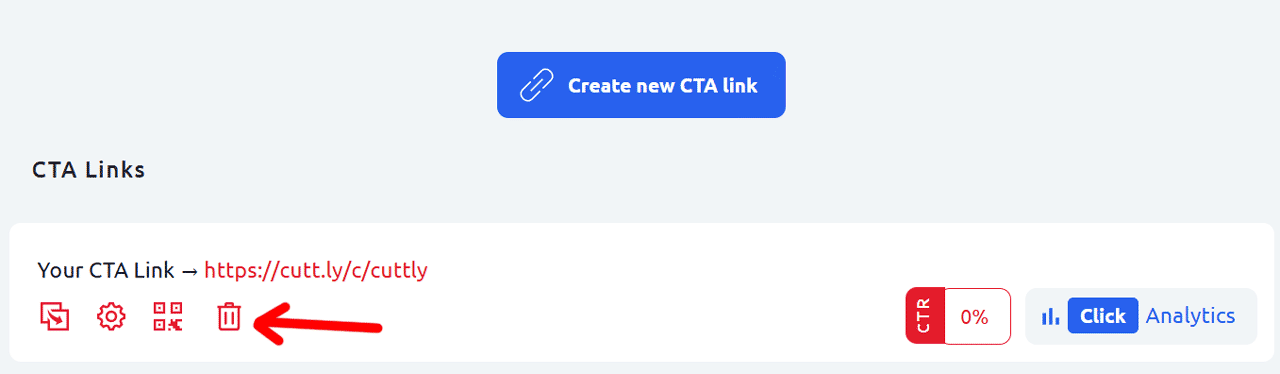
4. Confirm the deletion. The Action Page will be permanently removed from your account.
Warning: this action is permanent. Deleting an Action Page cannot be undone. The page, its URL, and all associated analytics data will be removed. Any QR codes generated for that page and any shared links pointing to it will stop working immediately.
If you are not sure, consider changing the page content or alias instead of deleting it.
Find out more about the options available in your subscription plan here: Cuttly pricing and features
FAQ
Is deleting an Action Page permanent?
Yes. Deleting an Action Page is permanent and cannot be undone. The page, its URL, and all associated data will be removed from your account.
What happens to QR codes and shared links after deletion?
Once an Action Page is deleted, its URL stops working. Any QR codes generated for that page and any links shared in emails, social media, or printed materials will no longer redirect visitors correctly.
Where is the delete button?
The delete (trash) icon is the last icon in the row of action icons displayed below each Action Page link in the CTA Links list.
-
What is an Action Page?
How to create an Action Page?
How to edit an Action Page?
How to delete an Action Page?
How to generate a QR code for an Action Page?
In which domains can I publish an Action Page?
How to change the alias / slug of an Action Page?
How to edit the background of an Action Page?
How to edit styles and template of an Action Page?
How to add or edit the logo on an Action Page?
How to edit the title of an Action Page?
How to edit the description of an Action Page?
How to add a video to an Action Page?
How to add a countdown timer to an Action Page?
How to edit the CTA button label?
How to edit the target URL (destination link)?
How to add a privacy policy and terms URL?
How to view analytics and CTR for an Action Page?