How to edit an Action Page?
After creating an Action Page, you can edit and customize all its elements at any time — logo, title, description, background, styles, video, countdown, CTA button, and more.
1. Log in to your Cuttly account and go to the Action Pages section in the left sidebar.
2. In the CTA Links list, find the Action Page you want to edit.
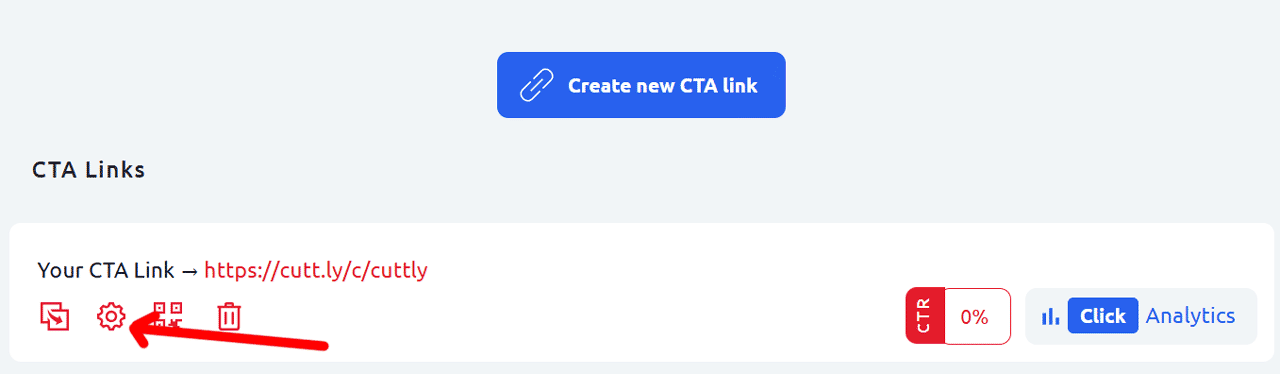
3. Click the settings (gear) icon below the Action Page link. This is the second icon in the row of action icons under the link.
4. The full Action Page editor will open, showing a live preview of your page on the left and an icon toolbar on the right side. Each icon in the toolbar opens a specific editing panel:
• Link icon — change the URL alias / slug
• Image icon — edit the background
• Template icon — edit styles and template
• Clock icon — set the countdown timer
• Shield icon — add privacy and terms URLs
• Avatar icon — upload the logo
• Lines icon — edit the title
• Text icon — edit the description
• Video icon — add a YouTube or Vimeo video
• Button label icon — edit the CTA button text
• Target URL icon — edit the destination link
5. Click any icon to open the corresponding panel, make your changes, and click "Save" to apply them.
Changes are applied immediately after saving and are visible to anyone who opens the Action Page link.
Find out more about the options available in your subscription plan here: Cuttly pricing and features
FAQ
How do I open the Action Page editor?
In the Action Pages section, find the page you want to edit and click the gear (settings) icon below the link. This opens the full editor with a toolbar of editing options.
What can I edit on an Action Page?
You can edit: logo, title, description, background, visual template (styles, fonts, button shape), video, countdown timer, CTA button label, target URL, privacy and terms URLs, and the page alias (slug).
Do changes take effect immediately?
Yes. After clicking Save in any editor panel, changes are applied immediately and visible to anyone who opens the Action Page link.
-
What is an Action Page?
How to create an Action Page?
How to edit an Action Page?
How to delete an Action Page?
How to generate a QR code for an Action Page?
In which domains can I publish an Action Page?
How to change the alias / slug of an Action Page?
How to edit the background of an Action Page?
How to edit styles and template of an Action Page?
How to add or edit the logo on an Action Page?
How to edit the title of an Action Page?
How to edit the description of an Action Page?
How to add a video to an Action Page?
How to add a countdown timer to an Action Page?
How to edit the CTA button label?
How to edit the target URL (destination link)?
How to add a privacy policy and terms URL?
How to view analytics and CTR for an Action Page?