How to add or edit the logo on an Action Page?
The logo is the brand image displayed at the very top of your Action Page, above the title. It is typically your company logo, product icon, or any visual that identifies your brand to visitors.
1. Log in to your Cuttly account and go to the Action Pages section.
2. Open the editor of the selected Action Page by clicking the edit icon.
3. In the editor toolbar on the left, click the image / logo icon (the avatar / person icon in the toolbar).
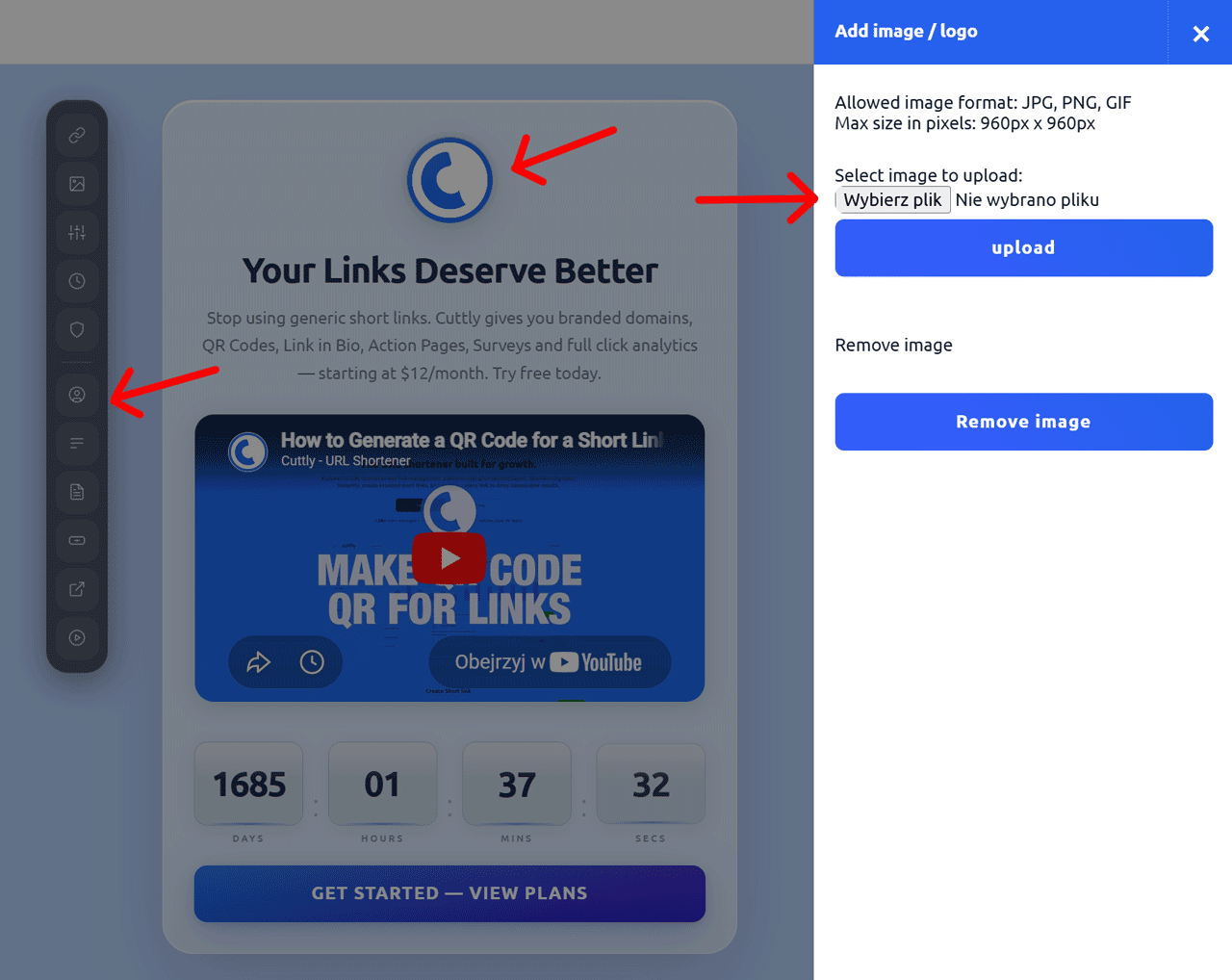
4. A side panel will slide out with the following options:
Upload image / logo:
— Allowed formats: JPG, PNG, GIF
— Maximum size: 960px × 960px
— Click "Choose file" to select the image from your device.
— Click "upload" to upload and apply the image.
Remove image:
If you want to remove the current logo, click the "Remove image" button. The page will display without a logo image.
5. The logo will appear at the top of your Action Page, above the title.
Find out more about the options available in your subscription plan here: Cuttly pricing and features
FAQ
What image formats are accepted?
Accepted formats are JPG, PNG, and GIF. The maximum image size is 960 × 960 pixels. For best results, use a square image with a transparent background (PNG).
Where does the logo appear on the page?
The logo is displayed at the top of the Action Page card, above the title and description. It is the first visual element visitors see when they open the page.
Can I remove the logo?
Yes. In the logo editor panel, click the "Remove image" button to remove the current logo. The page will display without a logo image.
-
What is an Action Page?
How to create an Action Page?
How to edit an Action Page?
How to delete an Action Page?
How to generate a QR code for an Action Page?
In which domains can I publish an Action Page?
How to change the alias / slug of an Action Page?
How to edit the background of an Action Page?
How to edit styles and template of an Action Page?
How to add or edit the logo on an Action Page?
How to edit the title of an Action Page?
How to edit the description of an Action Page?
How to add a video to an Action Page?
How to add a countdown timer to an Action Page?
How to edit the CTA button label?
How to edit the target URL (destination link)?
How to add a privacy policy and terms URL?
How to view analytics and CTR for an Action Page?