How to edit the target URL of an Action Page?
The target URL (also called the destination link) is the address visitors are sent to when they click the CTA button on your Action Page. You can point it to any destination — a product page, a pricing page, a registration form, or any external URL.
You can update the target URL at any time without affecting the Action Page URL or the QR code.
1. Log in to your Cuttly account and go to the Action Pages section.
2. Open the editor of the selected Action Page by clicking the edit icon.
3. In the editor toolbar on the left, click the target URL icon (the external link / arrow icon in the toolbar).
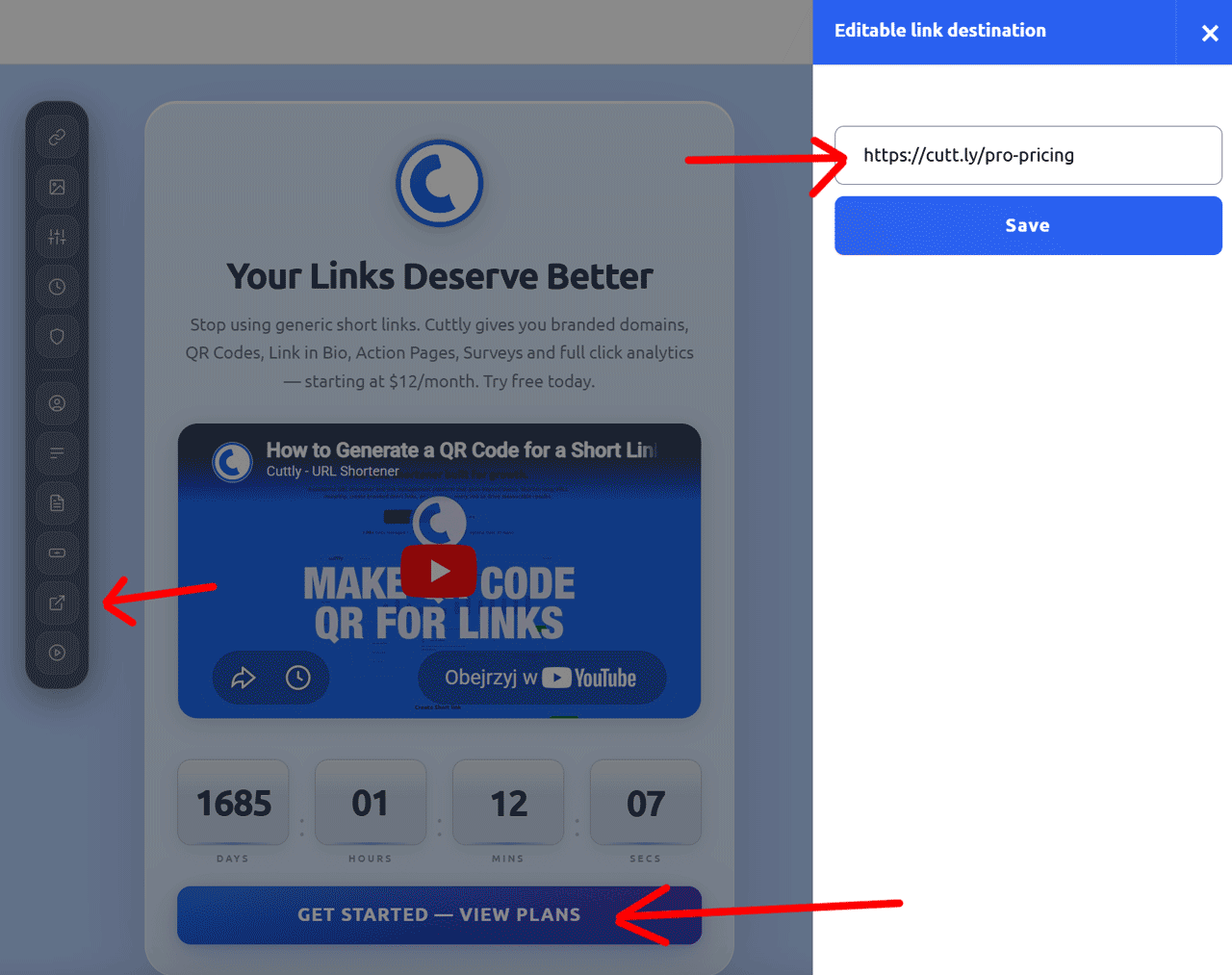
4. A side panel will slide out showing the current destination URL. Update the URL to the new destination.
5. Click "Save" to apply the changes.
Note: Changing the target URL does not change the Action Page URL (alias) or invalidate any QR code. The QR code is tied to the Action Page URL — not to the destination the button points to.
To change the CTA button label text, see: How to edit the CTA button label
Find out more about the options available in your subscription plan here: Cuttly pricing and features
FAQ
Can I change the destination URL after publishing?
Yes. You can update the target URL at any time from the editor. The page URL (alias) and the QR code remain unchanged — only the destination the CTA button points to is updated.
Does changing the target URL affect the QR code?
No. The QR code is tied to the Action Page URL (the alias), not to the destination URL. Changing the destination does not break the QR code.
Can the target URL be any website address?
Yes. The destination URL can be any valid URL — a product page, registration form, pricing page, or any external website you want visitors to reach when they click the CTA button.
-
What is an Action Page?
How to create an Action Page?
How to edit an Action Page?
How to delete an Action Page?
How to generate a QR code for an Action Page?
In which domains can I publish an Action Page?
How to change the alias / slug of an Action Page?
How to edit the background of an Action Page?
How to edit styles and template of an Action Page?
How to add or edit the logo on an Action Page?
How to edit the title of an Action Page?
How to edit the description of an Action Page?
How to add a video to an Action Page?
How to add a countdown timer to an Action Page?
How to edit the CTA button label?
How to edit the target URL (destination link)?
How to add a privacy policy and terms URL?
How to view analytics and CTR for an Action Page?