How to edit styles and template of an Action Page?
1. Log in to your Cuttly account and go to the Action Pages section.
2. Open the editor of the selected Action Page by clicking the edit icon.
3. In the editor toolbar on the left, click the template icon (third icon from the top).
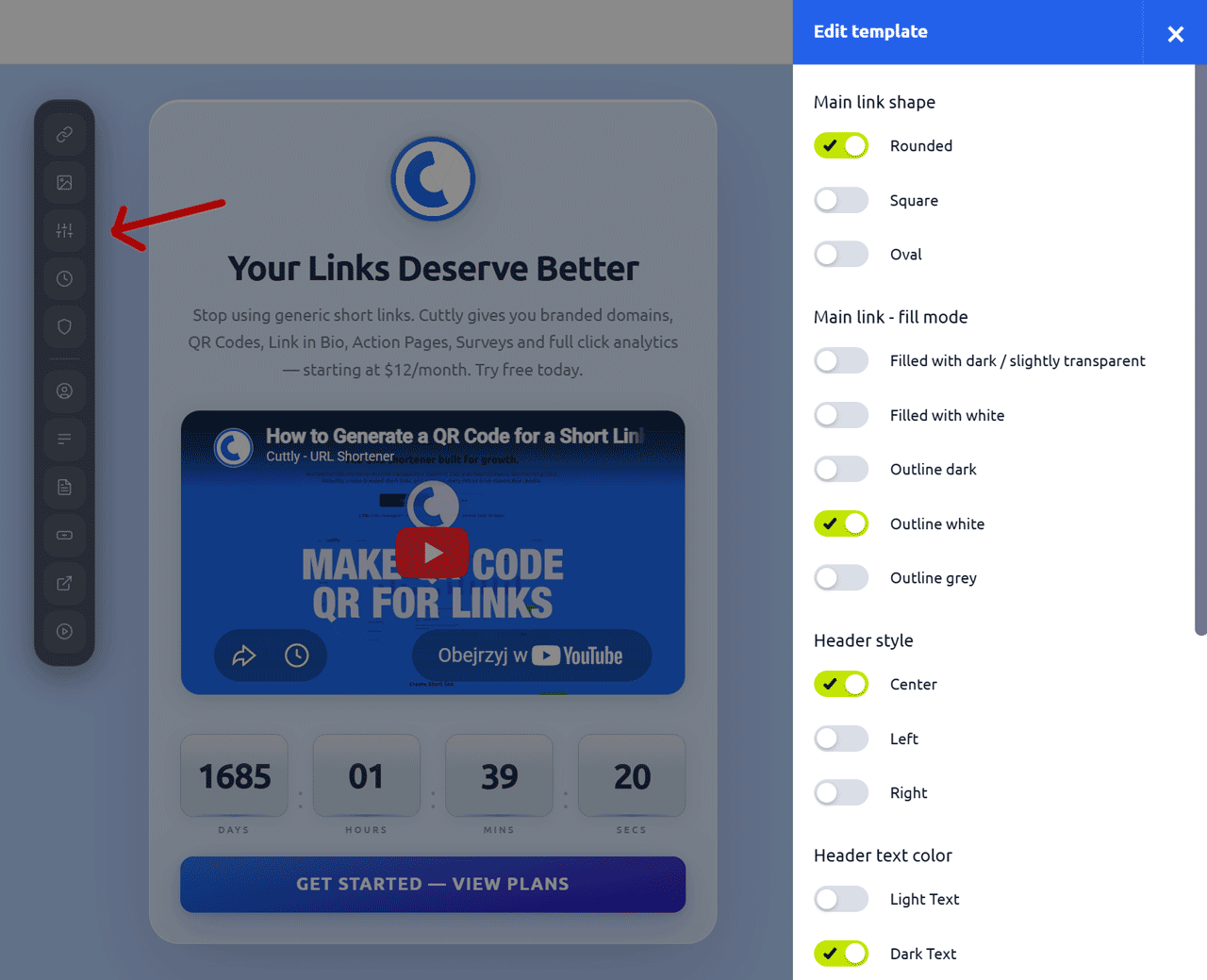
4. A side panel will slide out with the following style options:
a. Main link shape:
Rounded
Square
Oval
b. Main link — fill mode:
Filled with dark / slightly transparent
Filled with white
Outline dark
Outline white
Outline grey
c. Header style:
Center
Left
Right
d. Header text color:
Light Text
Dark Text
Grey Text
e. Font Family:
Ubuntu
Open Sans
Fuzzy Bubbles
Signika
Inconsolata
(more fonts will be added progressively)
5. After making your selections, click "Save" to apply the changes.
Note: Make sure the chosen styles complement your background. If you are using a dark or vivid background image, switch the header text color to Light Text and choose a button fill mode with good contrast (for example Outline white or Filled with white). Always preview the result after saving.
Find out more about the options available in your subscription plan here: Cuttly pricing and features
FAQ
What font options are available?
Currently available fonts are Ubuntu, Open Sans, Fuzzy Bubbles, Signika, and Inconsolata. More fonts will be added progressively.
What button shapes can I choose?
Three button shapes are available: Rounded, Square, and Oval.
How do I make the text readable on a dark background?
Use the Light Text option under Header text color. For the CTA button, choose Outline white or Filled with white fill mode to maintain good contrast against a dark background.
-
What is an Action Page?
How to create an Action Page?
How to edit an Action Page?
How to delete an Action Page?
How to generate a QR code for an Action Page?
In which domains can I publish an Action Page?
How to change the alias / slug of an Action Page?
How to edit the background of an Action Page?
How to edit styles and template of an Action Page?
How to add or edit the logo on an Action Page?
How to edit the title of an Action Page?
How to edit the description of an Action Page?
How to add a video to an Action Page?
How to add a countdown timer to an Action Page?
How to edit the CTA button label?
How to edit the target URL (destination link)?
How to add a privacy policy and terms URL?
How to view analytics and CTR for an Action Page?