How to add a privacy policy and terms URL to an Action Page?
You can optionally add links to your own privacy policy and terms of service directly on your Action Page. These links are displayed at the bottom of the page — below the CTA button — and are useful when you want to inform visitors about the policies applicable to your offer or campaign.
Both fields are optional. You may add one, both, or neither.
1. Log in to your Cuttly account and go to the Action Pages section.
2. Open the editor of the selected Action Page by clicking the edit icon.
3. In the editor toolbar on the left, click the shield / privacy icon.
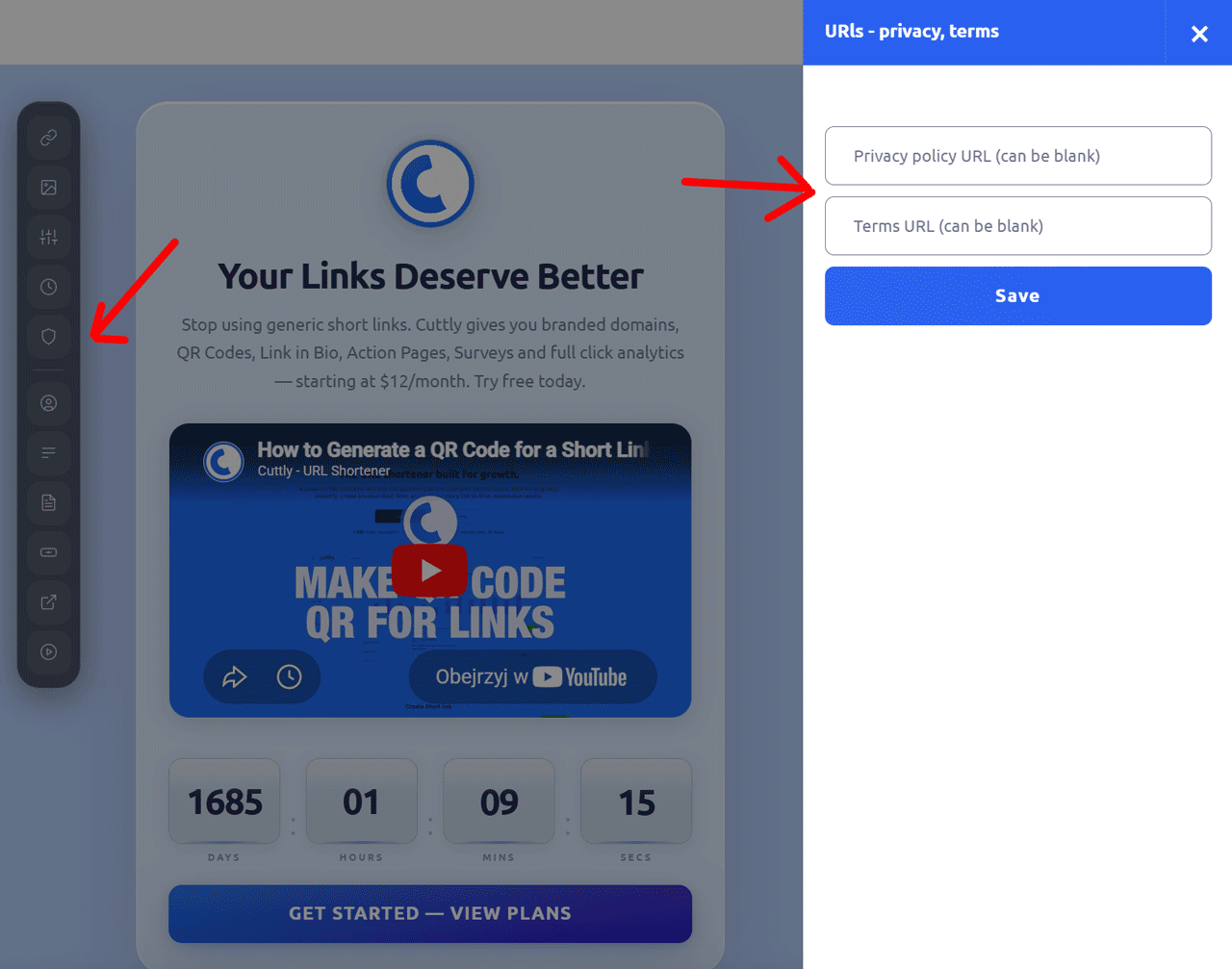
4. A side panel will slide out with two fields:
— Privacy URL: paste the link to your privacy policy page.
— Terms URL (can be blank): paste the link to your terms of service page, or leave it empty.
5. Click "Save" to apply the changes.
Note: Cuttly does not verify the content of the URLs you provide. You are responsible for ensuring that the linked pages are accurate, up to date, and compliant with applicable laws and regulations. If you have questions about legal compliance requirements for your campaigns, consult a qualified legal professional.
Find out more about the options available in your subscription plan here: Cuttly pricing and features
FAQ
Are privacy and terms URLs required?
No. Both fields are optional. You can add one, both, or neither. If left empty, no links will appear at the bottom of the page.
Where do the links appear on the page?
The privacy and terms links appear at the very bottom of the Action Page, below the CTA button.
Does Cuttly verify the linked pages?
No. Cuttly does not verify the content of the URLs you provide. You are fully responsible for the accuracy and legal compliance of the pages you link to.
-
What is an Action Page?
How to create an Action Page?
How to edit an Action Page?
How to delete an Action Page?
How to generate a QR code for an Action Page?
In which domains can I publish an Action Page?
How to change the alias / slug of an Action Page?
How to edit the background of an Action Page?
How to edit styles and template of an Action Page?
How to add or edit the logo on an Action Page?
How to edit the title of an Action Page?
How to edit the description of an Action Page?
How to add a video to an Action Page?
How to add a countdown timer to an Action Page?
How to edit the CTA button label?
How to edit the target URL (destination link)?
How to add a privacy policy and terms URL?
How to view analytics and CTR for an Action Page?