Bots
The Bots chart shows automated traffic detected on your short link — displayed separately from human click data so you have a clear, transparent picture of all access to your link.
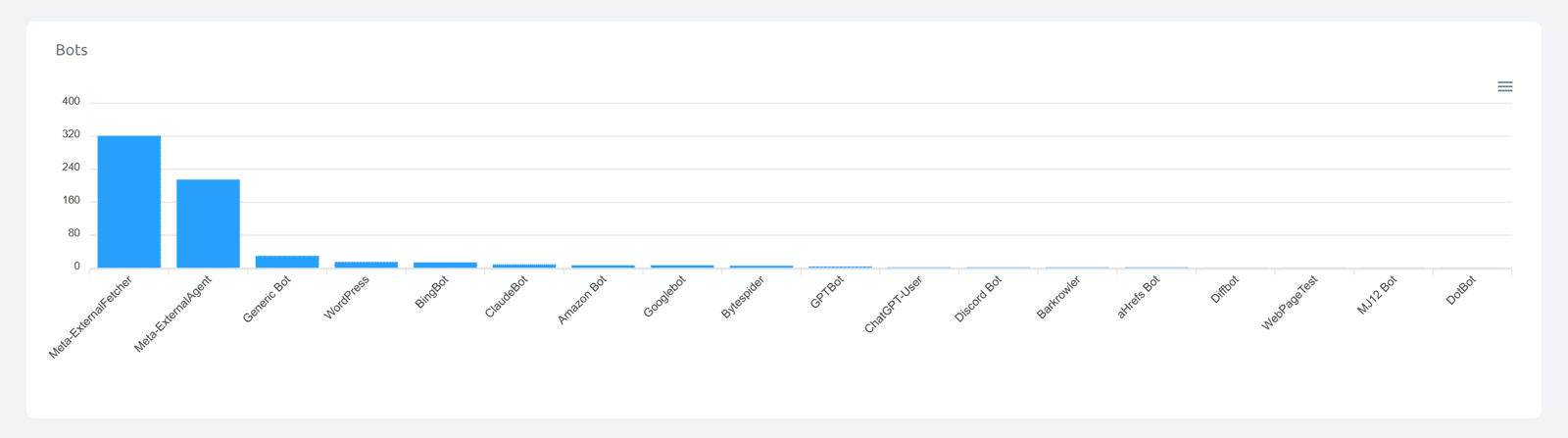
Cuttly identifies bots from their user agent strings. User agent-based bot detection covers a very wide range of known automated clients — the chart shows each detected bot type as a separate bar, ranked by access count.
Categories of bots you may see:
• Search engine crawlers — bots from major search engines that index content across the web
• AI training and crawling bots — bots operated by AI companies to index publicly available content for training or retrieval
• Social media preview fetchers — bots that fetch link content to generate preview cards when a link is shared on a social platform
• SEO and monitoring tools — crawlers used by SEO platforms, uptime monitors, and web analytics services
• Feed readers and aggregators — RSS/Atom readers that follow links in feeds
• Link checkers — automated tools that verify whether links are live
• CMS and platform bots — bots triggered by content management systems to verify or enrich links
• Generic/unclassified bots — automated user agents that identify as bots but are not matched to a specific known service
Why bot data matters:
• Social preview bots — a spike in social preview fetches is a strong indicator that your link is being actively shared on that platform. The platform fetches the link to generate the preview card every time the link is shared in a new post or message.
• Search crawlers — appearing in indexed content that crawlers follow means your link is referenced in publicly accessible places.
• AI bots — appear when your link is referenced in publicly accessible content that AI crawlers index, such as public web pages, open repositories, or forums.
• Monitoring tools — if you use uptime or performance monitoring services, their agents may regularly access your links.
All bot data is shown in UTC.
Find out more about the options available in your subscription plan here: Cuttly pricing and features
FAQ
How does Cuttly detect bots?
Cuttly identifies bots from their user agent strings. This detection method covers a very wide range of known bots — search engine crawlers, AI bots, social preview fetchers, monitoring tools, link checkers, feed readers, and many more. Detected bots are shown separately in the Bots chart.
Does Cuttly separate bot traffic from human clicks?
Yes. Detected bots are shown in the dedicated Bots chart, separate from the main click count and all other analytics charts. This gives you a transparent view of both human traffic and automated access.
Why do I see social media preview bots?
When a link is shared on a social platform, the platform's servers automatically fetch it to generate a preview card. A spike in social preview bot activity is typically a sign that your link is being actively shared on that platform.
Why do AI bots appear in my analytics?
AI crawling bots regularly index publicly accessible content across the web. If your short link appears on a public webpage, in an open repository, in a public forum, or in any other indexed content, AI bots may follow and access it.
-
What is Link Analytics?
How to view link analytics?
Time range filter (7 / 30 / 90 days / All)
Total Clicks Chart
Hourly Insights Heat Map
Source of Clicks (Facebook, Twitter, Instagram, LinkedIn, Direct)
Referrals / Other Sources
Devices Clicks (Desktop / Mobile / Other)
System (OS) Clicks
Browsers Clicks
Brand Clicks
Languages Clicks
Geo Location Clicks
Bots
Public and Private Analytics
Analytics Settings (per-link and global)
Download Analytics Report (.PDF)
Aggregated Link Analytics
Campaign Tag Analytics