Browsers Clicks
The Browsers clicks chart shows which browsers and client applications visitors use when clicking your short link. It covers standard web browsers as well as other client types that access links programmatically — all with version-level detail available on hover.
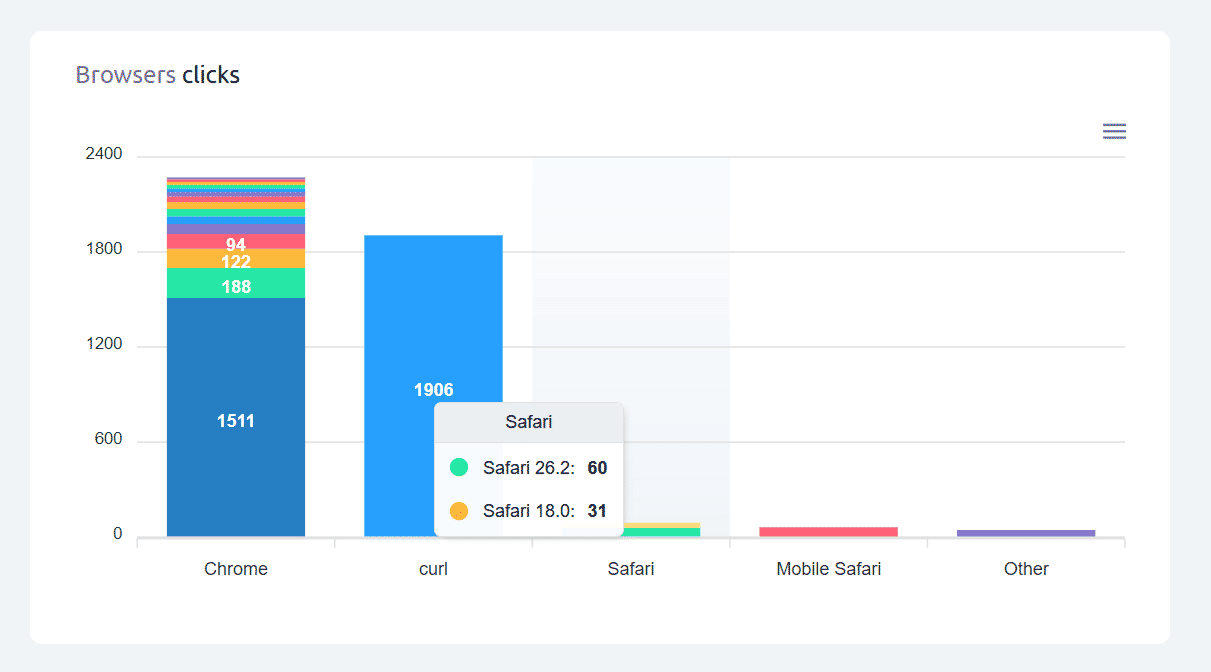
Cuttly detects hundreds of browsers and client applications from user agent data. Common examples you may see include:
• Standard web browsers — Chrome, Safari, Firefox, Edge, Opera, Samsung Internet, UC Browser, Brave, Vivaldi, and many others
• Mobile browsers — Chrome Mobile, Safari Mobile, Firefox for Android, and others
• In-app browsers — browsers embedded in apps like Facebook, Instagram, LinkedIn, or TikTok
• Feed readers — RSS and Atom feed readers that follow links
• Media players — video and audio players that resolve URLs
• Generic HTTP clients — command-line tools, scripts, API clients, and automation tools that access URLs without a standard browser
Version breakdown on hover: Hover over any bar to see the version-level split — for example Chrome shows Chrome 124, Chrome 123, etc. with their respective click counts.
About generic HTTP clients: If you see entries for generic clients or HTTP libraries in your chart, this is normal for links used in developer contexts, integrations, or automation pipelines. These are real accesses to your link — just not from a human using a browser. High counts on links not used in technical contexts may indicate automated activity, which is also visible in the Bots chart.
Find out more about the options available in your subscription plan here: Cuttly pricing and features
FAQ
Which browsers does Cuttly detect?
Cuttly detects hundreds of browsers and client applications — Chrome, Safari, Firefox, Edge, Samsung Internet, Opera, UC Browser, in-app browsers, feed readers, media players, generic HTTP clients, and many more. Version breakdowns are shown on hover.
What are generic HTTP clients?
Generic HTTP clients are programmatic tools — command-line utilities, scripts, API clients, or automation tools — that access URLs without a standard browser. Seeing them in your chart is normal for links used in developer or automation contexts.
How do I see browser version details?
Hover over any browser bar. A tooltip shows the version-level breakdown — for example Chrome 124, Chrome 123, Chrome 122 with individual click counts.
-
What is Link Analytics?
How to view link analytics?
Time range filter (7 / 30 / 90 days / All)
Total Clicks Chart
Hourly Insights Heat Map
Source of Clicks (Facebook, Twitter, Instagram, LinkedIn, Direct)
Referrals / Other Sources
Devices Clicks (Desktop / Mobile / Other)
System (OS) Clicks
Browsers Clicks
Brand Clicks
Languages Clicks
Geo Location Clicks
Bots
Public and Private Analytics
Analytics Settings (per-link and global)
Download Analytics Report (.PDF)
Aggregated Link Analytics
Campaign Tag Analytics