Geo Location Clicks
The Geo Location section shows where in the world your link clicks are coming from. It includes two complementary views: an interactive world map and a ranked country list.
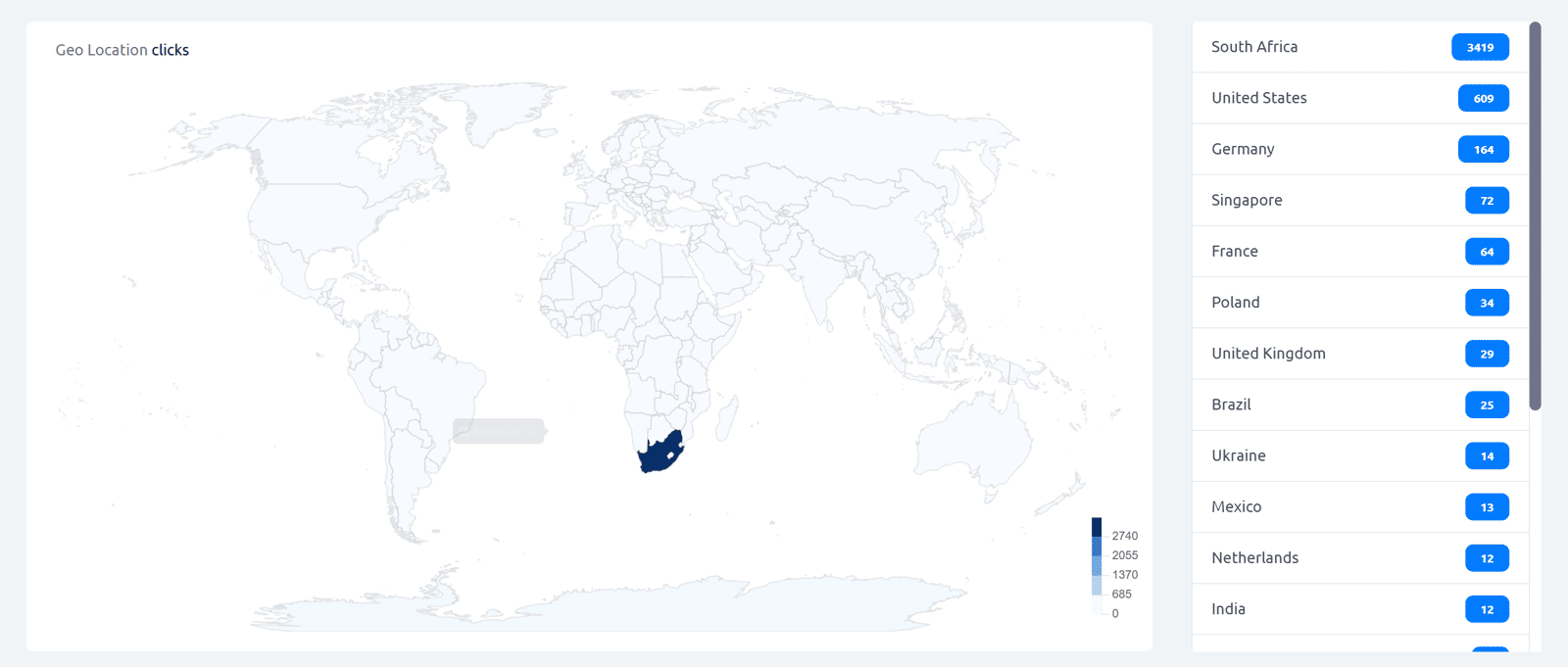
World map: Countries are shaded on a gradient from light to dark — darker shading means more clicks from that country. A color scale on the bottom right of the map shows the click volume range. Hover over any country on the map to see its name and exact click count.
Ranked country list: Displayed to the right of the map, this list shows the top countries by click count with their exact numbers — scrollable when more than a few countries have recorded clicks.
Important: Geo location is determined from the IP address of the clicking device and reflects the geographic location of the network, not necessarily the physical location of the individual visitor. All geo location data is aggregated and anonymized — individual visitor locations are not stored.
All geo location data in Cuttly is aggregated and anonymized. Individual visitor data is not tracked or stored.
Find out more: Cuttly pricing and features
FAQ
What does the Geo Location section show?
An interactive world map with click intensity shading by country, plus a ranked list of top countries with exact click counts. Hover on the map to see individual country data.
Is individual location data stored?
No. All geo location data is aggregated and anonymized. Individual visitor data is not tracked or stored by Cuttly.
-
What is Link Analytics?
How to view link analytics?
Time range filter (7 / 30 / 90 days / All)
Total Clicks Chart
Hourly Insights Heat Map
Source of Clicks (Facebook, Twitter, Instagram, LinkedIn, Direct)
Referrals / Other Sources
Devices Clicks (Desktop / Mobile / Other)
System (OS) Clicks
Browsers Clicks
Brand Clicks
Languages Clicks
Geo Location Clicks
Bots
Public and Private Analytics
Analytics Settings (per-link and global)
Download Analytics Report (.PDF)
Aggregated Link Analytics
Campaign Tag Analytics