Source of Clicks
The Source of Clicks chart shows where your link clicks are coming from — broken down by social platform and direct/other traffic. It helps you understand which channels are driving the most engagement for each short link.
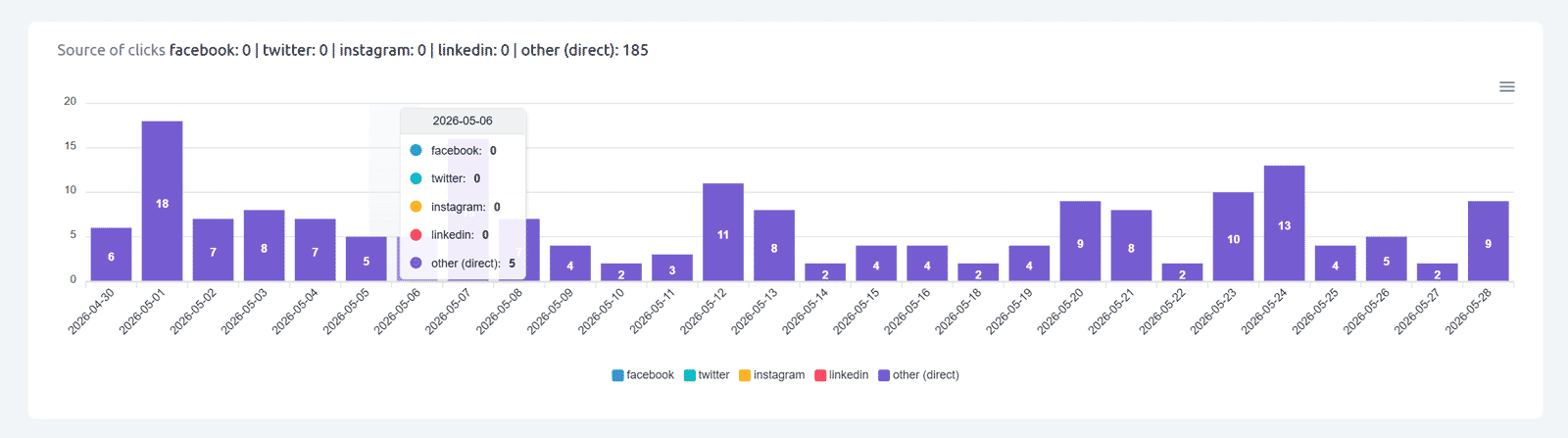
Tracked sources:
• Facebook — clicks originating from Facebook posts, stories, or messages
• Twitter — clicks from Twitter/X posts
• Instagram — clicks from Instagram (bio links, story links)
• LinkedIn — clicks from LinkedIn posts or messages
• Other (direct) — all other clicks, including direct URL opens, email clients, messaging apps (WhatsApp, Telegram, etc.), QR code scans, and any referrer not matching the four social networks above
How the chart works:
The chart is a stacked bar chart by day. Each bar represents one day; colored segments show click volume per source. A summary line above the chart shows the total for each source across the entire selected period (example: facebook: 0 | twitter: 0 | instagram: 20 | linkedin: 0 | other (direct): 434).
Hover interaction: Hovering over any bar shows a tooltip with the exact count for each source on that specific day.
Note about "other (direct)": This category is usually the largest. It captures every click that doesn't come from the four tracked social platforms — including direct opens, email newsletters, QR code scans, Slack links, WhatsApp, Telegram, and any other channel. For more detail on specific referring websites, see the Referrals / other sources chart.
Find out more about the options available in your subscription plan here: Cuttly pricing and features
FAQ
What does "other (direct)" include?
"Other (direct)" captures all clicks not coming from Facebook, Twitter, Instagram, or LinkedIn. This includes direct URL opens, email clients, messaging apps, QR code scans, and any other source not matched to the four social platforms.
How is the chart displayed?
A stacked bar chart by day, with a summary line above showing totals per source for the selected period. Hovering over a bar shows the exact per-source breakdown for that day.
Where can I see specific referring websites?
The Referrals / other sources chart shows the specific domains that sent clicks to your link — for example google.com, chatgpt.com, bing.com, and others.
-
What is Link Analytics?
How to view link analytics?
Time range filter (7 / 30 / 90 days / All)
Total Clicks Chart
Hourly Insights Heat Map
Source of Clicks (Facebook, Twitter, Instagram, LinkedIn, Direct)
Referrals / Other Sources
Devices Clicks (Desktop / Mobile / Other)
System (OS) Clicks
Browsers Clicks
Brand Clicks
Languages Clicks
Geo Location Clicks
Bots
Public and Private Analytics
Analytics Settings (per-link and global)
Download Analytics Report (.PDF)
Aggregated Link Analytics
Campaign Tag Analytics