Campaign Tag Analytics
Campaign Tag Analytics (shown as Campaigns in the Cuttly sidebar) lets you group multiple short links together using a shared tag and view the combined analytics for all of them in one place.
Instead of checking each link individually, you assign the same tag to all links in a campaign — for example #spring-sale, #newsletter-may, or #product-launch — and then load all analytics for that tag in the Campaigns view.
How to add a tag to a short link:
In the dashboard link list, click the "#add tag" button on the right side of any link row. Enter a tag name. You can add the same tag to multiple links to group them.
How to view Campaign Tag Analytics:
1. Go to Cuttly Campaigns → Tag Analytics in the sidebar.
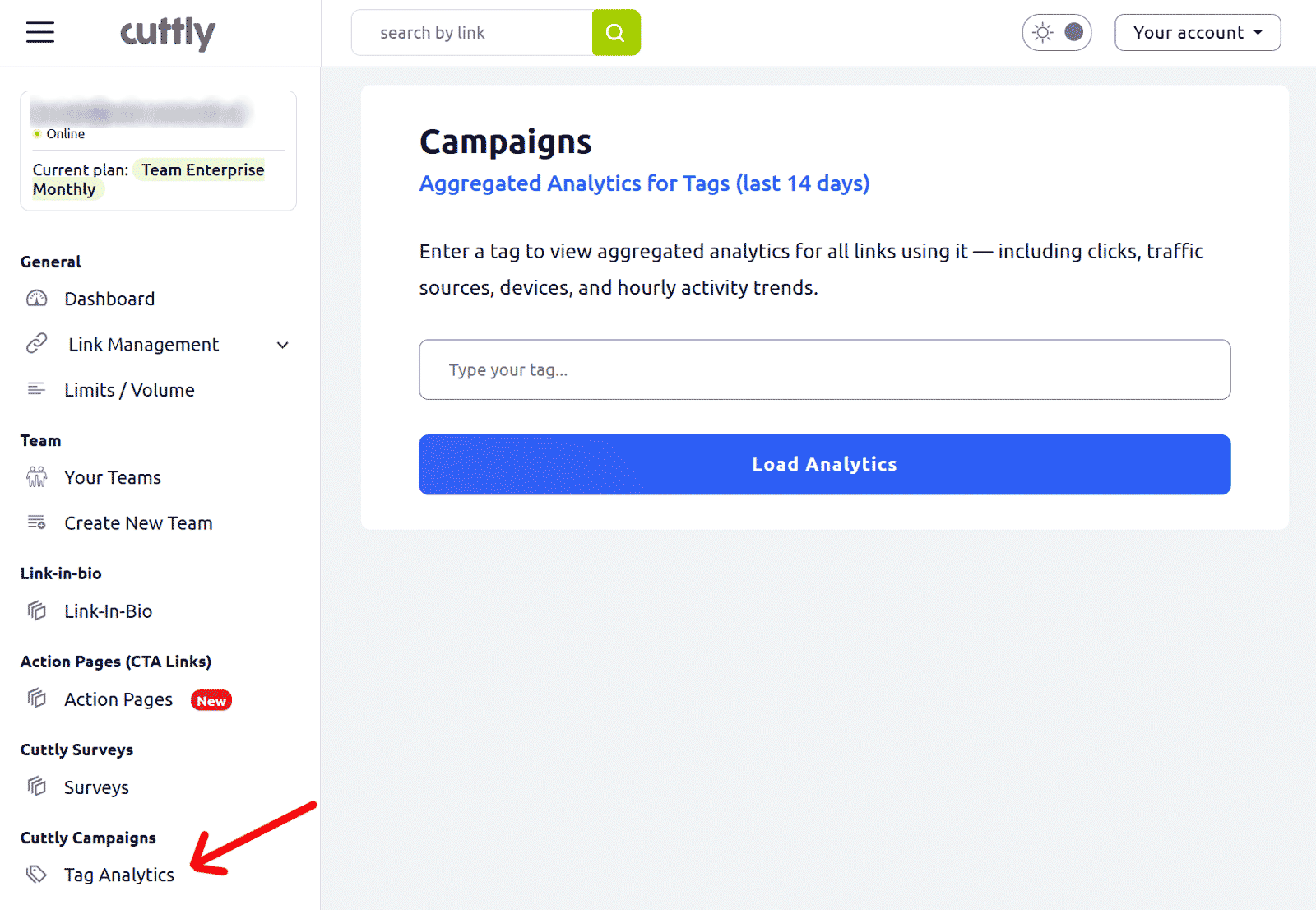
2. Type the tag name in the input field (e.g. cuttly) and click "Load Analytics".
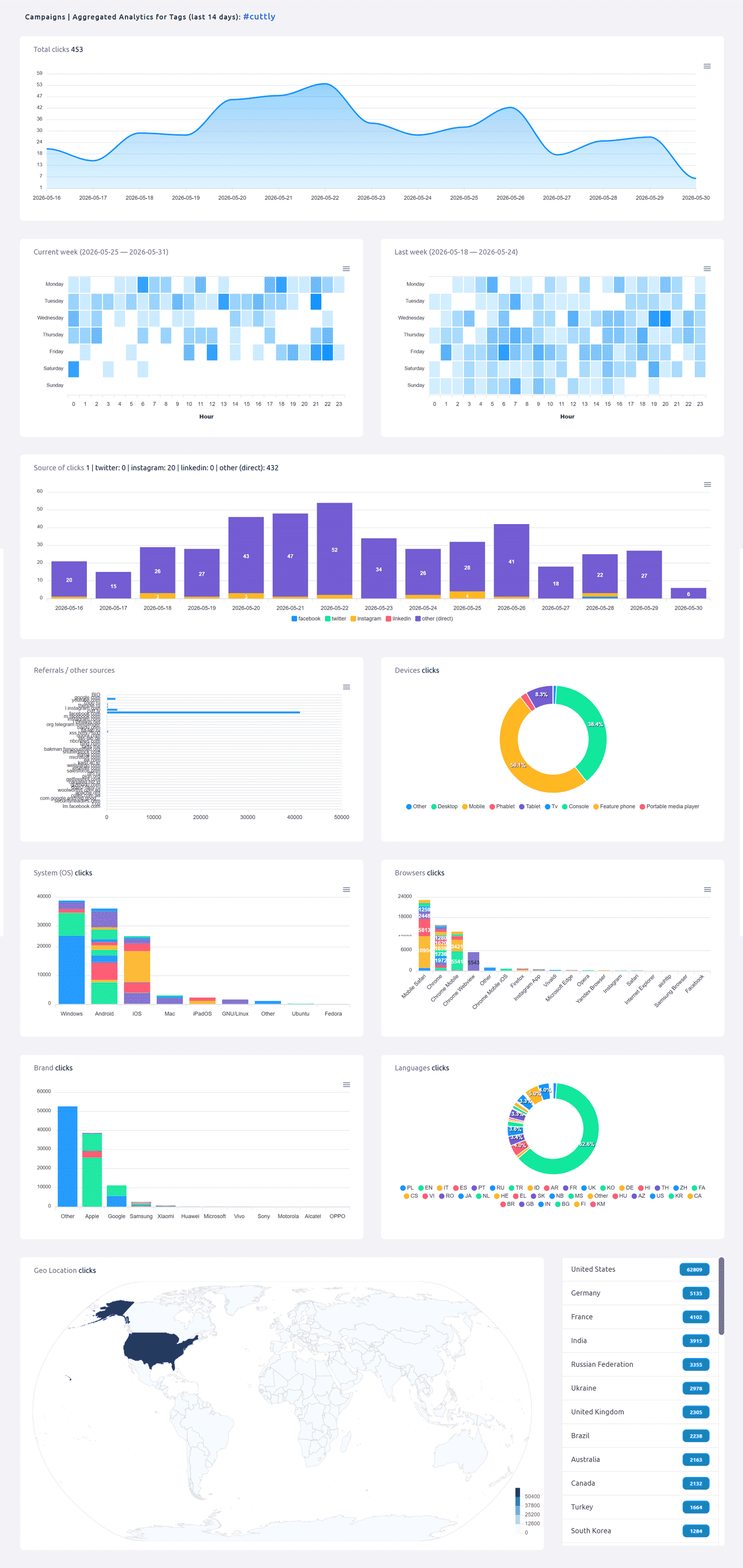
3. The Campaign analytics view loads, showing aggregated data across all links that share this tag for the last 14 days:
• Total clicks — line area chart of daily combined clicks for all tagged links
• Current week and last week heat maps — hourly activity across all tagged links
• Source of clicks — combined breakdown (Facebook, Twitter, Instagram, LinkedIn, direct)
• Referrals / other sources
• Devices, System (OS), Browsers, Brands
• Languages, Geo Location
The page header shows the campaign tag name (e.g. Campaigns | Aggregated Analytics for Tags (last 14 days): #cuttly).
Plan availability:
Team ($99/month): up to 50 tagged links per tag, last 14 days
Team Enterprise ($149/month): up to 100 tagged links per tag, last 14 days
Not available on Free, Starter, or Single plans.
Find out more: Cuttly pricing and features
FAQ
What is Campaign Tag Analytics?
It groups multiple short links by a shared tag and shows combined analytics for all of them — total clicks, heat maps, sources, devices, geo-location and more — in one view. Useful for measuring campaign performance across many links at once.
Which plan includes it?
Available from the Team plan ($99/month). Team: up to 50 tagged links, last 14 days. Team Enterprise: up to 100 tagged links, last 14 days. Not on Free, Starter, or Single.
How do I add a tag to a link?
In the dashboard link list, click the #add tag button on the right of any link. Enter a tag name. Add the same tag to all links you want to group in one campaign view.
Where do I find Campaign Tag Analytics?
In the sidebar: Cuttly Campaigns → Tag Analytics.
-
What is Link Analytics?
How to view link analytics?
Time range filter (7 / 30 / 90 days / All)
Total Clicks Chart
Hourly Insights Heat Map
Source of Clicks (Facebook, Twitter, Instagram, LinkedIn, Direct)
Referrals / Other Sources
Devices Clicks (Desktop / Mobile / Other)
System (OS) Clicks
Browsers Clicks
Brand Clicks
Languages Clicks
Geo Location Clicks
Bots
Public and Private Analytics
Analytics Settings (per-link and global)
Download Analytics Report (.PDF)
Aggregated Link Analytics
Campaign Tag Analytics